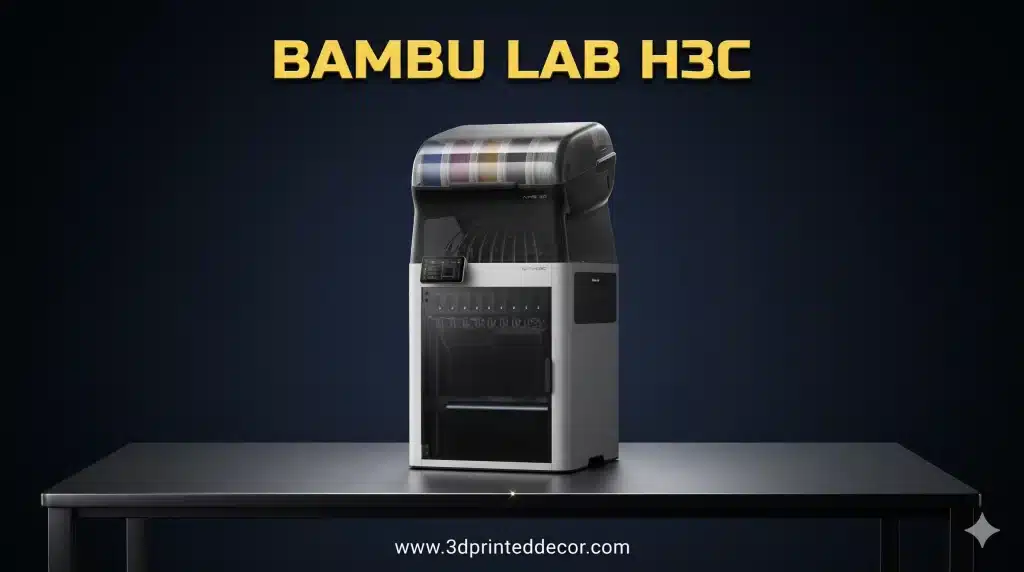
As an Amazon Associate, 3DPrintedDecor earns from qualifying purchases. The H3C, H2C and X2D are sold by Bambu Lab directly; we link to Bambu’s site without an affiliate tag and earn nothing from those links. Amazon prices were checked on November 1–3, 2026 and change often.
The H3C is real, it’s on sale now, and it costs $2,499. So the question has changed: it’s no longer “should you wait to find out?” but “is a $2,499 toolchanger the right buy for you, or is a Black Friday deal on something simpler the smarter move?”
For most people buying a printer this season, the answer is still a cheaper machine. For people who print a lot of multicolor, multi-material or soft TPU work, the H3C now looks like the printer to beat. Below we break down what Bambu confirmed, what the first reviews found, and how to decide.
Quick verdict
- Price: $2,499 for the H3C Combo (printer, built-in nine-spool AMS 3H and all nine tools). Bundles run up to $3,049.
- Availability: On sale now from Bambu Lab’s own store. It isn’t part of Bambu’s Black Friday sale.
- Early reviews: Tom’s Hardware gave it an Editor’s Choice, praising its TPU printing and fast swaps, but noted the price, its four-foot operating height and some pre-launch firmware quirks.
- Buy the H3C if multicolor or multi-material printing is your main hobby or business and $2,500 is in budget.
- Buy something cheaper if it’s your first printer, you mostly print one color, or your budget is under about $800.
H3C Specs and Price: What Bambu Confirmed
| Detail | Status | What Bambu announced |
|---|---|---|
| Price | Confirmed | $2,499 for the H3C Combo in the US (before tax, free shipping); £2,199 in the UK and €2,499 in the EU |
| Availability | Confirmed | On sale from November 3, 2026 on Bambu’s store. The UK and EU stores list dispatch within 1 to 3 business days of processing. |
| Tools | Confirmed | Nine “PrintTools” in a system Bambu calls Swaptek. Each has its own filament path, heater and cutter. Ships with eight 0.4 mm tools for 1.75 mm filament and one 0.4 mm tool for 2.85 mm TPU. |
| Swap speed | Bambu’s claim | 3.4-second tool change and about 6 seconds from one material to the next, from Bambu’s internal testing with PLA. Tom’s Hardware also timed it at about six seconds. |
| Purge per swap | Bambu’s claim | About 0.038 g in optimal internal tests. A prime tower is still used, so real prints still create some waste (see below). |
| Filament system | Confirmed | AMS 3H built into the top of the printer: nine sealed slots with RFID and auto-loading. Only two slots dry filament (up to 85 °C). |
| Build volume | Confirmed | 330 × 320 × 325 mm, enclosed (same as the H2C) |
| Temperatures | Confirmed | Nozzles to 350 °C, bed to 120 °C, actively heated chamber to 65 °C |
| Nozzles | Confirmed | All hardened steel. Sizes from 0.2 to 0.8 mm supported, and you can mix sizes in one print (extra hotends sold separately). |
| TPU | Confirmed | New FlexFeed extruder handles 1.75 mm and 2.85 mm filament, including very soft TPU 75A |
| Filtration | Confirmed | H11 HEPA plus activated carbon. An optional E1 Air Purifier comes in the top bundle. |
| Size and weight | Confirmed | 36.28 kg (about 80 lb) with the AMS 3H. Bambu recommends about 1.3 m (over four feet) of height to operate it comfortably. |
| Connectivity | Check before buying | Bambu’s spec sheet lists Wi-Fi 6 and USB, with no Ethernet port mentioned. If you need a wired connection, confirm with Bambu first. |
H3C bundles and prices (US)
| Bundle | What’s included | US price |
|---|---|---|
| H3C Combo | Printer, AMS 3H, nine PrintTools | $2,499 |
| Combo + Filament Starter Pack | Adds Bambu’s PLA Palette (cyan, magenta, yellow, black, white) for color mixing, plus TPU | $2,589 |
| Station bundle (open) | Starter pack bundle plus the Bambu Station rolling stand | $2,799 |
| Station bundle (enclosed) | Enclosed Bambu Station plus the E1 Air Purifier | $3,049 |
Launch prices as published by Bambu Lab on November 3, 2026. Every bundle includes the AMS 3H; there’s no H3C without it. Cutting, drawing and debossing tools are sold separately and weren’t available at launch.
What a Nine-Tool Toolchanger Actually Changes
Most multicolor printers today, like Bambu’s AMS-based models, use one nozzle and swap filament into it. Every swap pushes out the old color as purge waste, which adds filament cost and time to prints with lots of color changes. The H3C keeps nine materials loaded and pre-heated in separate tools, so a color change becomes a quick tool swap instead.
| Approach | Example | Materials without full purging | Trade-off |
|---|---|---|---|
| One nozzle + filament changer | Bambu P1S Combo, A1 Combo | 1 (each swap purges) | Cheapest, but wasteful and slow for many-color prints |
| Two nozzles | Bambu X2D | 2 | Great for one material + supports; limited for multicolor |
| Four full toolheads | Snapmaker U1 | 4 | Smaller build volume; open-top base model |
| Swappable hotends | Bambu H2C | Up to 7 | On sale for $1,899 at Bambu through December 1 |
| Nine tools | Bambu H3C | 9 | $2,499, tall, and only two drying slots |
How much waste does it really save?
Bambu’s 0.038 g-per-swap figure is a best case. The H3C still prints a prime tower, so real prints still waste some filament. Tom’s Hardware’s testing gives a fairer picture:
- Eight-color dragon model: just under 24 hours and 68 g of purge on the H3C, versus about 37.5 hours and 267 g on a single-nozzle printer with two filament changers.
- Nine-color figure: about 15 hours with a 152.6 g prime tower. The same model in five colors on the H2C took nearly 25 hours with 111.4 g of purge. Prusa’s eight-tool INDX matched the H3C’s time but wasted only about 24 g.
So the H3C is dramatically faster and less wasteful than an AMS-style printer, but it isn’t purge-free. If you mostly print in one color, none of this matters much: owners in our community note that single-nozzle printers still handle the vast majority of everyday printing.
Our Pre-Reveal Checklist, Answered
Before the reveal, we listed the questions that would decide whether the H3C is worth it. Here’s how Bambu answered them:
- Price, including the spool system: $2,499 with the nine-spool AMS 3H included. That’s about $600 more than the H2C Combo’s current $1,899 sale price.
- Swap time and purge waste: about 6 seconds per material change, similar to the Snapmaker U1’s roughly five-second swaps, with far less waste than AMS printers but still a prime tower.
- Where the spools live: all nine sit in a sealed box on top of the printer, but only two slots actively dry filament. If you print several moisture-sensitive materials, you’ll still want separate dry storage.
- Build volume: 330 × 320 × 325 mm, matching the H2C and well above the U1’s 270 mm cube.
- Enclosure and filtration: fully enclosed with a 65 °C heated chamber and HEPA plus carbon filtration, which suits apartments and homes with pets better than an open-top printer.
- Ship date and regions: on sale now in the US, UK, EU, Canada and Australia, with quick dispatch listed in the UK and EU.
- Maintenance: each nozzle is held by three screws and is easy to swap, according to Tom’s Hardware. Replacement 1.75 mm tools cost about $59. Long-term reliability of nine tools is still unknown.
What the First Reviews Say
Tom’s Hardware awarded the H3C an Editor’s Choice. The reviewer found it handled everything from nine-color PLA to soft TPU shoes and glass-filled nylon, and called it one of the best TPU printers she’d tested. The listed downsides were the price and the height: with the AMS 3H on top, she needed a step stool to load the back spools, and recommends the optional rolling Bambu Station.
Her review unit also ran beta firmware and developed a clicking sound from one motor, plus one tool whose tube tended to catch and knock it loose during long multicolor prints. VoxelMatters, in an early hands-on, found setup took under an hour and standard multicolor prints went smoothly, but undried soluble support and a tangled third-party spool both caused jams that meant opening up a tool to clear.
Neither reviewer blamed the machine’s design for the jams, but together they show the trade-off: the H3C automates a lot, and when something does go wrong, there are more parts to deal with than on a simple single-nozzle printer.
Buy the H3C, or a Cheaper Printer This Black Friday?
The H3C makes sense if…
- Multicolor or multi-material prints are most of what you make.
- You want to print soft TPU, or combine rigid and flexible parts in one print.
- You print engineering materials like nylon, PC or carbon-fiber blends.
- $2,500 or more fits your budget, plus the cost of a stand if you need one.
- You have the room: about 80 lb of printer and over four feet of height to operate it.
Buy something cheaper if…
- It’s your first printer. Learning on a simpler, proven machine is cheaper and less frustrating.
- You’ll mostly print one color or one material.
- Your budget is under about $800.
- Four colors are enough for you (the Snapmaker U1 covers that for far less).
- You’d rather buy a model with months of owner feedback behind it.
The first-batch question
Any brand-new printer carries more risk in its first months: early production units, firmware still maturing, and spare parts in short supply. The beta-firmware issues in early reviews are a reminder of that. In our community’s thread on what owners regret buying, defective units and slow support made up 9 of 24 regret stories. That isn’t a reason to avoid the H3C, but if you buy now, test it hard within your return window. If you can wait a few weeks, owner reports will tell you a lot more.
Will it arrive before Christmas?
It’s in stock rather than a pre-order, and Bambu’s UK and EU stores list dispatch within 1 to 3 business days of processing. Check the estimate on Bambu’s US store before you order a gift, since early demand can change it.
Will the H3C get a Black Friday discount?
Not this year, as far as we can tell. The H3C isn’t included in Bambu’s Black Friday sale, and 3DBite reports that the store’s 30-day price protection excludes promotions and flash sales. Don’t hold off for a deal that may not come. The H2C, by contrast, is on sale at $1,899 through December 1.
Bambu Lab H3C Combo
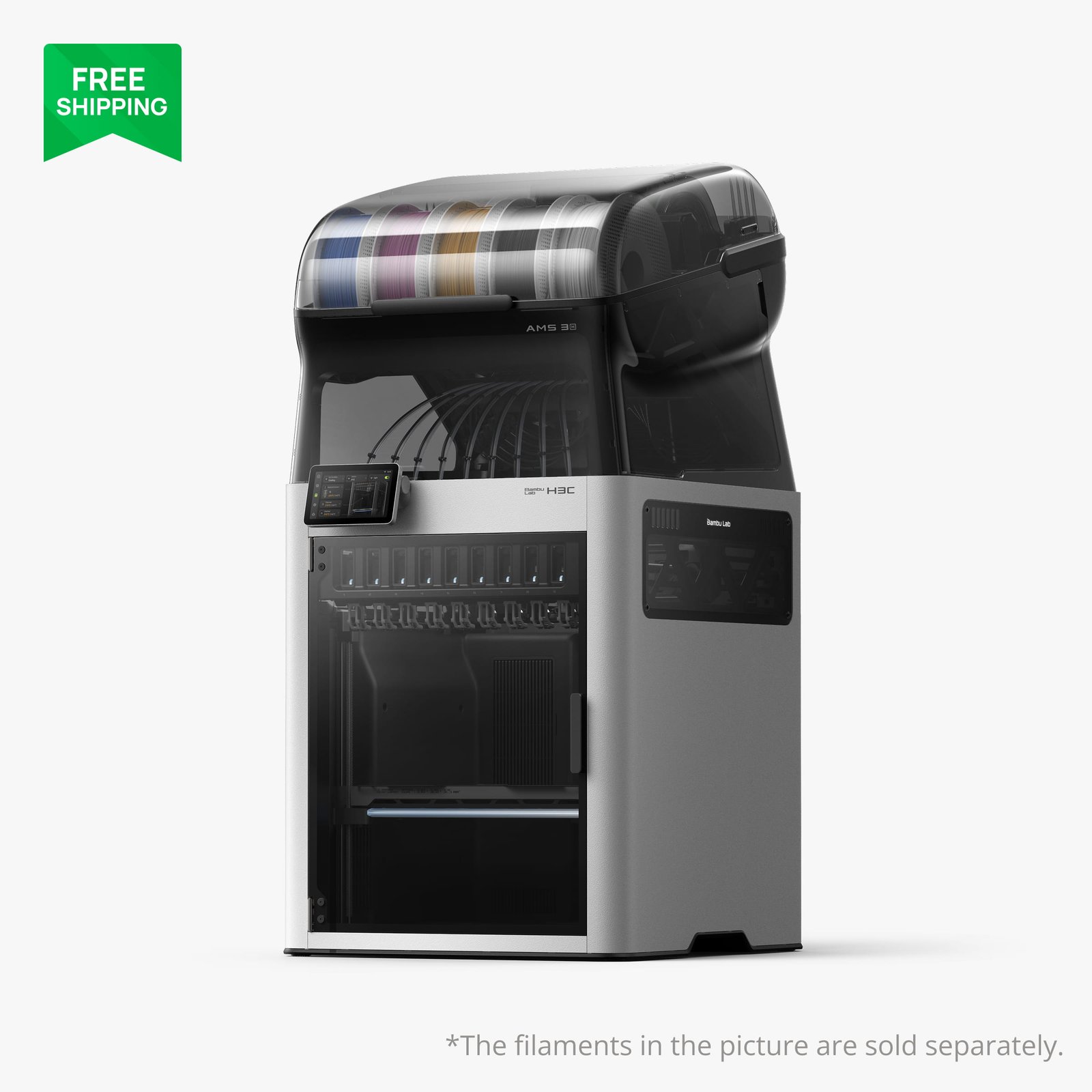
Nine pre-heated tools, a built-in nine-spool AMS 3H, a 65 °C heated chamber and a dedicated 2.85 mm tool for very soft TPU. It’s the most capable multicolor printer Bambu has made, but it’s tall, heavy and new, so check you have the space and test it well within the return window. It isn’t sold on Amazon, so this link earns us nothing.
See it on Bambu’s storeNot Spending $2,499? What to Buy Instead
If the “buy something cheaper” column describes you, these are the printers that make the most sense for each situation. For deeper comparisons, see our X2D vs QIDI Q2 vs Snapmaker U1 comparison.

Bambu Lab A1
Full automatic calibration, quiet operation and the MakerWorld library built in. It was the most common replacement printer in our owner-regret thread, mostly from people leaving older printers that needed constant tinkering. If you move up to an H3C later, an A1 is still a useful second machine.
Check price on Amazon
Bambu Lab P1S Combo
An enclosed printer bundled with the AMS for multicolor, and one of Amazon’s best-selling 3D printers. Multicolor prints create purge waste, so it’s best if color is an occasional extra rather than the main event. At about a fifth of the H3C’s price, it’s the sensible pick if you’re not sure how much multicolor you’ll really do.
Check price on Amazon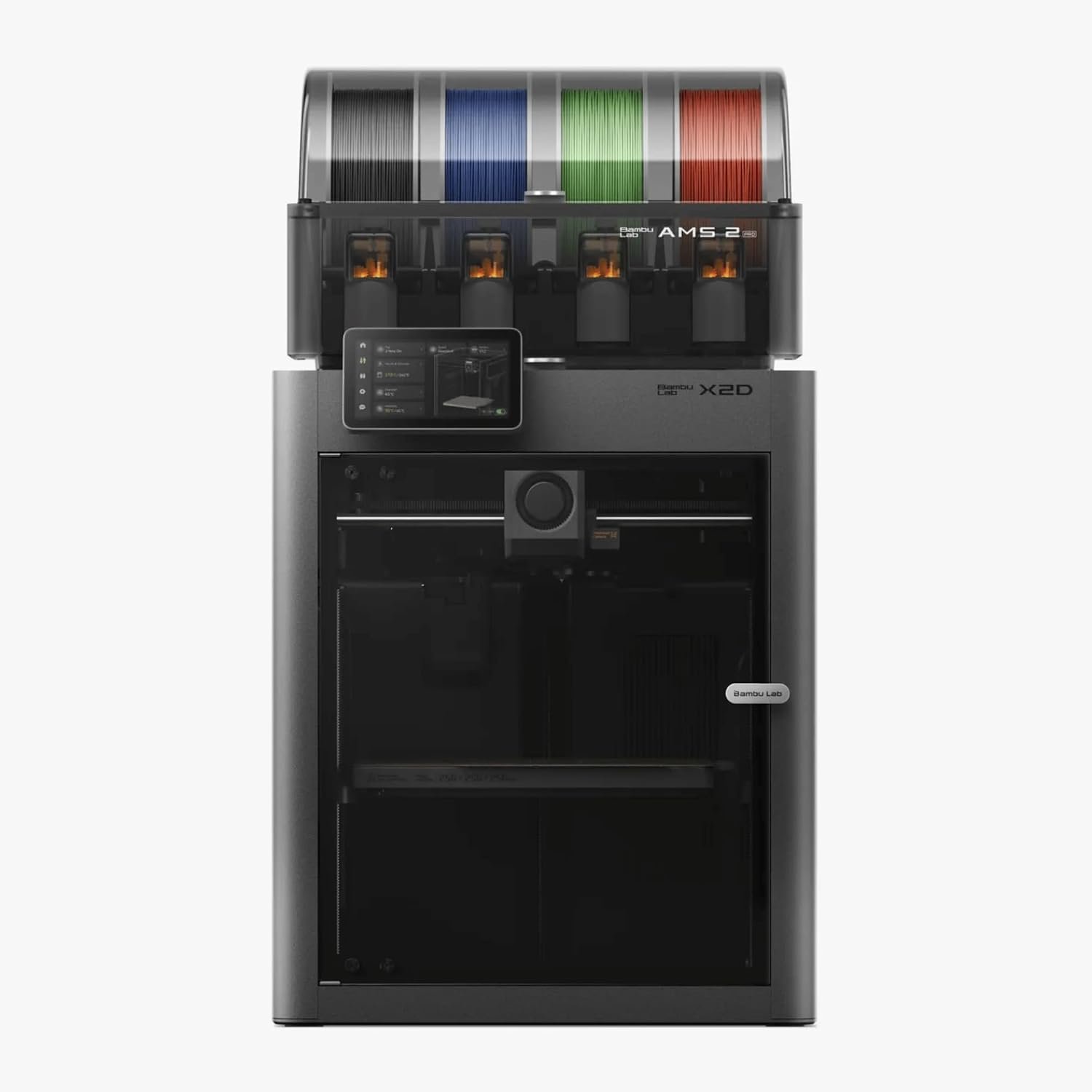
Bambu Lab X2D Combo
Two nozzles let you print breakaway supports in a second material with little waste, in a heated, HEPA-filtered enclosure. Owners call it Bambu’s “workhorse” pick. Bambu also says the mixed-nozzle-size feature introduced with the H3C is coming to the X2D by early 2027. It isn’t sold on Amazon, so this link earns us nothing.
See it on Bambu’s store
Snapmaker U1
A four-toolhead toolchanger with very low purge waste and about five-second swaps, at under a third of the H3C’s price. Owners who use it alongside a Bambu say it’s “hands down the winner” for prints with lots of color changes. It’s smaller than the H3C and the base model has an open top, so add Snapmaker’s filtered top cover for apartment printing. If you regularly need more than four materials, or want soft TPU, the H3C is the step up.
Check price on Amazon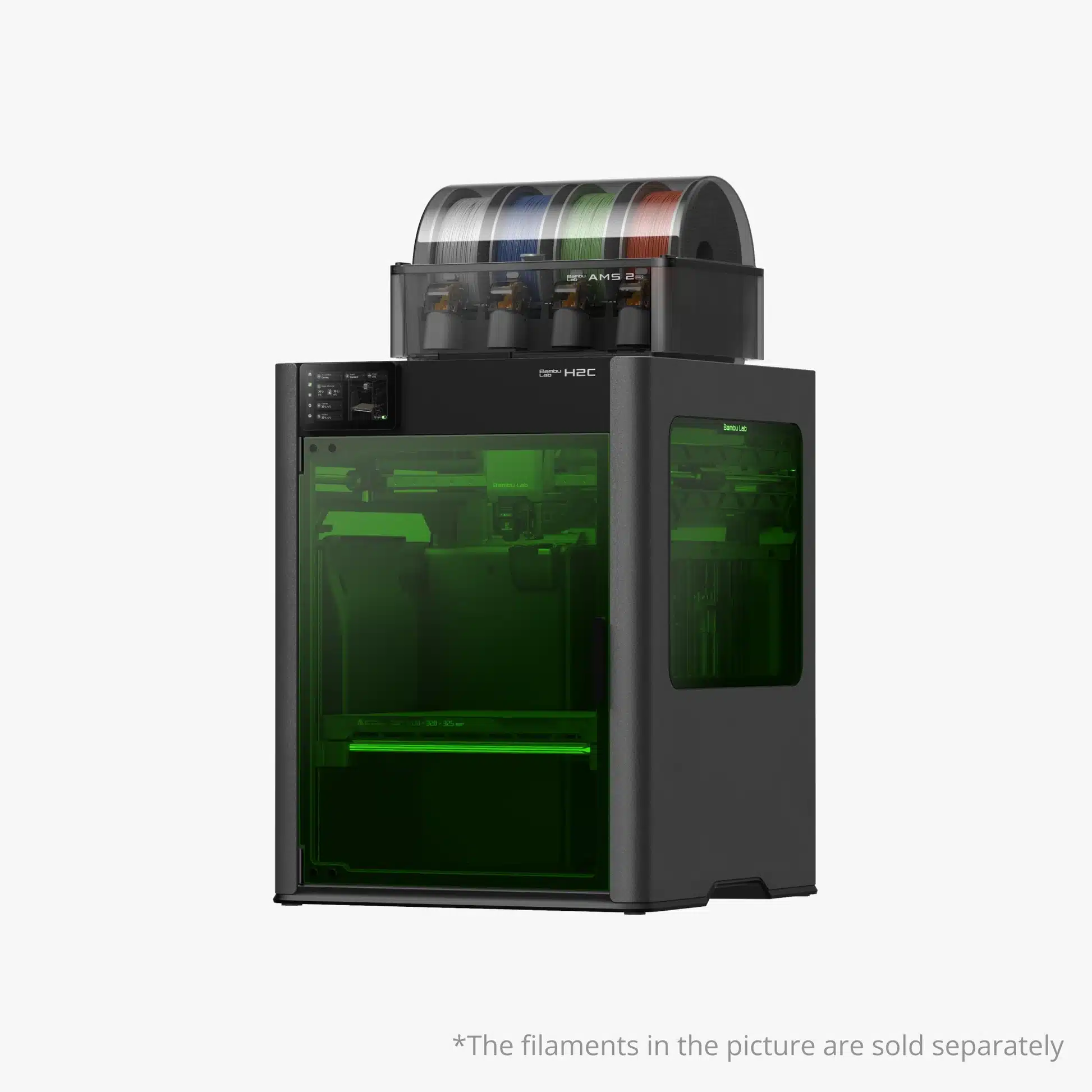
Bambu Lab H2C Combo
The H3C’s predecessor has the same 330 × 320 × 325 mm build volume and swaps between up to seven nozzles. It’s slower and wastes more filament on many-color prints than the H3C, and it lacks the soft-TPU tool, but it’s a proven machine with a year of owner feedback, and Bambu says it isn’t being discontinued. Bambu also says the mixed-nozzle-size feature is coming to the H2C by early 2027. It isn’t sold on Amazon, so this link earns us nothing.
See it on Bambu’s storeWhatever you buy, our 30-day new printer checklist covers the accessories worth getting, and our filament storage guide explains how to keep multiple spools dry. That matters even on the H3C, since only two of its nine slots have a dryer.
Frequently Asked Questions
How much does the Bambu Lab H3C cost?
The H3C Combo costs $2,499 in the US (before tax, with free shipping), £2,199 in the UK and €2,499 in the EU. Bundles with filament, a rolling stand and an air purifier range from $2,589 to $3,049.
Is the Bambu Lab H3C available now?
Yes. The H3C went on sale on November 3, 2026 through Bambu Lab’s own store. Bambu’s UK and EU stores list dispatch within 1 to 3 business days of processing. It isn’t sold on Amazon.
How many tools does the Bambu H3C have, and how fast does it swap?
Nine. It ships with eight tools for 1.75 mm filament and one for 2.85 mm TPU. Bambu quotes a 3.4-second tool change and about 6 seconds from one material to the next, and Tom’s Hardware also timed swaps at about six seconds.
Does the H3C eliminate purge waste?
No, but it cuts it sharply. It still prints a prime tower. In Tom’s Hardware’s testing, an eight-color model wasted 68 g on the H3C versus 267 g on a single-nozzle printer with filament changers.
Should I buy the H3C or a cheaper printer this Black Friday?
Buy the H3C if multicolor, multi-material or soft TPU printing is your main goal and $2,500 fits your budget. Buy a cheaper printer if it’s your first one, you’ll mostly print one color, your budget is under about $800, or four colors are enough.
Is the H3C better than the Snapmaker U1?
It does more: nine tools to the U1’s four, a larger enclosed build volume, a heated chamber, built-in spool storage and soft TPU support. But it costs over three times as much. The U1 was $749 on Amazon when we checked on November 3, and is the better value if four colors are enough.
Will the H3C be discounted for Black Friday?
It isn’t part of Bambu’s 2026 Black Friday sale, and there’s no sign of a launch discount. The older H2C is on sale at $1,899 through December 1.
Sources
- Bambu Lab: H3C product page
- Tom’s Hardware: Bambu Lab H3C review
- 3DPrinting.com: Bambu Lab launches the H3C, bundles and regional pricing
- VoxelMatters: Bambu Lab H3C brings a nine-tool changer to desktop 3D printing
- 3DBite: The H3C has launched, confirmed specs vs. the rumors
- 3Dnatives: Bambu Lab H3C launches with nine PrintTools
- Value Added Resource: Amazon 2026 holiday return window
First published November 2, 2026 before the reveal; updated November 3, 2026 with Bambu Lab’s confirmed launch details and early reviews. Swap-time and purge figures marked as Bambu’s claims come from its internal testing and will vary with filament and settings. Amazon prices were checked November 1, 2026 (Snapmaker U1 on November 3); Bambu store prices are launch or sale prices as published. 3DPrintedDecor has not tested the H3C.
Free 3D printing temperature cheat sheet
Nozzle and bed temperatures for common filaments, in one page.
Keep reading
 ComparisonsFlashforge Creator 5 Pro vs Snapmaker U1: Which Four-Toolhead Printer Should You Buy in 2026?Oct 25, 2026
 3D Printer Reviews5 Small 3D Printers for Beginners: Honest 2026 GuideSep 6, 2026
 ComparisonsFlashforge Creator 5 vs Creator 5 Pro: What Does the Extra $150 Actually Buy?Oct 26, 2026
 3D Printed Home DecorLive Black Friday 3D Printer Offers 2025 – Updated Hourly – Save Up to $400!Nov 26, 2025
 Budget PrintersBambu Lab 3D Printer Review 2026: Real User Experience After 1000+ HoursJan 31, 2026
 Beginner GuidesWe Asked 3D Printer Owners What They Regret Buying. Here’s What They Bought Instead.Nov 1, 2026