
As an Amazon Associate, 3DPrintedDecor earns from qualifying purchases. Printer prices were checked through Amazon on November 1, 2026 and change often, so confirm the current price before you buy. The owner stories below are unverified reports from our community.
Every buying guide tells you what to buy. Almost none tell you what people wish they hadn’t. So we asked.
In late October 2026 we ran two threads in our Reddit community, r/3DPrinterComparison, asking owners for their worst 3D printer purchase, what went wrong, and what they bought instead. The answers were blunt, specific and surprisingly useful. The biggest surprise: most regrets weren’t about a printer that was simply bad. They were about buying the wrong kind of printer, sinking money into an old design, or what happened when something broke.
Below you’ll find the four patterns behind the regrets, the specific steps that would have avoided each one, a 14-day plan for testing a new printer before your return window closes, and the printers owners switched to, including the cases where owners regretted those too.
The 4 Patterns Behind 3D Printer Regrets
1. The cheap or older printer that became a repair project (9 stories)
This was the most common regret, and almost every story followed the same arc: buy an affordable, older-design bed-slinger (several Ender 3 V2s, an Ender 3 V2 Neo, an Anet A8, two Tronxys, a used Artillery Sidewinder X2, a first-generation Anycubic Kobra), fight bed leveling and adhesion, buy upgrades, and keep fighting.
One owner listed the upgrades they added to an Ender 3 V2 Neo (direct drive, a second Z motor and lead screw, a new bed, stiffer springs, calibration switches) and concluded it still wasn’t as good as a basic Bambu A1 after spending about twice the price. Another estimated they spent ten times as long on calibration and repairs as on printing, and about three times the printer’s price on parts. Two owners said the experience put them off 3D printing for years.
This isn’t a verdict on any one brand today. Most of these printers are older designs without the auto-calibration that newer machines include. But it’s a clear warning about the “cheap now, upgrade later” approach.
How to avoid it
- Price the printer you’ll actually end up with. If you’d need a new extruder, bed and leveling kit, add those costs before comparing it with a newer printer that already has them.
- Look for automatic bed leveling and calibration if you want to print rather than tinker. Manual leveling was the single biggest frustration in these stories.
- Be careful with used printers. A cheap used machine can come with worn parts and no support. One owner replaced parts “almost every week.”
- Buy a tinkering printer only if you want tinkering to be the hobby. Several owners said they learned a lot, but that’s different from getting prints.
2. A defective unit, then poor or slow support (9 stories)
These stories hurt the most because the owners did nothing wrong. They included a printer that died after one failed print (and missed the return window), a printer that “never worked out of the box” with support that never answered, three replacement units in a row that each arrived with a different fault, a warped bed the manufacturer wouldn’t address, toolheads that failed out of the box, a resin printer refunded only through a credit card chargeback, and a multicolor printer with several defects that was returned within its two-week window.
How companies handled problems varied a lot, even within the same brand. One owner of the Elegoo Centauri Carbon 2 went through three faulty units, while another received three bad parts on one unit, got a box of replacements, and now says it works great. One owner returned an Anycubic Kobra S1 Max without pushback and with return shipping covered, and another got defective parts on a Creality K2 Plus replaced right away. No brand appeared only in good stories or only in bad ones. That included Bambu Lab: one X1C owner opened 12 support tickets over about two and a half years and was asked to do the repairs himself.
Quality control is where luck plays the biggest role, so the best defense is to find problems quickly and document them.
How to avoid it (or limit the damage)
- Test hard inside your return window. See the 14-day test plan below. The owner who returned a defective printer early was refunded smoothly; the owner who missed the window was stuck with it.
- Buy from a seller with an easy return policy, and keep the box and packaging until the return window has closed.
- Document everything: photos of damage on arrival, videos of faults, the serial number and firmware version. Support teams commonly ask for all of these, so having them ready can save days.
- Pay with a credit card if you can. Two owners only got refunds through a chargeback or the threat of one. Check your card’s purchase protection terms before you need them.
- Read recent support experiences, not just print-quality reviews. How a company handles a broken unit matters as much as how its working units print.
3. The wrong printer for the person or the use (5 stories)
These owners got working printers, just not the right ones. A large-format belt printer bought for long prints like swords that never happened (about 10 hours of total use in years). An $800 delta kit that turned out to be a tinkering project, with one successful print. A $1,100 premium printer that printed well but felt fiddly to an owner who wanted an appliance. A first printer that was hard for a beginner to dial in. And a resin printer that produced beautiful detail, but with cleanup and hazardous waste the owner couldn’t manage without a dedicated space.
In the follow-up thread, owners argued about exactly this. One longtime maker said most regrets come from buying on marketing without knowing what you’ll print. Another pushed back that there’s nothing wrong with wanting an appliance, and that some problems (like a dated interface) never appear in reviews. Both points are useful, and they lead to the same advice: decide what kind of owner you are before you choose a printer.
| If this sounds like you… | Look for | Be careful with |
|---|---|---|
| “I want to press print and get a good part.” | Automatic calibration, a polished app or slicer, a large model library, good support | Kits, older designs, printers known for needing tuning |
| “I enjoy tinkering and want to learn how it works.” | Open firmware, easy access to parts, an active modding community | Closed ecosystems that limit repairs and modifications |
| “I want tiny, ultra-detailed miniatures.” | A resin printer, plus a ventilated space and a cleanup routine | Buying resin without a place to handle chemicals and waste safely |
| “I’ll print lots of multicolor models.” | A multicolor system (AMS, CFS, toolchanger) | Paying for multicolor you may not use (see below) |
How to avoid it
- Write down five things you’ll print in the first month. Check that they fit the build volume, materials and detail level of the printer you’re considering. Buy for that list, not the prints you imagine.
- Think twice about paying extra for multicolor. One owner pointed out that many popular models on sites like MakerWorld are designed to print in a single color, so a multicolor system may sit unused.
- Have an ongoing need. As one commenter put it, once the novelty prints are done, you don’t want “an expensive box sitting on a desk… with nothing to do.”
- Choose resin only if you have the space for it. Our resin vs filament guide explains the trade-offs.
4. An upgrade that went wrong (1 story)
One owner paid $55 for an official multicolor add-on for a printer that had been one of their most reliable machines. After installing it, they got random freezes, crashes and failed overnight prints. A factory reset left the printer unable to finish its setup routine, and it had sat unused for two months at the time of posting. The owner couldn’t tell whether the cause was the parts, the firmware or the installation. Separately, another owner’s camera stopped working after a firmware update on a different printer.
How to avoid it
- Wait a few weeks after a new upgrade or firmware release and read what early adopters report before installing it on a printer you rely on.
- Write down your current firmware version and settings before you upgrade, so you can tell support exactly what changed.
- Check warranty coverage first. In this case the printer was just over a year old, so it was out of warranty when problems started.
The 14-Day Test Plan: Catch a Bad Printer Before Your Return Window Closes
Return windows are commonly between two weeks and 30 days, so check yours on the day the printer arrives. Several owners in these threads would have been spared months of frustration if problems had surfaced sooner. Here’s a plan that pushes a new printer hard while you can still send it back:
- Day 1: Inspect before you power on. Photograph the box and the printer from every side. Check the frame for bends, the build plate for warping or dents, and every cable for damage. One owner’s third replacement arrived with a bent frame in a pristine-looking box.
- Day 1: Run the full calibration and note any errors. Write down the firmware version.
- Days 2–3: Print a large, flat first-layer test that covers most of the bed. It’s the fastest way to reveal a warped bed or bad leveling, the most common problems in these stories.
- Days 3–5: Test every feature you paid for: the camera, Wi-Fi and app, multicolor system, filament runout sensor, LED lights and any AI detection. A feature that fails in week one won’t fix itself.
- Days 5–10: Run at least one long print of 8 hours or more. Some faults, like overheating, freezes or feeding problems, only appear on long jobs.
- Days 10–12: Try a second material you plan to use, such as PETG, if your printer supports it.
- Before the window closes: decide. If you’ve had repeated failures you can’t explain, contact the seller and support now, with your photos and videos, while a return is still an option.
Getting your first printer set up? Our 30-day new printer checklist covers what to buy for these first prints, and our guide to storing filament helps rule out wet filament when you’re diagnosing problems. One owner spent a month blaming his printer for what turned out to be bad filament.
What Owners Bought Instead
Fourteen owners named the printer they replaced their regret with. Nine moved to Bambu Lab: three to the A1 and one each to the P1S, P2S, X1C, X2D and H2D, plus one who just said “a Bambu machine.” The other five went to the Anycubic Kobra X, Creality K2 Plus Combo, Prusa XL, Ender 3 and Elegoo Centauri Carbon 2 Combo. (One of the Bambu switchers went to a resin Anycubic Photon M4S first, and one owner who didn’t switch said he’d choose Bambu if he were buying today.)
That’s a striking pattern, but it’s 14 people from a self-selected Reddit thread, not a survey, and the same threads included Bambu regrets (covered in the next section). Here are the printers owners switched to that are sold on Amazon, with what the owners said about each.

Bambu Lab A1
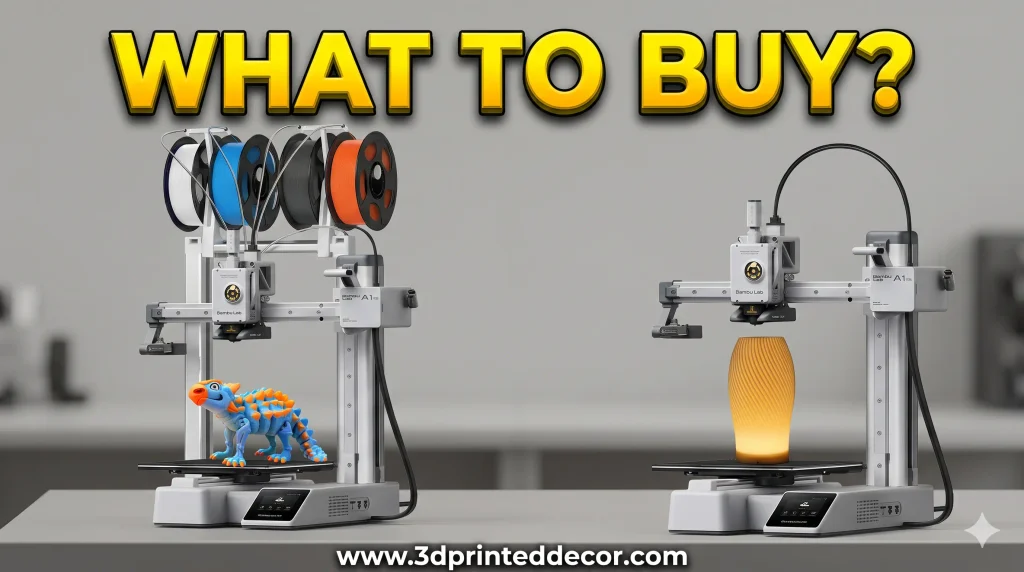
A bed-slinger with full automatic calibration, a quiet listed noise level of 48 dB or less, and Bambu’s MakerWorld model library built in. Three owners switched to it, two of them from older Ender 3 models. One called it “magnitudes better” than the V2 Neo he’d spent a fortune upgrading, and another ordered it the same day he gave up on his Ender-3 V2.
The caveat: an owner with almost 1,000 hours on his A1 says it’s been great, but it occasionally shows an extrusion warning when the filament meets resistance in the PTFE tube.
Best for: beginners and anyone who wants to press print and walk away. Our Bambu Lab A1 review goes deeper.
Check price on Amazon
Bambu Lab A1 mini (with LED Lamp Kit)
The smaller sibling of the A1, with the same automatic calibration in a compact frame. It isn’t a regret replacement, but a complete beginner in the follow-up thread chose it based on reviews and called it the “best thing I have purchased in years.” He’d worried the smaller build plate would be limiting, and found it wasn’t, since bigger models can be split across several plates.
The caveat: the build plate is small, so if you know you want to print large one-piece objects, choose the full-size A1.
Best for: first-time buyers on a tighter budget, small desks and kids’ projects.
Check price on Amazon
Bambu Lab P1S Combo
An enclosed CoreXY printer bundled with the AMS for multicolor printing, and one of Amazon’s best-selling 3D printers (rank #195 when we checked). One owner replaced two budget Tronxy printers with a P1S after “months of fighting” and said he never looked back.
The caveat: remember the multicolor lesson above. If you’re not sure you’ll use the AMS, compare the cost of a single-color printer first.
Best for: an enclosed printer for PETG and ABS, and people who know they want multicolor.
Check price on Amazon
Bambu Lab P2S
Bambu’s newer enclosed CoreXY printer, listed at up to 600 mm/s with AI error detection. One owner said he’s buying only Bambu after a $1,300 printer arrived with failed toolheads, and now runs a P2S and P1S. (Another commenter questioned whether that story was genuine, so weigh it accordingly.)
The caveat: a different owner who loves his Bambu printers still had extruder problems with his P2S when he first got it, a reminder that even well-regarded models can have early issues worth catching in your test window.
Best for: a faster, enclosed upgrade. See our A1 Combo vs P2S comparison.
Check price on Amazon
Anycubic Kobra X
A multicolor printer with native four-color printing, a listed 600 mm/s top speed and an AI camera. One owner replaced a used Artillery Sidewinder X2 (which needed new parts almost every week) with the Kobra X and says it’s “1000x more reliable” and that they’re “really happy with it.”
The caveat: its build volume is smaller than the large Sidewinder it replaced, which the owner accepted in exchange for reliability.
Best for: affordable multicolor printing. Read our Anycubic Kobra X review.
Check price on Amazon
Creality K2 Plus Combo
A large-format multicolor printer with a 350 × 350 × 350 mm build volume, Creality’s CFS filament system and dual AI cameras. One owner returned a defective Anycubic Kobra S1 Max Combo and bought a K2 Plus Combo on discount. It also arrived with defective parts, but Creality replaced them immediately, and it has worked well since.
The caveat: the owner says his own modifications have made it less reliable, and that if budget had allowed, he’d have bought a Bambu H2D for its dual nozzles.
Best for: big prints and multicolor in a large enclosed frame. See our K2 Plus Combo review.
Check price on AmazonTwo owners moved up to Bambu’s higher-end X2D and H2D, which weren’t available on Amazon when we checked. One called his X2D “flawless” at about double the price of the printer he returned. Our P2S vs X2D comparison covers whether the step up is worth it.
Has Anyone Regretted a Bambu?
We asked directly, because a thread where most switchers end up at one brand shouldn’t go unchallenged. The answer: yes, and the reasons are worth knowing.
- Support frustration on an X1C. One owner listed a smashed front glass on delivery, a lidar that couldn’t scan codes, an AMS that kept disconnecting and a stuck webcam. He’s replaced nearly every circuit board over 12 support tickets. Bambu covered the parts but, he says, always made him do the repairs himself. He’d still like an A1 mini for its size, but says the support struggles mean he wouldn’t buy another Bambu otherwise.
- Everyday quirks. Even happy owners mentioned problems: the A1’s occasional PTFE-resistance extrusion warning, early extruder issues on a P2S, bed adhesion and PTFE tube fights on an A1, and a damaged hotend assembly on an A1 mini after a PETG blob.
- Ownership and openness. One commenter raised concerns about terms-of-service changes after purchase and a more locked-down ecosystem, and prefers open-source printers for that reason.
- An accessory regret. One owner named Bambu’s Filament Track Switch as a regret without explaining why, and another owner replied that he finds it useful.
The takeaway isn’t that any brand is safe. It’s that the patterns above (fit, upkeep, quality control and support) apply to every brand, so test your printer early whatever you buy.
The Before-You-Buy Checklist
Built from what these owners wish they’d known, plus three rules from a commenter who has been printing since 2012:
- I can name five things I’ll print in the first month, and they fit this printer’s build volume and materials.
- I know whether I want an appliance or a hobby, and this printer matches.
- I’ve priced the printer I’ll actually end up with, including any upgrades it will need.
- I’ve read recent support and quality-control experiences for this model, not just print-quality reviews.
- I know the return window and seller’s return policy, and I’ll keep the box until it closes.
- I’m paying for multicolor only if I’ll use it.
- If it’s resin, I have a ventilated space and a plan for cleanup and waste.
- I’m not relying on a cheap filament or a cheap clone part for anything important. As the veteran put it: cheap filament will cost you more when deadlines count, it’s always the $2 part that fails, and the cheapest extruders, nozzles and beds generate the most pleas for help.
Still choosing? Our best 3D printers for beginners guide narrows the field, and our Elegoo Centauri Carbon 2 Combo review and Snapmaker U1 review cover two printers that came up on both sides of these threads.
Frequently Asked Questions
What do 3D printer owners regret most?
In our community threads, the two most common regrets were buying a cheap or older-design printer that turned into a constant repair project, and receiving a defective unit followed by slow or unhelpful support. Each accounted for 9 of 24 detailed stories from 23 owners. Buying the wrong type of printer for the person or the use came next, with 5 stories.
Is it worth buying a cheap 3D printer and upgrading it?
For most people who want to print rather than tinker, the owners in our threads said no. Several spent close to, or more than, the price of a newer printer on upgrades and still had leveling and adhesion problems. A cheap, older printer can be a good learning project if tinkering is the hobby you want.
What should I do if my new 3D printer arrives defective?
Document the problem right away with photos, videos, the serial number and firmware version, and contact the seller while you’re still inside the return window. Keep the original box. If the manufacturer is slow to respond, owners in our threads found that paying by credit card gave them extra protection; check your card’s terms.
Which 3D printers did owners switch to after a bad experience?
Of the 14 owners who named a replacement, nine chose a Bambu Lab printer: the A1 (three owners), P1S, P2S, X1C, X2D, H2D and one unspecified. The others chose the Anycubic Kobra X, Creality K2 Plus Combo, Prusa XL, Ender 3 and Elegoo Centauri Carbon 2 Combo. Some owners also reported problems with Bambu printers, so it’s not a guarantee.
Do I need a multicolor 3D printer?
Only if you’ll regularly print multicolor models. One owner pointed out that many popular models are designed to print in a single color, so a multicolor system can end up unused. If you’re unsure, a single-color printer is cheaper, simpler, and leaves money for filament.
Owner stories come from public replies in r/3DPrinterComparison in October 2026. They are unverified, self-reported experiences from a small, self-selected group, quoted with usernames removed and trimmed for length; they don’t represent every owner of these printers. Printer prices and availability were pulled from Amazon on November 1, 2026 and may have changed. 3DPrintedDecor has not lab-tested these printers.
Related posts:
 How to Choose a 3D Printer: The Definitive 2025 Guide for Hobbyists, Pros, and Creators
  Best 3D Printers for Beginners 2026: What Nobody Tells You Before You Buy
  DIY 3D Printed Decor: An Inspiring Beginner’s Guide
  Printing Your Way to Riches: Selling Your 3D Printed Decor Online!
  How Long Does 3D Printing Take? A Beginner’s Guide to Print Times
  Top Websites for 3D Printing Services Near You in the US (2025)
  Anycubic Kobra S1 Combo vs Kobra 3 Combo: Final Review Before You Buy in 2025
  Live Black Friday 3D Printer Offers 2025 – Updated Hourly – Save Up to $400!
  Bambu Lab vs Flashforge vs Creality vs Anycubic: Which to Buy in December 2025
  Bambu Lab 3D Printer Review 2026: Real User Experience After 1000+ Hours
  Is Bambu Lab A1 Plug and Play? Setup Time & First Print Results (Reddit Data)
  How to Use Claude AI for 3D Printing – Complete Guide 2026