
As an Amazon Associate, 3DPrintedDecor earns from qualifying purchases. Prices and availability were checked through Amazon on October 31, 2026 and change often, so confirm the current price on Amazon before you buy.
Your printer is unboxed (or on its way). Now comes the question nobody answers clearly: what else do you actually need, and what can wait?
Most “accessories” lists dump 40 products on you at once. That’s how beginners end up with a drawer full of upgrades they never use. This checklist works differently. It follows your first month in the order you’ll hit each problem: what you need on day 1 to print at all, what makes life easier in week 1, and what’s worth adding in weeks 2–4 once you know how much you’ll print.
Every pick below is in stock on Amazon.com, and the prices come straight from Amazon. Where it helps, we also note who sells it (the brand itself or Amazon, versus a third-party reseller) and how popular it is.
The 30-day checklist at a glance
- Day 1: filament, bed adhesive, flush cutters, a scraper, isopropyl alcohol
- Week 1: digital calipers, a deburring tool, a nozzle cleaning kit
- Weeks 2–4: filament storage, a dryer (if needed), an enclosure, an air purifier, vibration pads and a printer cart, but only if your setup calls for them
If you only read one section, read Day 1. You can print for weeks with just those five items.
Day 1: What You Need to Print at All
Your printer box usually includes a small sample of filament, a few tools and maybe a scraper. The sample runs out fast, and the included tools are often the bare minimum. These five items cover your first real prints.

OVERTURE PLA Filament, 1 kg
Start with plain PLA. It’s the most forgiving material, it prints at low temperatures, and it doesn’t need an enclosure. OVERTURE lists a dimensional accuracy of ±0.02 mm, which matters because inconsistent filament diameter is a common cause of patchy, under-extruded prints. It’s also one of the best-selling filaments on Amazon (rank #65 in its category when we checked).
Skip if: your printer came with a full 1 kg spool rather than a small sample.
Check price on Amazon
ELEGOO Matte PLA Bundle, 4 × 1 kg
If you already know you’ll print a lot, a bundle brings the cost per spool down to about $11. Matte PLA is especially beginner-friendly because the finish hides layer lines, so early prints look better than they otherwise would. This four-color pack (pink, purple, ice blue, yellow) is rank #154 in its category, so it’s a well-trodden choice.
Skip if: you’re not sure yet how often you’ll print. Start with one spool and buy in bulk later.
Check price on Amazon
Magigoo All-in-One Bed Adhesive, 50 mL
Prints that peel off the bed halfway through are the number-one beginner frustration. Magigoo is a pen-style adhesive you wipe on before a print. It’s listed for PLA, PETG, ABS, HIPS and TPU, and for glass, PEI, BuildTak and Kapton surfaces, so it’ll still be useful when you move beyond PLA. It’s also commonly used as a release layer for PETG, which can stick too hard to some PEI sheets.
Skip if: your prints already stick reliably on a clean bed. Many textured PEI plates don’t need anything for PLA. Our guide to what glue to use for 3D prints covers the alternatives.
Check price on Amazon
Hakko CHP-170 Flush Cutters, 3-Pack
You’ll use flush cutters every single day: snipping filament to a clean angled tip before loading it, trimming support material, and cleaning up brims. The Hakko CHP-170 is the cutter most 3D printing guides point to, because it cuts flat against the surface instead of leaving a pinched nub. Buying the 3-pack works out to about $8.77 each, so you can keep one at the printer, one with your tools, and a spare.
Skip if: your printer’s tool kit already includes a decent pair of flush cutters.
Check price on Amazon
ENOMAKER Print Removal Scraper
Many printers ship with a flimsy plastic scraper, or none at all. A proper metal scraper slides under stubborn prints without gouging your build plate. Always push away from your body and keep your other hand behind the blade, since slips with scrapers are a classic beginner injury.
Skip if: you use a flexible spring-steel plate. Flexing the plate pops most prints off with no tool needed.
Check price on Amazon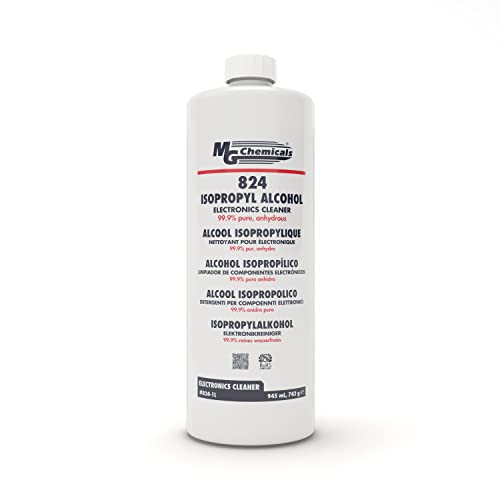
MG Chemicals 824 99.9% Isopropyl Alcohol, 945 mL
Fingerprint oil on the build plate is one of the most common reasons first layers won’t stick. Wiping the bed with high-purity isopropyl alcohol and a lint-free cloth before each print fixes most adhesion problems before you reach for glue. At 99.9% purity it evaporates cleanly without leaving residue, and a 945 mL bottle lasts most hobbyists many months.
Skip if: you already have 90%+ isopropyl alcohol at home. Avoid 70% rubbing alcohol, since its higher water content leaves more residue.
Check price on AmazonWeek 1: Tools That Make Printing Easier
After a few days of printing you’ll start running into small annoyances: a part that doesn’t quite fit, rough edges, a partial clog. These three tools handle them, and together they cost less than a spool of premium filament.
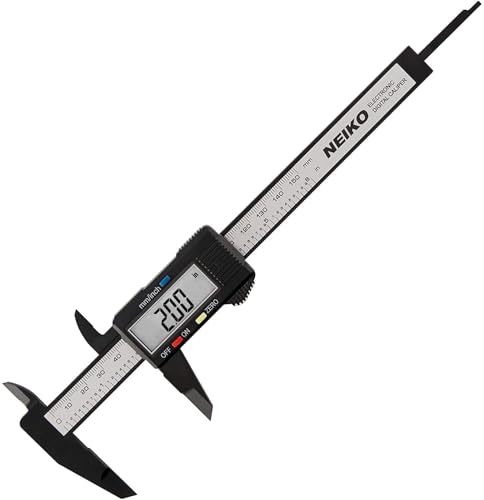
NEIKO 01417A 6″ Digital Caliper
The first time you print something that has to fit, like a replacement knob, a phone stand or a bracket, you’ll need to measure things accurately. This caliper reads 0–6 inches (0–150 mm) in both inches and millimeters, measures inside and outside dimensions, and is a top seller in its category. It’s also how you check that your filament really is 1.75 mm and that your printer is dimensionally accurate.
Skip if: you only download and print decorative models and never design or fix anything yourself.
Check price on Amazon
AFA Tooling Deburring Tool, 11 Blades
The first layer of a print often flares out slightly (“elephant’s foot”), and holes come out with rough edges. A deburring tool shaves these off in one smooth pass and is much safer than a hobby knife. The swivel blade follows curves and holes, and this kit includes 11 replacement blades, so you won’t need another for years.
Skip if: you plan to get the all-in-one tool kit below, which includes a deburring tool.
Check price on Amazon
YOOPAI Nozzle Cleaning Kit
Sooner or later a bit of dust or burnt plastic will partly block your nozzle, and your prints will start looking thin or stringy. This kit has 0.4 mm cleaning needles (the most common default nozzle size) on a rubber handle, plus a copper wire brush for scrubbing plastic off the outside of a hot nozzle. Because it doesn’t depend on your printer model, it fits almost every printer that uses a standard 0.4 mm nozzle.
Skip if: your printer uses a different nozzle size. Check your manual before buying.
Check price on AmazonWeeks 2–4: Upgrades Once You’re Printing Regularly
By now you’ll know whether 3D printing is a weekend hobby or something you do every day. These items solve problems that show up with regular use, but only buy the ones your situation actually calls for.

Equippo Filament Vacuum Storage Kit
Filament absorbs moisture from the air, and wet filament prints with popping, stringing and rough surfaces. Before you spend $45+ on a dryer, seal your open spools. This kit includes 30 vacuum bags, an electric pump, 30 silica gel packs, clips and markers, enough for a growing collection. For PLA in a reasonably dry room, sealed storage is often all you need.
Skip if: you only own one or two spools and use them up within a few weeks.
Check price on AmazonFilament dryer: only if you need one
You need a dryer if you live somewhere humid, print PETG, TPU or nylon, or notice that old spools print worse than new ones. Here are three options at different price points. Our filament dryer roundup goes deeper.

SUNLU FilaDryer S2
The simplest way to start drying filament. The S2 holds one spool, heats to 70°C (enough for PLA, PETG, TPU and ABS), and has a large screen to set temperature and time. You can also print directly from it, so the spool stays dry during long prints.
Skip if: you regularly switch between several filaments. A multi-spool dryer saves time.
Check price on Amazon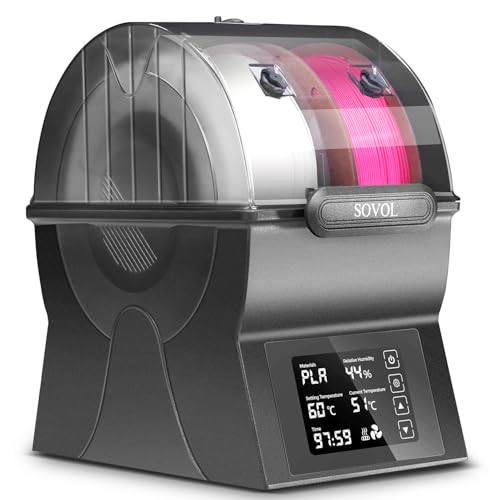
Sovol SH02 Filament Dryer
A step up from the S2: a sealed box with a PTC heater, touch screen and one-key presets, and it works with both 1.75 mm and 2.85 mm filament. At 20% off, it’s one of the better-value dryers right now. We cover it in detail in our Sovol SH02 review.
Skip if: you mostly print PLA and live somewhere dry. Vacuum storage is enough.
Check price on Amazon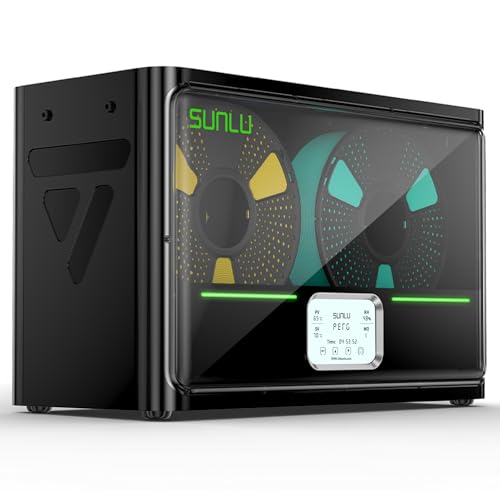
SUNLU FilaDryer S4 (4 Spools)
For multicolor printers or anyone juggling several materials. The S4 dries four spools at once with a 350 W PTC heater and automatic humidity control, so it can keep filament dry between prints too. It’s overkill for most beginners, but the right buy if you already own a multicolor system. See our SUNLU FilaDryer S4 overview.
Skip if: you print with one or two filaments at a time.
Check price on AmazonEnclosure: for noise, dust, pets and ABS
An open-frame printer doesn’t need an enclosure for PLA. In fact, PLA often prints better with open airflow. An enclosure is worth it if you want to print ABS or ASA, keep dust off the printer, keep curious pets or kids away, or take the edge off the noise. Our guide to 3D printer enclosures for noise and temperature control explains the trade-offs.

VEVOR Large 3D Printer Enclosure with LED
A tent-style enclosure made from 600D Oxford cloth, with a ventilation port, built-in LED lighting and a large interior designed around the Bambu Lab A1 Combo (printer plus AMS Lite). Tent enclosures are the cheapest way to add an enclosure, and they fold away if you change your mind.
Before you buy: measure your printer, including the bed’s full travel and any filament system on the side, and compare it with the listing’s interior dimensions. Enclosures are sized for specific printers.
Check price on Amazon
Pissente Anti-Vibration Rubber Feet, 4 Pack
Fast printers shake, and a wobbly table turns that shaking into noise and visible ripples on your prints. Rubber feet absorb some of the vibration before it reaches the table. They’re one of the cheapest fixes if your printer sits on a desk you also work at.
Check fit first: these are listed for the Ender 3, CR-10, Ender 5 and Bambu P1P. If you own something else, look for feet made for your model.
Check price on Amazon
LONGJIN 4-Tier Printer Cart with Filament Storage
Once spools, tools and a dryer pile up, a dedicated stand keeps everything in one place and gets the printer off your desk. This heavy-duty metal cart has four tiers, a filament storage rack and wheels, so you can roll the printer to a window for ventilation or into a closet when guests come over. We compared more options in our 3D printer stand guide.
Skip if: your printer already has a stable, dedicated spot.
Check price on AmazonHow Much Should You Budget? Four Starter Kits
Here’s what each stage costs using the picks above, at Amazon prices on October 31, 2026. Each kit includes everything in the row before it.
| Kit | What’s in it | Total |
|---|---|---|
| Day-1 kit | OVERTURE PLA, Magigoo, Hakko cutters (3-pack), ENOMAKER scraper, MG Chemicals IPA | $91.93 |
| Week-1 kit | Day-1 kit + NEIKO caliper, AFA deburring tool, YOOPAI nozzle kit | $124.60 |
| Month-1 kit | Week-1 kit + Equippo vacuum storage, SUNLU S2 dryer, anti-vibration feet | $197.52 |
| Full setup | Month-1 kit + VEVOR enclosure, LONGJIN printer cart | $302.41 |
For most beginners, the Week-1 kit is the sweet spot: about $125 covers everything you need to print reliably and finish parts cleanly. Everything after that depends on your room, your materials and how much you print. Wondering about the printer itself and its running costs? See how much a 3D printer really costs.
What Not to Buy in Your First Month
Beginners waste the most money in the first few weeks. Hold off on these until you have a specific reason:
- Hardened steel nozzles. You only need them for abrasive filaments like carbon fiber or glow-in-the-dark. Plain PLA and PETG don’t wear out a standard brass nozzle quickly.
- Specialty filaments (nylon, carbon fiber, silk, flexible TPU). Learn your printer on PLA first. Each new material has its own settings to learn, and some need a dryer or enclosure. Our PLA vs ABS vs PETG guide explains when to switch.
- 10 kg filament bundles. Wait until you know which brand and finish you like. A big bundle of the wrong filament is a lot of plastic to get through.
- Hardware and firmware upgrades. Modern printers work well out of the box. Upgrade only to fix a problem you’ve actually run into.
- Cheap all-in-one kits with calipers and cutters. The bundled versions are usually much weaker than the standalone tools. Buy the essentials separately, or choose a kit for its storage case rather than its tools.
Want the bigger picture of add-ons worth considering later? Our list of must-have 3D printer accessories covers the longer-term upgrades.
Frequently Asked Questions
What do I need to buy with my first 3D printer?
To start printing you need five things: filament (a 1 kg spool of PLA), a bed adhesive, flush cutters, a print scraper and high-purity isopropyl alcohol to clean the bed. Using our picks, that costs about $92. Calipers, a deburring tool and a nozzle cleaning kit are worth adding in the first week.
Do I need a filament dryer right away?
Usually not. If you print PLA in a reasonably dry room, sealing open spools in vacuum bags with silica gel is often enough. Buy a dryer if you live somewhere humid, print PETG, TPU or nylon, or notice older spools printing with popping, stringing or rough surfaces.
Do I need an enclosure to print PLA?
No. PLA prints well on open-frame printers and often benefits from open airflow. An enclosure helps with ABS and ASA, keeps dust off, reduces noise and keeps pets and kids away from moving parts. If you buy one, measure your printer first, since enclosures are sized for specific models.
How much should I budget for 3D printer accessories?
Plan for roughly $90–$125 in your first week for essentials and basic tools. A more complete setup with storage, a budget dryer and vibration pads is about $200, and adding an enclosure and printer cart brings it to about $300. Filament is an ongoing cost after that.
Is it safe to run a 3D printer in my bedroom?
PLA gives off fewer fumes than ABS, ASA or resin, but any printer benefits from ventilation in a small closed room. If you can’t open a window near the printer, consider an air purifier with a true HEPA filter and an activated carbon stage, and never leave a printer running unattended for long periods without a working smoke detector nearby.
Prices, deals and availability were pulled from Amazon on October 31, 2026 and may have changed. Product details are taken from manufacturer listings and independent buying guides; 3DPrintedDecor has not lab-tested these products.
Related posts:
 Comgrow Filament Dryer Box Review: Is This the Best Budget Dryer for 3D Enthusiasts?
  SUNLU FilaDryer SP2: 2-in-1 Dryer Drops May 19!
  16 Best 3D Printing Tools That Actually Fix Real Problems (2026)
  Creality Space Pi Plus Filament Dryer Review: Say Goodbye to Moisture Issues
  Why Risk Poor Prints? SUNLU FilaDryer S4 Guarantees Dry, Ready-to-Use Filament!
  Top 15 Must-Have 3D Printing Tools for Perfect Finishes
  Creality Space Pi Plus Filament Dryer vs Comgrow Filament Dryer Box: Which One Boosts Your 3D Prints Best?
  35+ Super Useful 3D Printing Tools for 2025
  Is AEORUM A Recommended Tool Kit for 3D Printing
  Is YEETIN a Good Tool Kit for 3D Printing
  Sovol SH01 Filament Dryer 2025 Review: Best Budget Pick for 3D Printing?
  Anycubic ACE 2 Pro Review: The Filament Dryer That Finally Gets Multicolor Right