
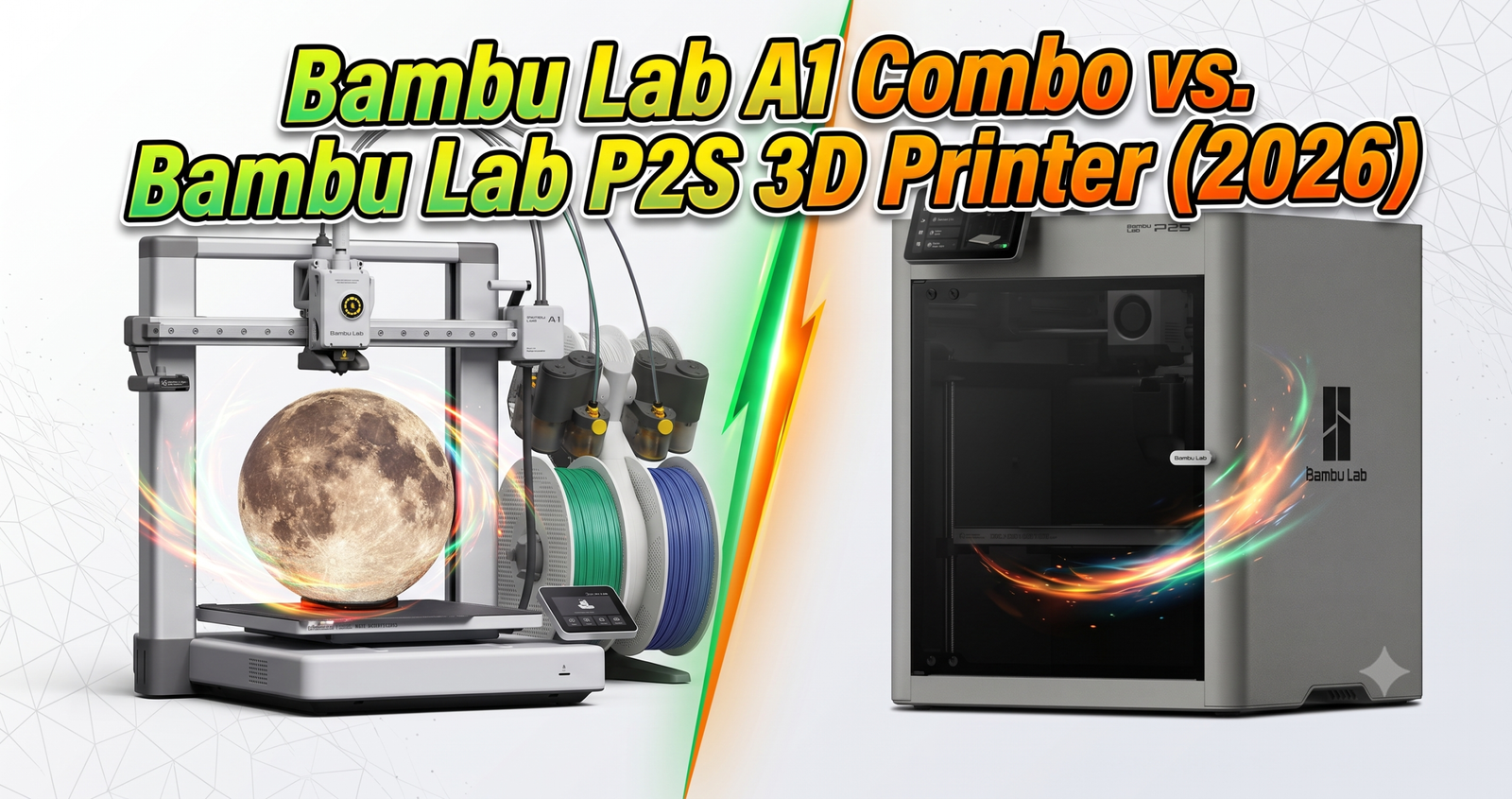
The Bottom Line: Buy the A1 Combo if you’re new to 3D printing and want to make things for your own home. Buy the P2S if you’ll regularly print ABS, ASA, or nylon parts that need a sealed, heated chamber.
The Killer Feature: The A1 Combo gives you the same 256×256×256mm build volume and AMS multicolor printing as the P2S for $150 less. The P2S gives you an enclosure and AI failure detection the A1 Combo doesn’t have.
The 2026 Value Score: A1 Combo — 8.7/10 | P2S — 8.3/10

We put a Bambu Lab A1 Combo and a Bambu Lab P2S on the same desk for months. Same rooms, same filament brands, same MakerWorld model files, printed side by side so nothing but the printer itself could explain the difference. Both use the same 256×256×256mm build plate. Both run on Bambu Studio and the Bambu Handy app. Both showed up mostly pre-calibrated out of the box.
What actually separates them isn’t print quality on a good day — it’s what happens when the material gets picky, the room gets humid, or you want to walk away and trust the printer to finish the job. That’s the part a spec sheet won’t tell you, so that’s what this review is built around.
Is the Bambu Lab A1 Combo Worth It in 2026?
Yes, for most first-time buyers. At $419.00, the A1 Combo includes the AMS lite for multicolor printing, hits the full 256mm cube build volume, and handled PLA and PETG without us touching a slicer setting beyond picking the filament profile. It’s the printer we’d hand to someone who’s never owned one — for a deeper dive on that question alone, see our full is the Bambu Lab A1 worth it breakdown and our standalone Bambu Lab A1 review.
The open frame is the tradeoff. Spools sit exposed on the side, so in a humid room they pull moisture faster than a sealed system would. We noticed it most during the rainier months — multicolor prints with fine detail started showing tiny surface defects that single-color PLA prints didn’t. Drying the filament before a big print fixed it every time. If you’re still deciding whether the AMS lite setup is worth the money at all, we cover that question separately in is the Bambu Lab A1 with AMS lite still worth it.
Bambu Lab P2S vs A1 Combo: What’s Actually Different?
The P2S is a fully enclosed CoreXY printer with a bigger 5-inch touchscreen, a 600mm/s top speed, and the AMS 2 Pro, which actively dries filament instead of just storing it. The enclosure is the headline difference — it holds chamber heat, which matters a lot more than it sounds like on paper. Curious how it stacks up against Bambu’s older enclosed models? We break that down in P2S vs P1S vs X1C.
We printed the same ABS bracket on both. On the A1 Combo it warped at the corners because the open chamber let heat escape unevenly. On the P2S it came out flat. That single test explains most of the price gap.
Is the P2S Enclosure Worth the Extra Money?
Only if you’ll use it. The sealed chamber unlocks ABS, ASA, PC, nylon, and carbon-fiber-reinforced filaments that the open A1 Combo genuinely struggles with. If you’re only ever printing PLA and PETG home decor, you’re paying $150 for a feature you’ll never touch. For a look at how the P2S compares against a similarly enclosed rival outside the Bambu ecosystem, see Bambu Lab P2S vs Creality K2 Pro and Creality K2 Pro Combo vs Bambu Lab P2S.

Bambu Lab A1 Combo vs P2S: Full Comparison Table
Here’s every spec that actually changed how these printers behaved on our desk, not just what’s on the marketing page. If you want to see how either printer holds up outside the Bambu Lab family, we’ve also run Bambu Lab vs Flashforge vs Creality vs Anycubic and ELEGOO Centauri Carbon 2 Combo vs Bambu Lab P1S Combo.
| Feature | A1 Combo | P2S | Winner | Why It Won |
|---|---|---|---|---|
| Price | $419.00 | $569.00 | A1 Combo | $150 cheaper for the same build volume |
| Build volume | 256×256×256mm | 256×256×256mm | Tie | Identical print area despite the price gap |
| Chamber | Open frame | Fully enclosed | P2S | Holds heat evenly, so ABS/ASA parts don’t warp at the corners |
| Top toolhead speed | 500mm/s | 600mm/s | P2S | Faster CoreXY motion cuts time on multi-part batches |
| Touchscreen | 3.5″ IPS | 5″ full-color | P2S | Easier to read filament and error prompts without walking over with your phone |
| AMS system | AMS lite, exposed spools | AMS 2 Pro, active drying | P2S | Filament stays dry between prints without a separate dry box |
| Failure detection | Camera monitoring | AI error detection (NPU) | P2S | Flags spaghetti failures mid-print instead of after the roll is wasted |
| Filament compatibility | PLA, PETG, TPU | PLA, PETG, TPU, ABS, ASA, PC, nylon, carbon-fiber blends | P2S | Chamber heat retention is what unlocks the engineering-grade materials |
| Best for | First-time buyers, home decor | Small businesses, tougher functional parts | Depends | Matches the printer to what you’ll actually print, not just the price tag |
Bambu Studio and Bambu Handy: Is the Software the Same?
Yes, and it’s the reason both printers feel easy even for someone who’s never modeled anything in 3D. Bambu Studio on desktop handles slicing — layer height, infill, wall count, supports, speed — and both printers show up as selectable devices inside the same app. You don’t need any 3D modeling skill to get started; sites like MakerWorld host thousands of ready-to-print files you just download and send straight to either printer. If you’re weighing Bambu Studio against the open-source alternative, we compare the two directly in Bambu Studio vs Orca Slicer.
The Bambu Handy phone app is where we actually lived day to day. It starts and pauses prints remotely, streams a live camera feed, and sends a notification the moment a print finishes or fails. Being able to check on a print from another room — and stop it the second something looks wrong — saved us filament more than once on both machines.
What We Actually Printed (and What Went Wrong)
Over months of testing we ran everything from simple keychains and headphone stands to full multicolor logos and small business test batches. Single-color prints were close to flawless on both printers almost every time. Multicolor prints were a different story — color changes are where filament tangles, purge waste, and moisture issues show up, and we saw more failed multicolor attempts on the open-frame A1 Combo, especially during humid weeks.
Print speed matters more than it looks like on a spec sheet, too. Pushing either printer to its fastest setting produced visibly rougher surfaces and more layer artifacts. For anything you’ll actually keep or sell, dropping to a mid-range speed profile made a bigger quality difference than which printer we used. We go deeper on dialing in exact speed and quality settings in our A1 Mini settings guide, and most of the same logic carries over to the full-size A1 Combo.
What Printing Actually Costs Per Part
A standard 1kg spool of PLA runs roughly $18–25, which works out to a couple of cents per gram. A small functional part using 10–15 grams of filament costs well under a dollar in material on either printer. Add a rough estimate for electricity and the occasional failed print, and most small parts still land under a couple of dollars — the real cost driver is your time, not the machine. If you’re shopping around for cheaper spools, our best third-party PLA filament for Bambu Lab printers guide and our Bambu Lab PLA filament color guide cover what’s worth buying.
If you’re thinking about this as a small business rather than a hobby, one printer won’t get you meaningful volume. Selling in batches of 5–10 units realistically means running several printers side by side, or printing multiple copies on one plate at once. The A1 Combo’s lower buy-in makes it easier to scale to two or three units for the same budget as one P2S.
The Reality of Long-Term Ownership
Both printers are easy for the first week. The differences show up after dozens of prints, not on the first one.
Maintenance & Wear
The extruder is the part that takes the most abuse on both machines — it’s what pulls, heats, and pushes filament all day. Expect to clean it periodically, and expect that a failed multicolor print or two will happen while you’re still learning how your specific filament brand behaves. The nozzle also wears faster with abrasive filaments like carbon-fiber blends, which only really makes sense to run on the P2S anyway. Owners looking to improve filament drying beyond the stock AMS should check our SUNLU AMS heater review.
Hidden Costs
Neither printer has a subscription fee. Your real ongoing cost is filament — a standard 1kg PLA roll runs roughly $18–25, and a single small print can use well under $1 of material once you count electricity for the heated bed and enclosure. The P2S’s sealed chamber does draw slightly more power to maintain temperature during long prints, but it’s a minor line item next to filament cost.
The Tinkerer’s Hack
Pros and Cons
A1 Combo — Pros
- $150 cheaper for the same build volume
- Full multicolor printing with AMS lite included
- Simple enough for a true first-time buyer
- Same MakerWorld and Bambu Handy ecosystem
A1 Combo — Cons
- Open chamber warps ABS/ASA at the edges
- Exposed AMS spools pick up humidity faster
- Smaller 3.5″ screen
- No AI-based failure detection
P2S — Pros
- Enclosed chamber unlocks ABS, ASA, nylon, carbon-fiber blends
- AI error detection flags failures mid-print
- AMS 2 Pro actively dries filament
- Bigger 5″ screen, faster 600mm/s toolhead
P2S — Cons
- $150 more than the A1 Combo
- Overkill if you only print PLA/PETG
- More AMS hardware to maintain over time
Frequently Asked Questions
Is the Bambu Lab A1 Combo good for beginners?
Yes. It arrives largely pre-calibrated, runs full auto bed-leveling before every print, and the AMS lite handles multicolor without manual tuning. It’s the printer we’d recommend to someone who has never touched a 3D printer before.
What’s the real difference between AMS lite and AMS 2 Pro?
AMS lite stores and feeds up to four filament spools but doesn’t actively manage humidity. AMS 2 Pro adds active filament drying, so rolls stay print-ready longer without a separate dry box, which matters more in humid climates — see our AMS heater upgrade review if you want to add drying to an AMS lite setup.
Can the A1 Combo print ABS or nylon?
Not reliably. Its open chamber lets heat escape unevenly, which caused visible warping at the corners of every ABS test part we ran. Stick to PLA, PETG, and TPU on the A1 Combo, and move up to the P2S for engineering filaments.
Is the P2S worth $150 more than the A1 Combo?
Only if you need the enclosure. The sealed chamber and AI error detection genuinely matter for ABS, ASA, or nylon parts and for unattended print runs. If you’re printing home decor in PLA, the A1 Combo gets you the same result for less.
Do both printers use the same slicer software?
Yes. Both run on Bambu Studio for desktop and the Bambu Handy app for remote monitoring, so switching between the two — or running them side by side — doesn’t mean learning a second piece of software.
The P2S’s enclosure noticeably muffles extruder fan noise compared to the A1 Combo’s open frame. Neither is silent during a print, but if the printer will sit near a desk or bedroom, the P2S is the quieter neighbor.
Final Verdict
Same build plate, same software, same core printing quality on PLA and PETG. The real decision is the chamber. Buy the A1 Combo if you want the cheapest way into multicolor 3D printing for home projects. Buy the P2S if engineering filaments or unattended print runs are actually part of your plan, not just a “maybe someday.”
Related posts:
 Bambu A1 Mini: Is the AMS Lite Worth $150? (Real Answer)
  Bambu Lab A1 vs Creality K2 Plus vs Anycubic Kobra 3 Max: Ultimate 2026 Showdown
  Bambu Lab P2S vs. Creality K2 Pro: Which 2026 Flagship Wins?
  FLASHFORGE Adventurer 5M Pro vs Anycubic Kobra 3 Combo Review: Which 3D Printer Wins Your 2025 Projects? Click to Find Out!
  Anycubic Kobra S1 vs Bambu Lab P1S: $350 Cheaper, But Better?
  Best 3D Printer Black Friday Deals 2026: What’s Actually Worth Buying (Based on Real Amazon Sales Data)
  Bambu Lab A1 vs A1 Mini: Complete 2025 Comparison
  Bambu Lab P2S vs P1S vs X1C: Test Reveals the Clear Winner in Noise, Speed & Quality (2025 Update)
  Why 87% of Small Businesses Waste Money on Wrong 3D Printers (2025 Buying Guide)
  QIDI Q2 vs QIDI Q2C: Which Enclosed 3D Printer Deserves Your Money?
  Bambu Lab 3D Printer Review 2026: Real User Experience After 1000+ Hours
  Best 3D Printer 2026: 14 Models Tested and Compared