
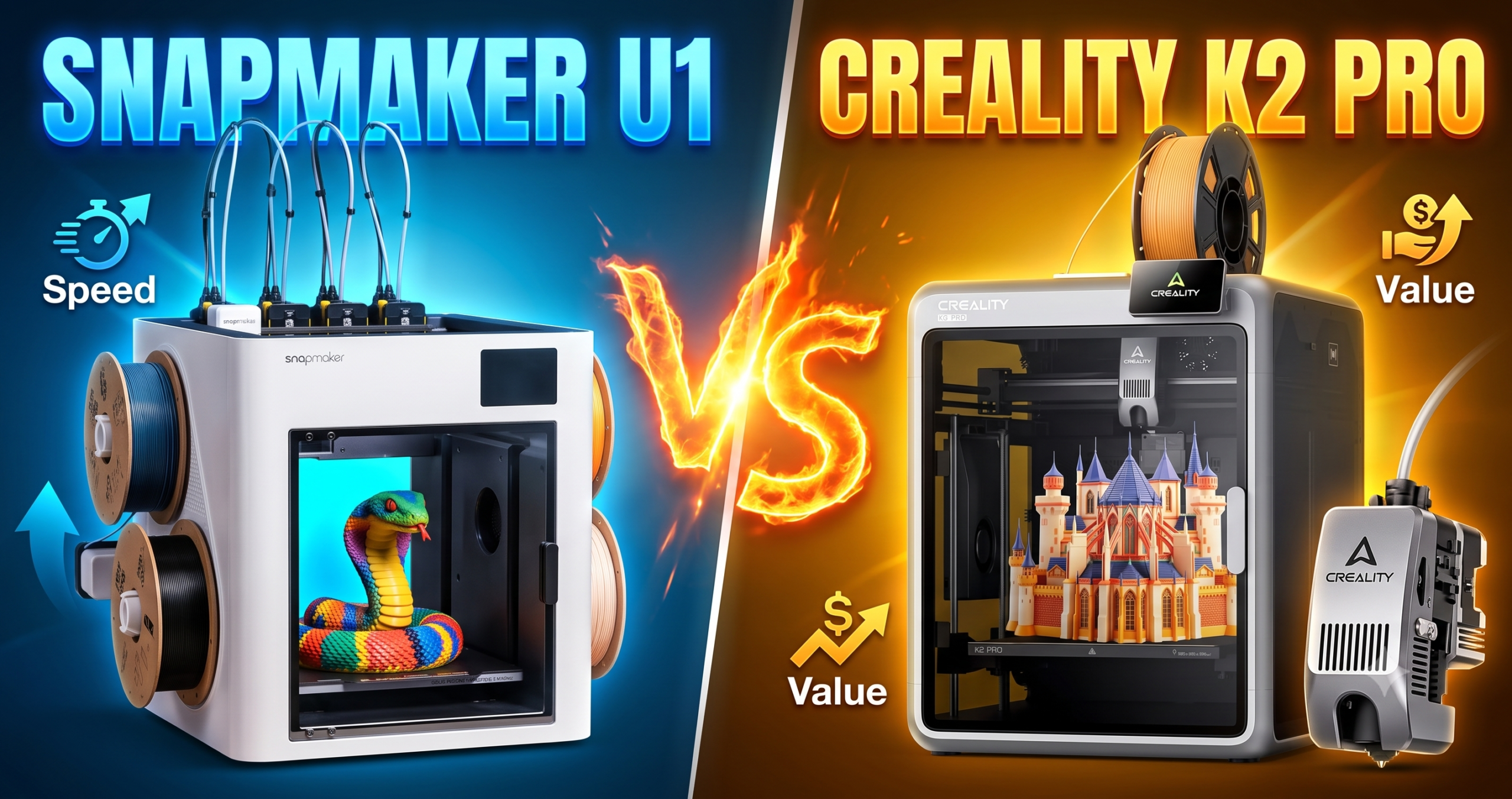
Two $849 printers, same launch price, completely different approach to color. The Snapmaker U1 gives every color its own nozzle. The Creality K2 Pro Combo feeds up to 16 colors through one nozzle via its CFS buffer. That single design choice touches everything: waste, speed, noise, and how much you’ll fight with purge blocks at 1 a.m.
We pulled verified Amazon listing data, owner reviews, and spec sheets for both machines to settle which one actually deserves a spot on your bench in 2026.
The Bottom Line: Buy the Snapmaker U1 if multi-color output quality and near-zero filament waste matter more to you than raw build volume — buy the K2 Pro Combo if you need a bigger bed, higher top speed, and don’t mind occasional purge waste.
The Killer Feature: The U1’s 5-second SnapSwap toolchanger, validated through 1,000,000 swaps with zero recorded failures — nothing else at this price swaps color that fast with that little waste.
2026 Value Score: Snapmaker U1 — 9.1/10 · Creality K2 Pro Combo — 8.2/10 (editorial scores, based on current market competition at this price point)

Is the Snapmaker U1 Faster Than the Creality K2 Pro Combo?
On paper, no — the K2 Pro Combo hits 600 mm/s versus the U1’s 500 mm/s. In practice, the U1 finishes multi-color prints faster because it never stops to purge.
Raw print speed favors Creality. Its FOC step-servo motors and linear rails push 20,000 mm/s² acceleration, genuinely fast for single-color jobs. But multi-color is where the numbers flip. One verified owner timed a 4-color model at 32 hours on the U1, versus roughly 58 hours on a single-nozzle multi-color machine completing the same print — because that machine also has to purge and repurge with every color swap.
If you print mostly single-color, functional parts, the K2 Pro Combo’s raw speed wins. If color is the point of the print, the U1’s toolchanger erases Creality’s speed advantage entirely.
Which Printer Wastes Less Filament: U1 or K2 Pro Combo?
The U1 wastes dramatically less. Four dedicated nozzles mean no purge tower and no waste chute; the K2 Pro Combo’s CFS system still purges through a single nozzle when switching colors.
This is the U1’s whole reason for existing. Every toolhead stays preloaded and preheated with its own filament, so switching color is a mechanical swap, not a purge-and-flush cycle. One verified buyer specifically called out having no massive “poop chute” and no buckets of discarded filament compared to their old single-nozzle setup.
The K2 Pro Combo’s CFS buffer is genuinely clever for going up to 16 colors from one printer, and its auto filament ID and moisture-proof storage are real conveniences. But every color change still runs filament through one hot end, so purge waste is unavoidable — just less of it than older single-nozzle systems, thanks to smarter flow management.
Snapmaker U1 vs Creality K2 Pro Combo: Build Volume and Materials
The K2 Pro Combo wins on space — 300×300×300mm versus the U1’s 270×270×270mm — and its active chamber heating (up to 60°C) handles warp-prone materials the U1 can’t.
That 10% larger bed matters if you print large single pieces or batch multiple parts per plate. The K2 Pro Combo’s heated chamber also opens the door to ASA, PPA-CF, and PET-CF — carbon-fiber composites the U1’s open-frame design isn’t built to run reliably.
The U1 counters with material breadth for a different reason: four toolheads mean you can combine TPU, PVA supports, and rigid engineering plastics in one print without touching the machine. One owner specifically praised mixing flexible TPU with rigid material in a single job — something the K2 Pro Combo’s single nozzle can technically do, but with far more purge overhead between swaps.
270×270×270mm · CoreXY · 500mm/s · 4 toolheads · No chamber heat
300×300×300mm · CoreXY · 600mm/s · CFS 16-color · Heated to 60°C
The Reality of Long-Term Ownership
Maintenance & Wear
The U1’s toolchanger is the part most owners worry about failing — Snapmaker’s own testing puts it at over a million swap cycles with zero failures, which should outlast the printer itself for most home users. The nozzles themselves are the actual wear item; expect to swap them every few hundred print-hours if you run abrasive or high-temp filaments often.
The K2 Pro Combo’s CFS unit is the equivalent wear point. Its auto filament ID sensors and feed tubes are mechanically simple but do collect dust and filament shavings over months of use — a quick vacuum-out every few weeks keeps feed jams from creeping in.
Hidden Costs
Neither machine is a $849-and-done purchase. For the U1, budget for spare nozzles once your 1-year warranty period ends — a 4-pack of hardened steel replacements runs well under $50. A double-sided build plate is also a near-universal early upgrade, since it lets you swap between textured and smooth finishes without re-leveling. For the K2 Pro Combo, factor in replacement CFS spool adapters and the higher power draw from maintaining a heated 60°C chamber during long prints.
 ↗ Get Spare U1 Nozzles — $43.69 on Amazon
 ↗ Get CryoGrip Pro Build Plate — $29.99 on Amazon
The Tinkerer’s Hack
Swap the U1’s stock build plate for a double-sided textured/smooth plate before your warranty print count climbs. It’s a five-minute swap, doesn’t touch calibration, and gives you a smooth-finish option for display models without re-leveling between plates.
For the deeper dive on daily-driver reliability, our full Snapmaker U1 review covers three months of continuous use, and our 30-day K2 Pro Combo ownership report tracks the same for Creality’s machine.
Snapmaker U1 vs Creality K2 Pro Combo: Full Spec Comparison
| Feature | Snapmaker U1 | Creality K2 Pro Combo | Winner | Why It Won |
|---|---|---|---|---|
| Color switching | 5-sec toolchanger, 4 nozzles | CFS buffer, 1 nozzle, up to 16 colors | Snapmaker U1 | Near-zero waste and no purge tower on every color change |
| Max color count | 4 native (Full Spectrum expands range) | Up to 16 via CFS | Creality K2 Pro Combo | CFS handles far more simultaneous spools |
| Build volume | 270×270×270mm | 300×300×300mm | Creality K2 Pro Combo | ~15% more usable print volume for large or batch jobs |
| Max speed | 500mm/s | 600mm/s | Creality K2 Pro Combo | Higher top speed on single-color, non-purge prints |
| Chamber heating | None | Active, up to 60°C | Creality K2 Pro Combo | Handles warp-prone ASA/PPA-CF the U1 isn’t built for |
| Toolchanger durability | 1,000,000+ swaps tested, zero failures | N/A (single nozzle) | Snapmaker U1 | Verified mechanical reliability at extreme cycle counts |
| Monitoring | 3.5″ touchscreen, app control | Dual AI camera (chamber + nozzle) | Creality K2 Pro Combo | Real-time flow-rate auto-tuning and failure detection |
| Setup time (owner reports) | ~20 minutes | ~30–45 minutes, rudimentary manual | Snapmaker U1 | Multiple owners specifically praised sub-20-minute setup |
| Price | $849 | $849 | Tie | Identical launch pricing at time of writing |
 ↗ Check Creality K2 Pro Combo — $849 on Amazon
Snapmaker U1 vs Creality K2 Pro Combo: Pros and Cons
- Near-zero multi-color filament waste
- 5-second toolchanges vs. minutes of purging
- Sub-20-minute setup, beginner-friendly
- 1,000,000-cycle toolchanger validation
- Smaller 270mm build volume
- No active chamber heating
- Capped at 4 native toolhead colors
- Larger 300mm build volume
- Faster 600mm/s top speed
- Heated chamber for ASA/PPA-CF
- Dual AI camera monitoring
- Still purges filament on color swaps
- Steeper learning curve per owner reports
- Some units shipped with only white filament loaded
Still weighing the K2 Pro Combo against other Creality machines? Our breakdown of the entire K2 lineup sorts out which tier actually needs the Pro badge, and our standalone CFS system review tests the buffer’s reliability in isolation.
Snapmaker U1 vs Creality K2 Pro Combo: FAQ
Which is better for a total beginner with zero 3D printing experience?
The Snapmaker U1, based on setup-time reports. Multiple verified buyers went from unboxing to first print in under 20 minutes with no prior printing experience.
Does the K2 Pro Combo really include four filament colors out of the box?
Not always. Some verified buyers received only white filament despite marketing images showing four pre-loaded colors — order extra spools separately if you want to print multi-color immediately.
Can either printer handle carbon-fiber filament?
The K2 Pro Combo is built for it, with hardened steel gears and active chamber heating for PET-CF and PPA-CF. The U1’s spec sheet lists standard engineering materials but not chamber-heated carbon-fiber composites.
Will the Snapmaker U1’s toolchanger wear out over time?
Snapmaker’s own testing validates the locking mechanism through 1,000,000 swap cycles with zero recorded failures — the nozzles wear out long before the mechanism does.
Is the Snapmaker Orca slicer difficult to learn?
Owner reports say no. It ships with a built-in model library and was specifically praised by first-time users as easy to pick up alongside the printer’s guided on-screen calibration.
Bottom line: the U1 is the better everyday multi-color machine for most people — faster color swaps, less waste, easier setup. The K2 Pro Combo earns its keep if you need the bigger bed, higher top speed, or heated-chamber materials the U1 simply isn’t built for.
Related posts:
 Snapmaker U1 Review 2026: Is the 4-Toolhead Printer Worth $899?
  Best 3D Printer 2026: 14 Models Compared
  QIDI Max4 Combo Review 2026: The Largest Sub-$1,500 CoreXY That Can Actually Print Nylon
  Creality K2 Pro Combo: Your Gateway to Pro-Level Multicolor 3D Printing
  2025’s Best Multi-Color 3D Printer: AD5X Full Review
  Best Cyber Monday 3D Printer Deals 2025: Save Up to 45% on Bambu Lab, Creality & ANYCUBIC (Live Deals)
  Why 87% of Small Businesses Waste Money on Wrong 3D Printers (2025 Buying Guide)
  Creality K2 Pro Combo vs K2 Plus Combo: Which Multi-Color 3D Printer Delivers Better Value in 2025?
  Creality K2 Comparison 2026: Which Model Is Worth Your Money? (K2 Combo vs K2 Plus vs K2 Plus Combo vs K2 Pro Combo)
  Anycubic Kobra X vs ELEGOO Centauri Carbon Review: Best 3D Printer Under $400 in 2026?
  Best Multicolor 3D Printers of 2025 for Etsy Sellers Boosting Sales
  What is the Best Multi-Material 3D Printer?
1 thought on “Snapmaker U1 vs Creality K2 Pro Combo: Real 2026 Test”