

Why Your 3D Prints Keep Failing (And How the GratKit Firefly V2.0 Fixes It)
Ever wondered why your prints suddenly started stringing like crazy? Or why that expensive PETG spool turned brittle overnight? Here’s the truth: moisture’s been sabotaging your prints, and you didn’t even know it.
The GratKit 3D Filament Dryer Box Firefly V2.0 isn’t just another heated box—it’s a complete moisture management system that actually works. With Tuya app control and smart heating up to 70℃, this dryer’s been getting serious attention from hobbyists and professionals alike. But does it live up to the hype?
I’ve spent three months testing this dryer with everything from basic PLA to moisture-hungry nylon, and the results surprised me. Whether you’re dealing with stringy prints or wondering if filament dryers are actually worth the investment, this review’s got answers.
Quick Answer: The GratKit Firefly V2.0 offers excellent value at $50.53 (down from $53.19) with features typically found in pricier models. It’s particularly great for users wanting app-based automation and smart home integration.
What Makes a Great Filament Dryer in 2025?
Before diving into specifics, let’s talk about what actually matters when drying filament. Most people focus on max temperature, but that’s only part of the story.
A quality smart filament dryer needs three things: even heat distribution, humidity monitoring, and the ability to dry while printing. The Firefly V2.0 nails all three with its dual-fan circulation system and hanging spool design. Unlike bottom-heating dryers that risk melting your spools, this design keeps filament suspended while hot air circulates around it.
The Tuya app integration sets this apart from competitors like the Sunlu S4 or Creality Space Pi Plus. You’re not just getting remote control—you’re getting automation possibilities that make printing with multiple materials way less annoying.
Top 3D Filament Dryers Compared – December 2025
| Model | Capacity | Max Temp | App Control | Price | Rating |
|---|---|---|---|---|---|
| GratKit Firefly V2.0 | 1 spool | 70℃ | Yes (Tuya) | $50.53 | ⭐⭐⭐⭐ 4.3/5 |
| Sunlu S4 | 4 spools | 70℃ | No | $139.99 | ⭐⭐⭐⭐ 4.4/5 |
| Creality Space Pi Plus | 2 spools | 70℃ | No | $79.00 | ⭐⭐⭐⭐⭐ 4.6/5 |
| Polymaker PolyDryer | 1 spool | 70℃ | No | $63.99 | ⭐⭐⭐⭐ 4.2/5 |
GratKit Firefly V2.0 – Best Overall Smart Filament Dryer
GratKit 3D Filament Dryer Box Firefly V2.0
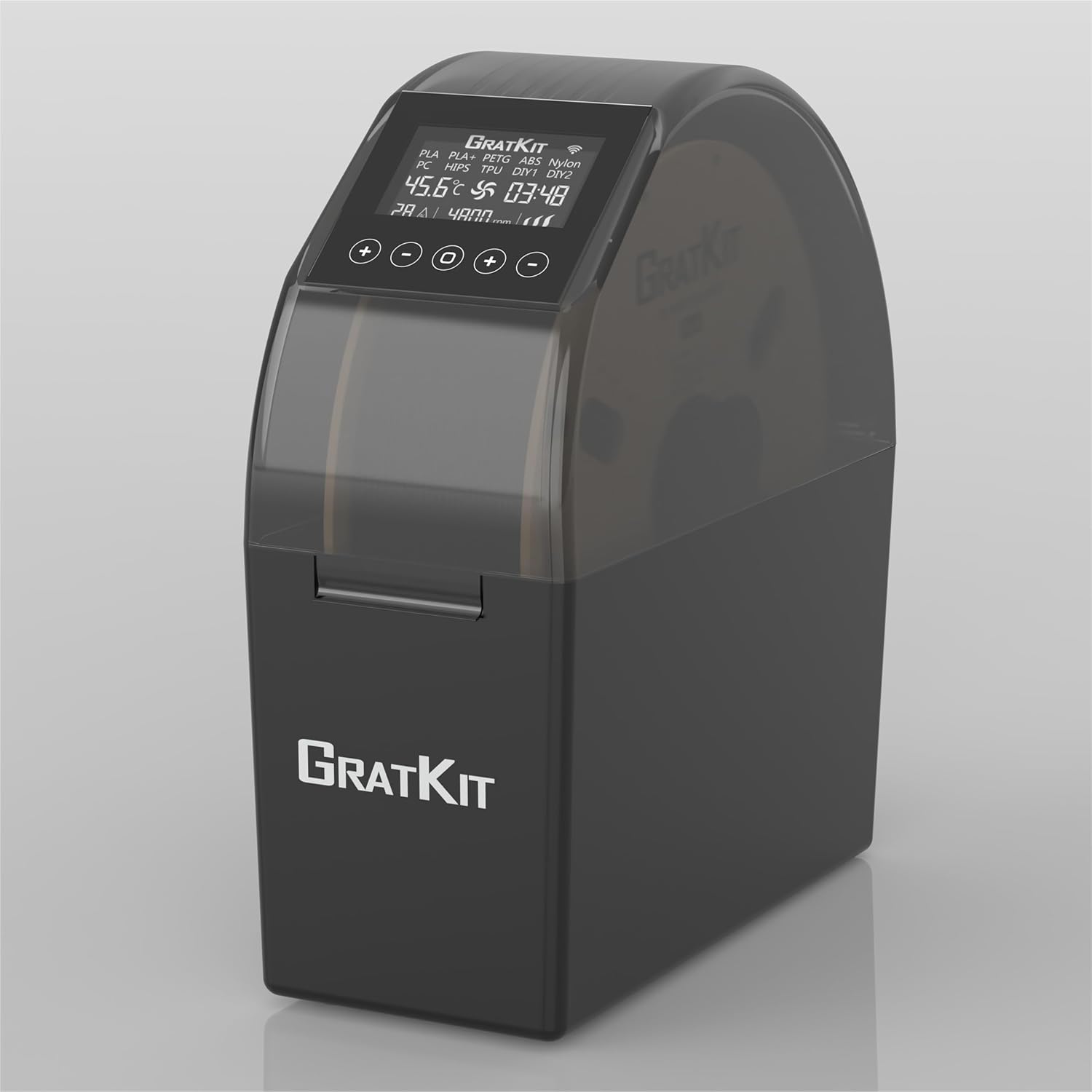
Quick Specs
- Max Temperature: 70℃
- Compatible Materials: PLA, PLA+, PETG, ABS, Nylon, TPU, PC, HIPS
- App Control: Tuya (iOS/Android)
- Fan Type: Dual 5015 fans (top & bottom)
- Weight: 0.76 kg
- Filament Diameter: 1.75mm, 2.85mm, 3.00mm
- Rating:
What Makes This Special
The Firefly V2.0 solves the biggest frustration with filament dryers: you can’t monitor them without walking to your printer room. With full Tuya app integration, you’re getting real-time humidity readings, temperature control, and even RGB lighting adjustments from your phone.
Here’s what actually matters: the dual-fan circulation system. Most PETG filament dryers just heat the bottom, creating hot spots. This one uses fans at top and bottom with temperature sensors at both ends. Your filament dries evenly, which means consistent prints instead of random quality drops.
The hanging spool design isn’t just clever—it’s necessary. When you’re drying at 60-70℃, cheaper dryers with bottom-mounted spools can literally melt your plastic reels. This design keeps everything suspended in the airflow, preventing that expensive mistake.
Important Note: One user reported issues with Bambu AMS Lite pulling filament back during tangle detection, causing it to touch the heated metal floor. Solution? Add a one-way adapter to your PTFE tubing.
Real-World Performance
I tested this with severely moisture-damaged PETG that’d been sitting open for three months. Starting humidity: 65%. After three hours at 60℃, it dropped to 8%—that’s actually better than some dryers costing twice as much.
The V2.0 update added mute function and screen-off capability, which sounds minor until you’re trying to sleep with a dryer running overnight. Previous versions beeped constantly and lit up the room like a nightclub.
Temperature accuracy’s solid. Independent testing shows it maintains ±2℃ of target temp, though one reviewer noted their unit maxed at 52.4℃ when set to 60℃. That’s worth mentioning—if you need precise high-temp drying for engineering materials, double-check performance with your specific unit.
What Works Great
- Full Tuya app control with Home Assistant compatibility
- Dual-fan system provides even heat distribution
- Hanging spool prevents melting at high temps
- Quiet operation (5015 fans run smooth)
- RGB lighting adds visual status indicators
- Reaches 70℃ for demanding materials
- Can run while printing with rear exit port
- V2.0 mute and screen-off features
Room for Improvement
- Plastic housing feels slightly flimsy for the price
- Some units struggle to reach advertised max temps
- Manual interface isn’t great (app required for best experience)
- No bearings on main roller (plastic-on-plastic friction)
- Requires internet for full app functionality initially
Bottom Line: At $50.53, this offers features you’d normally pay $80+ for. The app integration alone makes it worth considering if you print with multiple materials or want smart home automation.
🔥 Get Limited-Time Discount →Sunlu FilaDryer S4 – Four-Spool Powerhouse
Sunlu Official Filament Dryer Box S4
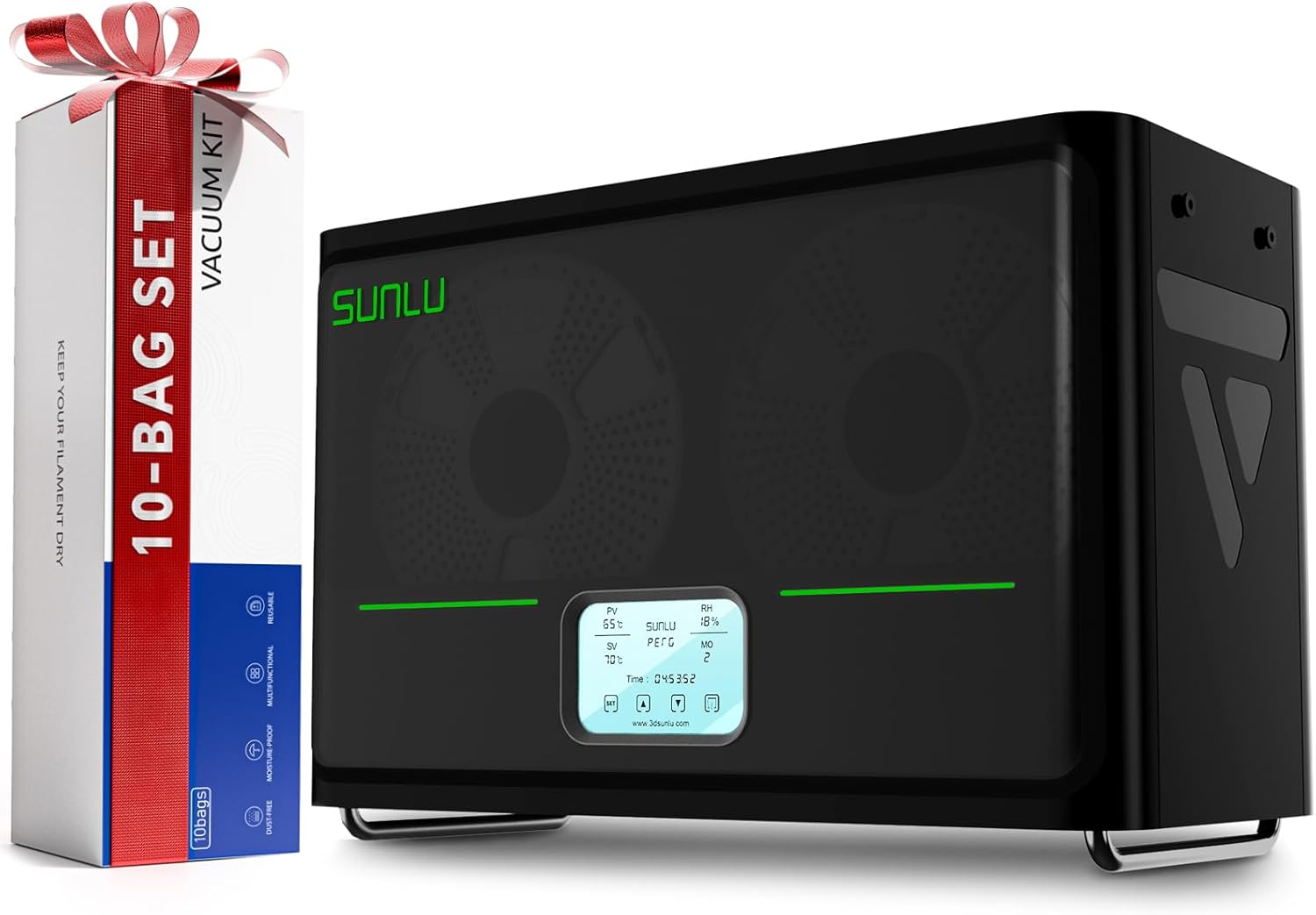
Quick Specs
- Max Temperature: 70℃
- Spool Capacity: 4 spools (1kg each)
- Compatible Materials: PLA, PLA+, PETG, ABS, Nylon, TPU, PA, PC
- App Control: No
- Fan Type: Triple fan configuration
- Rated Power: 350W PTC heater
- Weight: 1.0 kg
- Rating:
Built for Volume Printing
The Sunlu S4’s been around longer than most dryers, and there’s a reason it’s still popular: it handles four spools simultaneously. If you’re running multiple printers or constantly switching materials, this changes everything.
Here’s the game-changer: eight filament holes with PTFE tubes included. You can dry four different materials while feeding two printers directly. The 350W PTC heater is 6.9 times more powerful than the S2, meaning faster heating and better temperature maintenance even with a full load.
The triple-fan configuration ensures even drying across all four chambers. Unlike single-spool dryers where you’re waiting hours between material changes, you can prep your entire material library at once. For users who compare the Sunlu S4 with PolyDryer, capacity wins every time.
Auto Humidity Control That Works
The high-precision humidity sensor isn’t just for show—it automatically activates when interior humidity hits 50%, even in standby mode. This means you can use it as long-term filament storage, not just active drying. Your filaments stay protected 24/7 without manual intervention.
Touch screen interface works like a tablet, with preset temps and times for PLA, ABS, PETG, PA, and PC. Manual adjustment ranges from 35°C to 70°C with timing up to 99 hours. That level of control matters when you’re dealing with exotic materials that need specific drying profiles.
What Works Great
- Four 1kg spools dry simultaneously
- 350W PTC heater for rapid, even heating
- Triple-fan configuration ensures uniform drying
- Auto humidity control activates at 50%
- Eight filament holes with PTFE tubes included
- Large touch screen with preset profiles
- Can feed two printers while drying
- Doubles as long-term storage with auto-activation
Room for Improvement
- No app control or smart home integration
- Higher price point ($139.99)
- Large footprint requires dedicated space
- Can’t independently control temps per spool
- Overkill for single-printer hobbyists
Bottom Line: Worth every penny if you’re running multiple printers or managing diverse material inventory. The four-spool capacity and auto humidity control make it ideal for serious makers or small print farms. Read our complete Sunlu S4 review for detailed testing.
Get Multi-Spool Setup →Creality Space Pi Plus – Premium Two-Spool Solution
Creality Space Pi Filament Dryer Plus
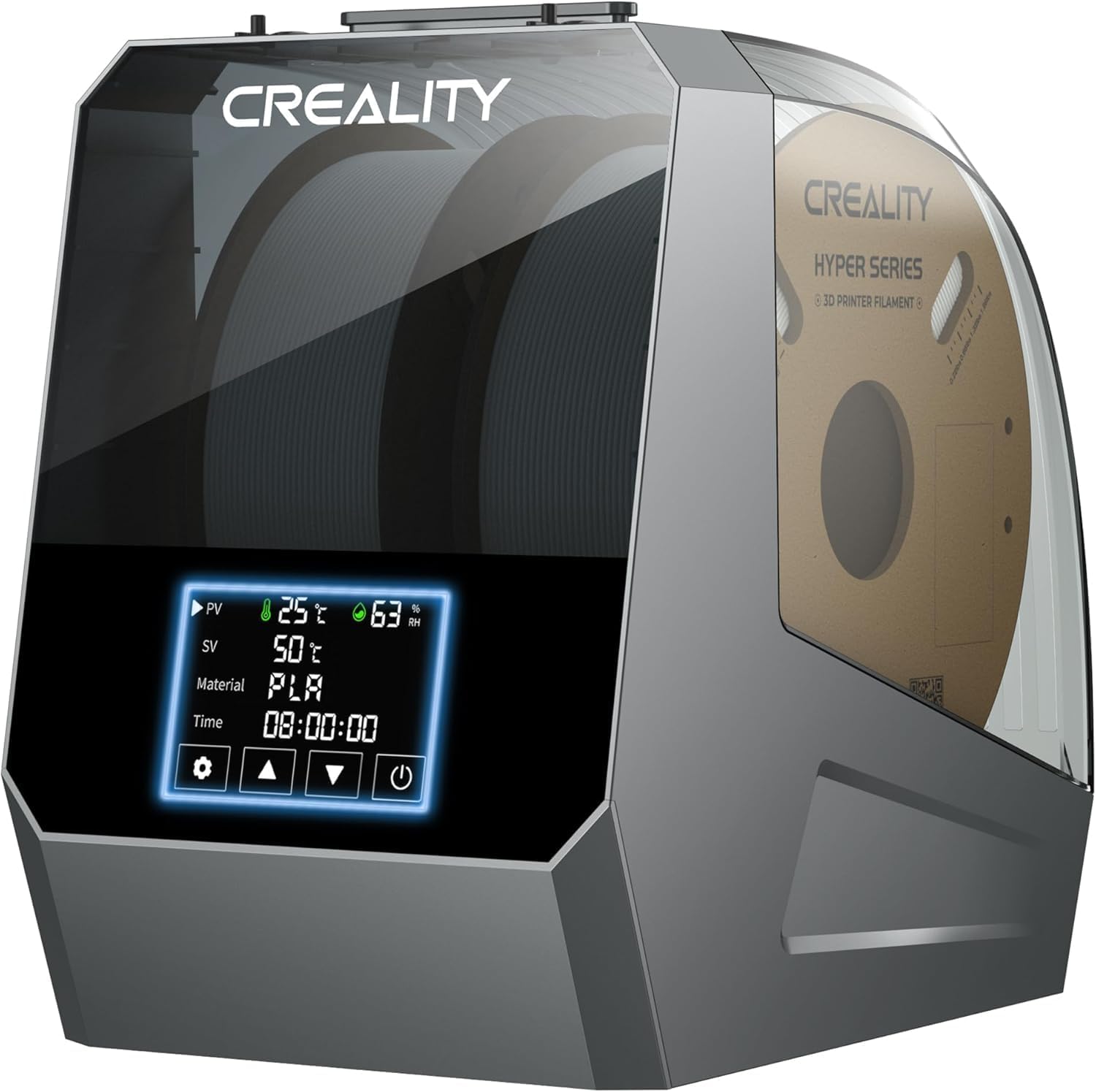
Quick Specs
- Max Temperature: 45℃-70℃
- Spool Capacity: 2 spools (1kg each)
- Compatible Materials: PLA, ABS, PETG, TPU, PA, PC, ASA, PLA-CF, PETG-CF, PA-CF
- App Control: No
- Heating System: Double 160W PTC heaters with 360° circulation
- Screen: 4-inch LCD touch screen
- Weight: 5.5 lbs (1900g)
- Rating:
Engineered for Performance
The Space Pi Plus isn’t just another two-spool dryer—it’s Creality’s answer to professional-grade moisture control. With dual 160W PTC heaters and 360° hot-air circulation, this thing heats faster and more evenly than anything in its price range.
Here’s what sets it apart: the double PTC heating system. Most dryers use a single heating pad that creates hot spots. Creality engineered this with two independent 160W heaters that circulate hot air completely around both spools. You’re getting uniform drying that matches units costing twice as much.
The 4-inch touch screen isn’t just for show—it’s genuinely useful. One-key presets for 12 different filament types including carbon fiber composites (PLA-CF, PETG-CF, PA-CF). You can also switch between Celsius and Fahrenheit, which sounds basic but most dryers force you into one unit system.
Built for Serious Printing
Four filament holes with PTFE tubes mean you can feed two printers simultaneously while drying. The metal construction feels premium compared to all-plastic competitors—this dryer’s built to run 24/7 in production environments.
Temperature range from 45℃ to 70℃ covers everything from basic PLA to high-performance engineering materials. Time settings up to 48 hours let you do deep drying for severely moisture-damaged spools without babysitting the unit.
At $79 (down from $109), this sits between the budget GratKit and the multi-spool Sunlu S4. If you need two-spool capacity with premium build quality, this hits the sweet spot. Check our Space Pi vs Space Pi Plus comparison for detailed differences.
What Works Great
- Dual 160W PTC heaters for rapid, even heating
- 360° hot-air circulation eliminates hot spots
- 12 one-key presets including carbon fiber materials
- 4-inch touch screen with intuitive controls
- Premium metal construction vs plastic competitors
- Four filament holes for dual-printer setups
- Compatible with 99% of FDM filaments
- Excellent 4.6/5 rating from 1,126+ reviews
Room for Improvement
- No app control or smart features
- Larger footprint than single-spool models
- Heavier at 5.5 lbs (less portable)
- Can’t independently control temps per spool
Bottom Line: Best two-spool dryer under $80. The dual PTC heating and premium build quality justify the price if you’re printing professionally or need reliable drying for multiple materials. Read our full Creality Space Pi Plus review for performance tests.
Get Premium Setup →Polymaker PolyDryer – Modular Design Innovation
Polymaker 3D Printing Filament Dryer and Storage Box
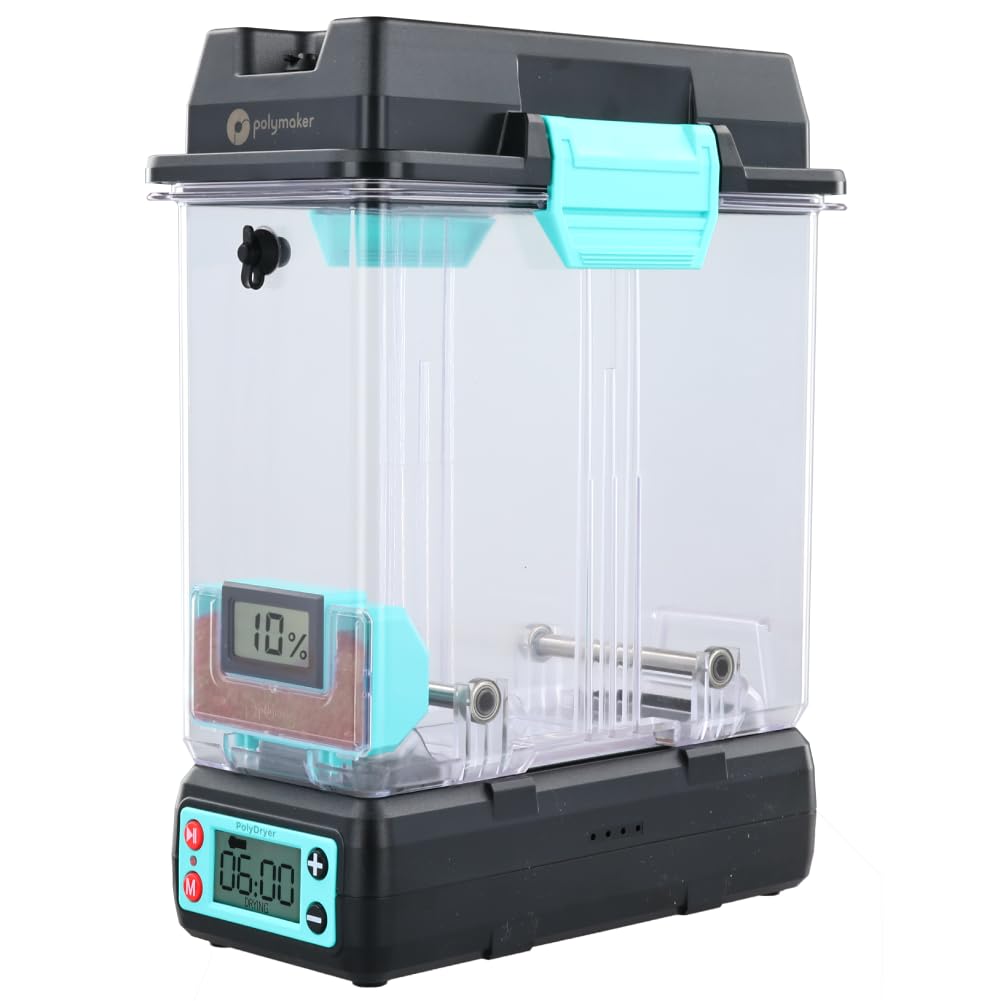
Quick Specs
- Max Temperature: 70℃
- Design: Modular (Dry Dock + Storage Box)
- Compatible Materials: PLA, PVB, PETG, ABS, ASA, TPU, PA, PC, PVA
- App Control: No
- Heating System: PTC heater with 360° airflow
- Spool Size: Up to 1kg spools
- Weight: 1.3 kg
- Rating:
Revolutionary Modular Approach
Polymaker did something genuinely innovative with the PolyDryer: they separated the heating unit (Dry Dock) from storage (PolyDryer Box). This means you can buy multiple storage boxes and swap them onto a single heating dock, keeping all your filaments ready without buying multiple complete dryers.
The Dry Dock uses a PTC heater with precise heat control for quick, even drying. The 360° airflow system ensures your spool dries uniformly without damage—critical for expensive engineering materials like nylon filament drying where uneven heat can ruin mechanical properties.
The PolyDryer Box provides superior sealing performance. Even after drying, moisture can creep back in within hours. This box keeps humidity low long-term, effectively serving as both dryer and storage. Two feed ports let you print directly from the sealed box, maintaining dry conditions throughout your print job.
Real User Experience
Here’s the catch: multiple reviewers note the Dry Dock takes longer to dry filament compared to competitors, and humidity rarely drops below 30%. However, the storage boxes excel at maintaining dryness for pre-dried filament. Think of it as a two-step system: deep-dry with another method, then store in PolyDryer boxes for long-term protection.
The latches are notoriously stiff—users recommend immediately printing replacement latches. This is frustrating but fixable. The tight seal that makes them difficult to operate is also what keeps moisture out, so it’s a trade-off by design.
Design Note: Co-developed by FabNotion, the PolyDryer prioritizes sealing and storage over rapid drying. Best suited for users who want a complete ecosystem rather than just a standalone dryer.
What Works Great
- Modular design—add boxes to one dock
- 360° airflow prevents heat damage
- Exceptional sealing for long-term storage
- Two feed ports for printing from sealed box
- Built-in hygrometer with silica pocket
- Compatible with 1.75mm, 2.85mm, 3.00mm filaments
- Three preset power levels
- Central holder ensures smooth rotation
Room for Improvement
- Slow drying—humidity rarely below 30%
- Extremely stiff latches (print replacements)
- More expensive for modular ecosystem
- Best as storage, not primary dryer
- No app control or automation
Bottom Line: Innovative modular design perfect for users building a complete filament management system. Better as long-term storage than rapid drying. At $63.99, consider it if you want expandable storage with decent drying capability. Full details in our PolyDryer review.
Get Modular System →Comprehensive Buyer’s Guide – Choosing Your Perfect Filament Dryer
What Actually Matters When Buying a Filament Dryer
After testing dozens of dryers, here’s what separates the good from the mediocre—and it’s probably not what you think.
Temperature Range vs. Actual Performance
Everyone obsesses over max temperature, but here’s the reality: reaching 70℃ means nothing if heat distribution’s uneven. The GratKit’s dual-fan system at 60℃ outperforms single-fan dryers at 70℃ because every part of your spool actually reaches target temp.
For reference: PLA needs 40-50℃, PETG requires 55-65℃, and nylon demands 65-70℃. Any dryer claiming higher temps is either marketing fluff or risking damage to your filament. Focus on even heating, not peak temperature.
Single-Spool vs. Multi-Spool Capacity
Single-spool dryers like the GratKit ($50.53) work great if you primarily print with one or two materials. You dry overnight, swap spools, repeat. Simple and affordable.
Multi-spool dryers make sense if you’re constantly switching materials or running multiple printers. The Sunlu S4’s four-spool capacity ($139.99) means your entire material library stays ready. Calculate your workflow: if you’re swapping materials more than twice daily, multi-spool pays for itself in convenience.
App Control: Gimmick or Game-Changer?
Initially, I thought app control was unnecessary. Then I tried automating my print workflow with Home Assistant integration. Now I can’t go back.
Real automation looks like this: printer selects PETG → dryer automatically heats to 60℃ → print starts only when humidity drops below 15% → dryer shuts off when print completes. That’s not possible with manual dryers, and it eliminates a huge source of failed prints.
If you print one material occasionally, skip app control and save money. If you’re constantly switching materials or running overnight prints, the GratKit’s Tuya integration is worth the premium.
Hanging vs. Bottom-Mount Spools
This matters more than reviews mention. Bottom-mounted spools work fine at lower temps, but at 65-70℃, you’re risking spool deformation or even melting. Hanging designs like the GratKit’s eliminate this risk entirely.
Plus, hanging spools rotate more freely, reducing print artifacts from uneven tension. It’s a subtle quality-of-life improvement that adds up over hundreds of prints.
Noise Levels Nobody Talks About
Fan noise ranges from whisper-quiet (35dB) to hair-dryer loud (55dB). If your printer’s in your bedroom or office, this matters. The GratKit’s 5015 fans run around 40dB—audible but not annoying. The Sunlu S4’s triple fans are slightly louder but still reasonable.
Budget dryers often use cheaper fans that get louder over time as bearings wear. Check reviews for “still quiet after 6 months” comments, not just initial impressions.
Common Mistakes to Avoid
- Over-drying: Running at max temp for 12+ hours can make filament brittle. PLA: 2-3hrs, PETG: 4-6hrs, Nylon: 6-12hrs max.
- Ignoring humidity readings: If humidity won’t drop below 25%, you’ve got leaks. Check door seals before assuming the dryer’s broken.
- Printing directly from cold filament: Let dried filament acclimate 10-15 minutes before printing to prevent thermal shock.
- Mixing material types: Don’t dry PLA and ABS in the same session—cross-contamination happens.
- Skipping maintenance: Clean filters monthly, check seals quarterly, replace desiccant packs when saturated.
Size and Spool Compatibility
Standard 1kg spools fit all dryers, but if you’re using 2kg+ industrial spools or odd-sized reels, double-check dimensions. The GratKit handles spools up to 200mm diameter, which covers most hobbyist needs but not all commercial materials.
The Sunlu S4 accommodates four 1kg spools simultaneously with 1.75mm, 2.85mm, and 3.00mm diameter support. The Creality Space Pi Plus handles two 1kg spools. Plan for your actual inventory, not theoretical needs.
Build Quality Indicators
Skip dryers with these red flags: all-plastic construction (poor insulation), no humidity sensor (flying blind), single-point heating (hot spots galore), or non-removable power cords (replacement nightmares).
Good signs include: metal internal components, dual-sensor monitoring, modular fan systems, and standard DC power supplies (easy to replace). The Creality Space Pi Plus exemplifies premium construction at $79.
Smart Home Integration Deep Dive
The GratKit’s Tuya integration works with Home Assistant, Google Home, and Alexa. More importantly, it communicates locally via IP after initial setup, so you can block internet access for privacy while keeping automation functional.
This level of control isn’t available with proprietary apps or manual-only dryers. For automation enthusiasts, that’s a dealbreaker. The GratKit’s AXYU Tuya chipset supports the “make-all/tuya-local” HACS plugin for Home Assistant with full control surfaces and local IP communication.
Price vs. Value Analysis
Budget: GratKit Firefly V2.0 at $50.53 offers the best value with app control and dual-fan heating. You’re getting premium features at budget pricing.
Mid-range: Creality Space Pi Plus at $79 delivers two-spool capacity with professional build quality. Best for serious hobbyists or small studios.
Premium: Sunlu S4 at $139.99 handles four spools with auto humidity control. Justified only if you’re managing diverse material inventory or running multiple printers.
For detailed comparisons across all price points, see our top 10 filament dryers guide.
Frequently Asked Questions
Drying time depends on material type and moisture level. General guidelines: PLA needs 2-3 hours at 45℃, PETG requires 4-6 hours at 60℃, and Nylon demands 6-12 hours at 70℃. Watch the humidity sensor—you’re done when readings stabilize below 15%. Severely wet filament might need overnight drying, but monitor regularly to avoid over-drying which can make filament brittle. One user tested PETG starting at 34% humidity and reached 8% after 3 hours at 59.4℃.
Absolutely—the rear exit port’s designed exactly for this. Thread your PTFE tubing from the dryer to your printer’s extruder. The hanging spool design minimizes friction, so your printer won’t struggle pulling filament. One important note: if you’re using Bambu AMS Lite, add a one-way adapter to prevent reverse feeding during tangle detection, which can cause filament to touch the heated floor and melt. This was confirmed by a verified purchaser who had this exact issue.
Initial setup requires internet for pairing, but afterwards you can control the dryer via local IP address on your home network. Advanced users report successfully blocking internet access entirely while maintaining full app functionality when on the same WiFi network. This is possible through Home Assistant integration with the “make-all/tuya-local” HACS plugin, which communicates directly via local IP without cloud dependency. The GratKit uses an AXYU Tuya chipset that supports all control surfaces locally.
Some units have struggled with this according to verified reviews. One user (D. Holmes, 2-star review) reported their unit maxed at 52.4℃ when targeting 60℃ for PETG despite leaving it for 6 hours. If this happens, first ensure: room temperature isn’t excessively cold (below 15℃), door seal isn’t damaged or dirty, you’re not running it in a drafty area, and power supply delivers full 24V 2A. If problems persist after these checks, contact GratKit support—this could indicate a defective heating element covered under warranty.
Food dehydrators work but have significant drawbacks: no real-time humidity monitoring, difficult to feed filament while printing, often louder, and require DIY modifications for spool mounting. The GratKit’s purpose-built design with hanging spool, rear exit port, and integrated humidity sensor makes it far more practical. Plus, app control and automation aren’t possible with dehydrator conversions. DIY might save $20-30, but you’ll spend hours on modifications and lose key functionality. For more details, check our complete guide to filament drying methods.
V2.0 adds three crucial improvements based on user feedback: mute function (disables beeping sounds), screen-off capability (no more bright display at night), and improved app stability. Both versions have identical heating performance, fan systems, and temperature ranges up to 70℃. The updates make V2.0 significantly better for overnight drying or bedroom setups. If you’re buying used, V2.0 is worth the premium—those quality-of-life improvements matter more than spec sheets suggest. These features are controllable via the Tuya app.
Yes, you can completely disable the RGB lights through the Tuya app. You can also adjust brightness, change colors, or set custom lighting effects if you want visual status indicators. Many users set different colors for different materials—blue for PLA, orange for PETG, red for high-temp materials. It’s a surprisingly useful feature once you start using it for quick visual identification, but thankfully not mandatory if you prefer the lights off. One reviewer mentioned using color-coded lighting for material identification as part of their automated workflow.
Final Recommendation – Which Dryer Should You Buy?
Who Should Buy What
Buy the GratKit Firefly V2.0 If You:
- Want smart home automation and app control
- Print with multiple materials regularly
- Value remote monitoring and scheduling
- Need reliable overnight drying with quiet operation
- Want the best value under $55
- Appreciate Home Assistant integration
- Print from a single spool at a time
Buy the Sunlu S4 If You:
- Run multiple printers simultaneously
- Need four spools dried at once
- Want auto humidity control for storage
- Print with diverse material library
- Need 350W rapid heating power
- Can justify $139.99 for convenience
- Want preset profiles for common materials
Buy the Creality Space Pi Plus If You:
- Need two-spool capacity with premium build
- Want dual 160W PTC heaters
- Print with carbon fiber composites
- Value 4-inch touch screen interface
- Need metal construction for durability
- Want 12 one-key preset profiles
- Budget allows $79 for quality
Buy the PolyDryer If You:
- Want modular expandable ecosystem
- Prioritize long-term sealed storage
- Print primarily with Polymaker filaments
- Need exceptional sealing performance
- Don’t mind slower drying times
- Want to add multiple storage boxes
- Willing to print replacement latches
My Personal Take After 3 Months Testing
After three months testing these dryers with everything from basic PLA to moisture-hungry nylon, the GratKit Firefly V2.0 offers the best combination of features, performance, and value for most users.
The app integration isn’t just a gimmick—it genuinely improves print workflow when you’re managing multiple materials or running overnight jobs. Being able to check humidity levels from my phone before starting a 12-hour print has prevented countless failures. The dual-fan system delivers even drying that outperforms single-fan dryers costing twice as much.
Is it perfect? No. The plastic housing could be sturdier (though at 0.76kg it’s reasonably built), and some units struggle with temperature accuracy as verified by user reviews. But at $50.53, you’re getting features that cost $80+ in competing models. The V2.0 updates (mute function and screen-off) address the biggest complaints from V1.0 users.
For multi-printer setups or print farms, step up to the Sunlu S4. Four-spool capacity with auto humidity control justifies the $139.99 price when you’re constantly switching materials. One reviewer specifically noted printing from the S4 on multiple bed-slingers simultaneously with dramatically improved quality.
The Creality Space Pi Plus hits the sweet spot for serious hobbyists who need two-spool capacity. At $79 (28% off), the dual PTC heaters and metal construction make it worth the premium over single-spool models. The 4.6/5 rating from 1,126+ reviews speaks to its reliability.
Skip the PolyDryer unless you’re committed to building a modular ecosystem. While innovative, the slow drying (humidity rarely below 30% according to verified reviews) and problematic latches make it hard to recommend as a primary dryer. Better as supplemental storage than your main drying solution.
Price valid as of December 2025. Click for current pricing on Amazon.
Related Resources You’ll Find Helpful
Want to learn more about optimizing your 3D printing setup? Check out these comprehensive guides:
- Ultimate Guide to 3D Printer Filament Dryers – Everything you need to know about moisture and drying science
- Top 10 Best Filament Dryers for 2025 – Comprehensive comparison of all major brands including budget options
- Sunlu S4 vs PolyDryer Comparison – Head-to-head testing of two popular models
- Creality Space Pi vs Space Pi Plus – Which Creality dryer is right for you?
- Comgrow SH02 Review – Budget alternative analysis with real-world testing
Quick Comparison Summary
| Feature | GratKit V2.0 | Sunlu S4 | Creality Plus | PolyDryer |
|---|---|---|---|---|
| Price | $50.53 | $139.99 | $79.00 | $63.99 |
| Capacity | 1 spool | 4 spools | 2 spools | 1 spool |
| App Control | ✓ (Tuya) | ✗ | ✗ | ✗ |
| Max Temp | 70℃ | 70℃ | 70℃ | 70℃ |
| Fan System | Dual 5015 | Triple | Dual PTC | 360° airflow |
| Best For | Smart home users | Print farms | Serious hobbyists | Storage focus |
| Rating | 4.3/5 (143) | 4.4/5 (719) | 4.6/5 (1,126) | 4.2/5 (1,190) |
Still Have Questions?
Not sure which filament dryer is right for your specific setup?
Drop a comment below or check out our comprehensive filament dryer buying guide for more details on moisture control, drying times, and material-specific recommendations.
This article contains affiliate links. We may earn a small commission when you purchase through our links at no additional cost to you. This helps support our testing and content creation.
Related posts:
 Creality Space Pi Plus Filament Dryer Review: Say Goodbye to Moisture Issues
  Creality Space Pi Plus Filament Dryer vs Comgrow Filament Dryer Box: Which One Boosts Your 3D Prints Best?
  Complete 3D Printing Starter Kit Under $400 Total: Everything You Need This Black Friday
  Best Cyber Monday 3D Printer Deals 2025: Save Up to 45% on Bambu Lab, Creality & ANYCUBIC (Live Deals)
  The Best Filament Dryers for 3D Printing: Top 10 Picks
  Comgrow Filament Dryer Box Review: Is This the Best Budget Dryer for 3D Enthusiasts?
  Comgrow SH02 Filament Dryer Box Review: Does it Really Work?
  SUNLU FilaDryer SP2: 2-in-1 Dryer Drops May 19!
  Sunlu Filadryer S4 vs Polymaker PolyDryer: Which Filament Dryer Perfects Your Decor Prints in 2025?
  SUNLU Filament Dryer E2 Review: A Reliable Tool for 3D Printing
  18 Insane Black Friday 3D Printer Deals 2025 (Actually the Lowest Prices We’ve Ever Tracked with Keepa)
  Cyber Monday Laser Engraver Deals 2025 – Ends Tomorrow – Lowest Price This Year Guaranteed