

Anycubic ACE 2 Pro Review:
The Filament Dryer That Finally Gets Multicolor Right
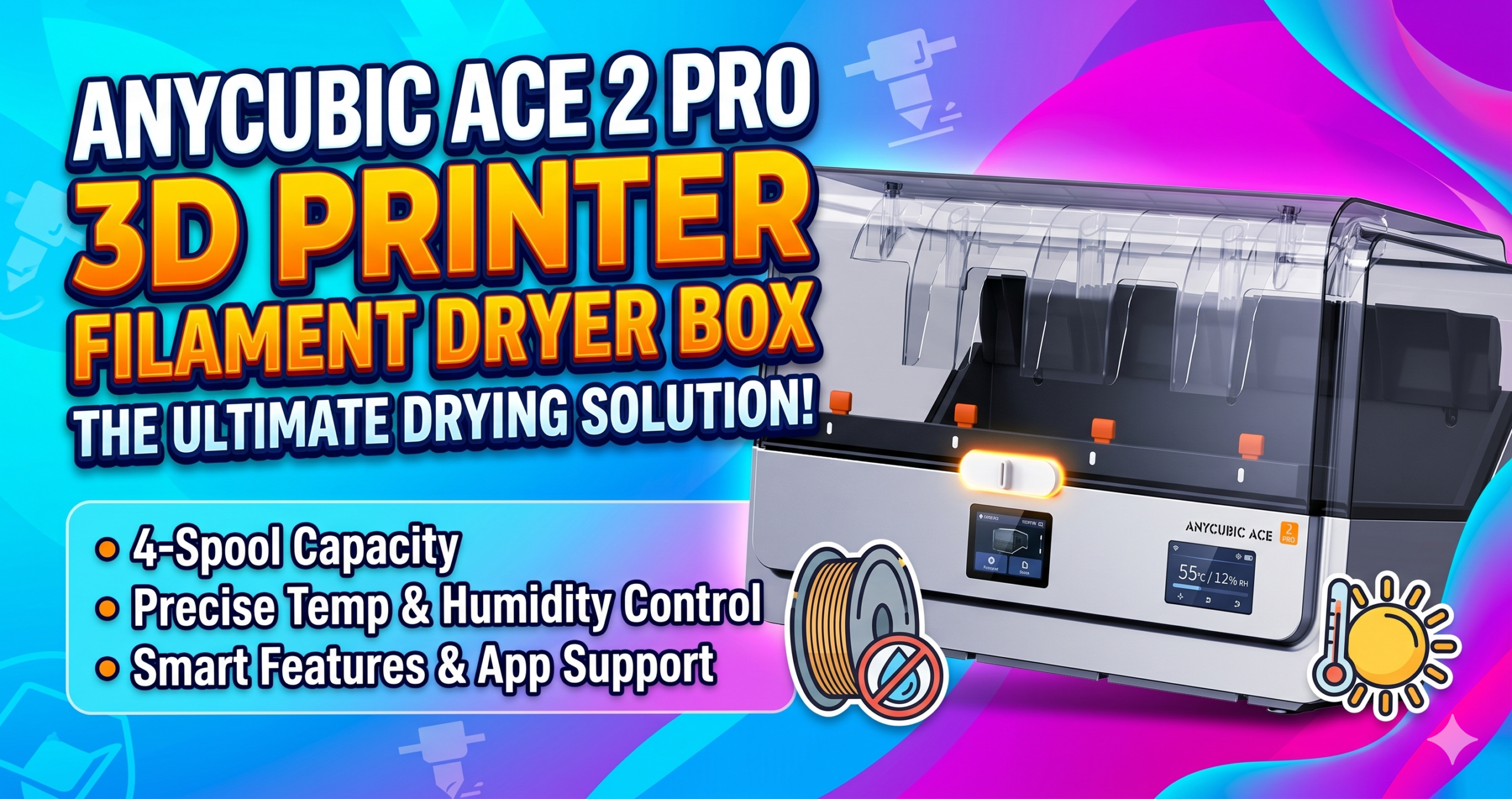
The ACE 2 Pro mounted on a Kobra X frame — the brushless motor housing is visibly larger than the original ACE Pro.

Does the ACE 2 Pro Actually Improve on the Original?
Yes — and not in a minor, marketing-copy way. The original ACE Pro had a documented failure rate with the Kobra 3 Max that frustrated enough users to become a recurring complaint thread. One verified buyer on Amazon put it plainly: two ACE Pros produced zero successful prints; the ACE 2 Pro worked flawlessly from the first spool.
The core engineering changes are three: brushless motors (4 of them, independent), an upgraded sealed moisture barrier with active humidity control, and a 65°C heater that runs during printing rather than only in standby mode. Each change addresses a specific failure mode of the first generation.
Is the 65°C Active Drying Effective While Printing?
Yes — at 65°C, the ACE 2 Pro reaches the optimal drying range for PLA (45–65°C), PETG (65°C), and TPU (50–60°C). Running heat during a print rather than pre-drying only is a meaningful distinction: filament absorbs ambient moisture continuously, and a sealed chamber with active heat addresses that in real time.
In humid environments — think a basement shop in July — this prevents the crackle-and-bubble layer defects that ruin 6-hour print jobs. The sealed storage design means the chamber maintains lower humidity even when the heater cycles off between prints.
Setting Up the Kobra X Integration: What the Manual Gets Wrong
The setup instructions are the weakest part of this product. The cable routing is not clearly documented: the beige cable connects to the bottom-right port (closest to center) and to the 4-to-1 adapter that mounts on the frame. The black cable runs from the bottom-right printer port to the printer’s back.
The 7-color setup issue confused at least one early reviewer into thinking multicolor was broken. It isn’t. On first connection, a dialog appears on the Kobra X screen with two options preceded by the word “Example.” These look like sequential steps — they are not. Select the top option and dismiss the dialog. If you miss it, go to Settings → ACE 2 Pro and adjust there. Seven-color printing works correctly once this is set.
ACE 2 Pro vs. Competitors: 7-Column Comparison
The ACE 2 Pro competes in a narrow category — integrated filament hubs with active drying. Here’s how it stacks up against the closest alternatives available in 2026.
| Feature | ACE 2 Pro | Creality Space Pi X4 | Bambu AMS Lite | Sunlu S4 | Winner | Why It Won |
|---|---|---|---|---|---|---|
| Max Drying Temp | 65°C | 55°C | No active drying | 70°C | ACE 2 Pro / Sunlu tie | 65°C covers all common filaments; Sunlu reaches 70°C but lacks hub integration |
| Motor Type | 4× Brushless | Brushed | Stepper-driven | No motors | ACE 2 Pro | Brushless = longer lifespan + less noise under sustained multicolor workloads |
| Noise Level | 48 dB | ~55 dB | ~52 dB | ~45 dB (fan only) | Tie (context-dependent) | Sunlu is quieter but lacks filament feeding; ACE 2 Pro quietest among active hubs |
| Filament Colors (1 unit) | 4 (S1) / 7 (Kobra X) | 4 | 4 | 1 | ACE 2 Pro | 7-color single-unit on Kobra X is unmatched in this tier |
| Max Scalable Colors | 16 (S1) / 19 (Kobra X) | 4 (no chaining) | 16 (with AMS) | 1 | ACE 2 Pro | 19-color on Kobra X via 4× units is the highest color count in the sub-$300 hub category |
| Runout Detection | Yes + Auto-Resume | Yes | Yes | Yes | Tie | All four units support runout detection; ACE 2 Pro’s auto-resume is a convenience edge |
| Ecosystem Lock-In | Anycubic only | Open / most FDM | Bambu only | Universal | Creality / Sunlu | ACE 2 Pro and Bambu AMS both require proprietary ecosystems; Creality and Sunlu work broadly |
The Reality of Long-Term Ownership
Maintenance & Wear
The PTFE tubes connecting each spool slot are the first failure point on multicolor hubs. With brushless motors the stress on tubes is reduced, but at high print speeds — especially in 19-color configurations — the couplers at the tube ends show wear after extended use. Keep spare Bowden fittings on hand.
The humidity seals degrade if the lid is repeatedly opened in a high-moisture environment. Anycubic doesn’t sell replacement gaskets separately as of this writing. Treat the seal the way you’d treat a camera bag zipper: open when necessary, not habitually.
Hidden Costs
The ACE 2 Pro draws power continuously when the heater is active. At 65°C sustained, expect roughly 30–50W of additional power consumption per unit. Running four units in a 19-color setup adds meaningful cost at scale — not a dealbreaker, but not zero. The 4-to-1 and 8-color filament hubs required for maximum color counts are sold separately and not included in the base price.
The Tinkerer’s Hack
The ACE 2 Pro’s moisture sensor can be fooled by a sharp ambient temperature drop. If your print space cools significantly overnight (basement in winter), the heater may cycle on unnecessarily and stress the seals. Setting your slicer to schedule print starts after the room has reached operating temperature prevents this. A $12 smart outlet with scheduling solves this completely.
- 65°C active drying during print — not just standby
- 4 brushless motors: quieter and longer-lived than brushed
- Up to 19-color printing on Kobra X (4× units)
- 100% faster filament load vs. ACE Pro
- Sealed humidity control with runout detection
- 1-year warranty + lifetime technical support
- Works only with Anycubic Kobra S1 and Kobra X
- Cannot be used alongside original ACE Pro
- Instructions are sparse and poorly organized
- Expansion hubs sold separately
- Replacement seals not sold individually
- $289.99 is expensive for a dryer-only use case
Who Should Buy the ACE 2 Pro?
Buy this if you own a Kobra X or Kobra S1 and want multicolor printing without building a custom buffer system. The seven-color capability from a single unit is genuinely impressive, and the brushless motor system is a real step up from anything in this category using brushed motors.
Skip it if you’re looking for a standalone filament dryer. At $289.99, the Sunlu S4 or Creality Space Pi Plus dry filament more cheaply and work with any printer. The ACE 2 Pro’s value is the hub-plus-dryer integration, not the drying capability in isolation.
Skip it if you own a non-Anycubic printer. The ecosystem lock-in is absolute — this unit will not feed filament into a Bambu, Creality, or Prusa machine.
Our Verdict: Buy
For Kobra X and Kobra S1 owners ready to go multicolor, the ACE 2 Pro is the cleanest, most capable solution available in 2026. The brushless motors and sealed drying make this the version that should have launched first.
Check Price on AmazonFrequently Asked Questions
Related posts:
 Creality Space Pi Plus Filament Dryer Review: Say Goodbye to Moisture Issues
  Why Risk Poor Prints? SUNLU FilaDryer S4 Guarantees Dry, Ready-to-Use Filament!
  Comgrow Filament Dryer Box Review: Is This the Best Budget Dryer for 3D Enthusiasts?
  Creality Space Pi Plus Filament Dryer vs Comgrow Filament Dryer Box: Which One Boosts Your 3D Prints Best?
  SUNLU FilaDryer SP2: 2-in-1 Dryer Drops May 19!
  Sovol SH01 Filament Dryer 2025 Review: Best Budget Pick for 3D Printing?
  Bambu Lab Hack: Dry Filament Mid-Print with SUNLU AMS Heater – 2026 Review & $102 Upgrade Guide
  The Best Filament Dryers for 3D Printing: Top 10 Picks
  Sunlu Filadryer S4 vs Polymaker PolyDryer: Which Filament Dryer Perfects Your Decor Prints in 2025?
  SUNLU Filament Dryer E2 Review: A Reliable Tool for 3D Printing
  3D Printer Filament Dryer | The Ultimate Guide | No More Failed Prints
  Prime Day 2025: 100 Essential 3D Printer Upgrades and Filament Deals for Every Maker