

Creality Black Friday Deals 2025: K1 vs K1 SE vs K1C vs K1 MAX
Complete comparison guide to help you choose the perfect Creality K1 series printer. Save up to $100 this Black Friday. Which one is right for YOU?
⚡ Quick Decision Guide – Pick Your Winner
Not sure which K1 to buy? Start here:
Budget: $250 or less
→ K1 SE ($237)
Best value. 600mm/s speed, auto-leveling, leaves money for filament.
Need Engineering Materials
→ K1C ($419)
All-metal hotend. Print carbon fiber, nylon, PC. Worth the upgrade.
Want Biggest Build Volume
→ K1 MAX ($683)
300x300x300mm. Print helmets, large props, multiple small items at once.
Original K1 Deal Hunter
→ K1 ($379)
Original model. Good middle ground but K1 SE often better value.
📊 Side-by-Side Comparison
| Feature | K1 SE | K1 | K1C | K1 MAX |
|---|---|---|---|---|
| Black Friday Price | $236.55 | $379.05 | $419.00 | $683.00 |
| Normal Price | $249 | $398.99 | $519 | $719 |
| Savings | $13 (5%) | $20 (5%) | $100 (19%) | $36 (5%) |
| Build Volume | 220x220x250mm | 220x220x250mm | 220x220x250mm | 300x300x300mm |
| Print Speed | 600mm/s | 600mm/s | 600mm/s | 600mm/s |
| Hotend Type | Standard (260°C) | Standard (260°C) | All-Metal (300°C) | Standard (260°C) |
| Enclosure | Partial | Full | Full | Full |
| AI Camera | No | Yes | Yes | Yes |
| Auto Leveling | Yes | Yes | Yes | Yes |
| Max Nozzle Temp | 260°C | 260°C | 300°C | 260°C |
| Materials | PLA, PETG, TPU | PLA, PETG, TPU | All + Carbon Fiber, Nylon, PC | PLA, PETG, TPU, ABS |
| Best For | Beginners, Budget | Mid-range | Engineering, Pro | Large prints |
| Value Rating | ⭐⭐⭐⭐⭐ | ⭐⭐⭐ | ⭐⭐⭐⭐ | ⭐⭐⭐⭐ |
🥇 Creality K1 SE – The Value Champion

Creality K1 SE 3D Printer
Why K1 SE is the Value King
The K1 SE strips away non-essential features (AI camera, full enclosure) to deliver pure printing performance at the lowest price. It’s the printer most people should buy.
✓ Pros
- Unbeatable price-to-performance – $237 for 600mm/s CoreXY is mental
- Perfect for beginners – One-click auto-leveling, simple setup
- Leaves budget for accessories – Save $150+ vs K1C for filament, tools
- Fast printing – Same 600mm/s as more expensive models
- Reliable – Same CoreXY structure as K1/K1C
- Good build volume – 220mm is enough for 90% of prints
✗ Cons
- No AI camera – Can’t monitor prints remotely
- Partial enclosure – Not ideal for ABS (but PETG works fine)
- Standard hotend – Can’t print engineering materials like nylon
- Smaller than K1 MAX – No huge helmets or large props
- Basic features – Fewer bells and whistles than K1/K1C
👉 Best For:
- First-time 3D printer buyers who want speed without complexity
- Budget-conscious makers who print PLA, PETG, TPU
- Hobbyists who don’t need engineering materials
- People who want fast ROI – lowest upfront cost
- Anyone who doesn’t need 300mm build volume
💡 Pro Tip
If you’re printing 95% PLA and PETG, the K1 SE is all you need. Don’t overspend on features you won’t use. Save that $180 difference vs K1C for a filament dryer, 5kg of filament, and proper tools.
Related Comparisons:
🔥 Creality K1C – The Engineering Beast

Creality K1C 3D Printer
Why K1C is Worth the Premium
The K1C adds an all-metal hotend capable of 300°C, opening up carbon fiber, nylon, polycarbonate, and other engineering materials. If you know you need these, the $180 premium over K1 SE is worth every penny.
✓ Pros
- Engineering materials capable – Carbon fiber, nylon, PC, ABS
- All-metal hotend (300°C) – Opens material possibilities
- Best Black Friday discount – $100 off (19%) is huge
- Fully enclosed – Better for ABS, warping-prone materials
- AI camera included – Monitor prints remotely
- Professional results – When you need functional parts
✗ Cons
- $180 more than K1 SE – Only worth it if you use the features
- Engineering filament is expensive – Nylon/CF costs 3x PLA
- Same build volume as K1 SE – Not bigger despite higher price
- Overkill for PLA printing – Don’t pay for what you won’t use
- Requires more knowledge – Engineering materials need tuning
👉 Best For:
- Engineering professionals who need carbon fiber, nylon, PC
- Functional part makers – gears, brackets, tools
- ABS enthusiasts – full enclosure handles it beautifully
- Upgraders from budget printers who want more capability
- People who know they need 300°C hotend
⚠️ Don’t Buy K1C If…
You’re only printing PLA and PETG. The K1 SE does those perfectly at $180 less. The all-metal hotend is wasted if you never go above 260°C. Be honest about what you’ll actually print.
Material Capability Breakdown:
Related Comparisons:
📐 Creality K1 MAX – The Large Format Legend
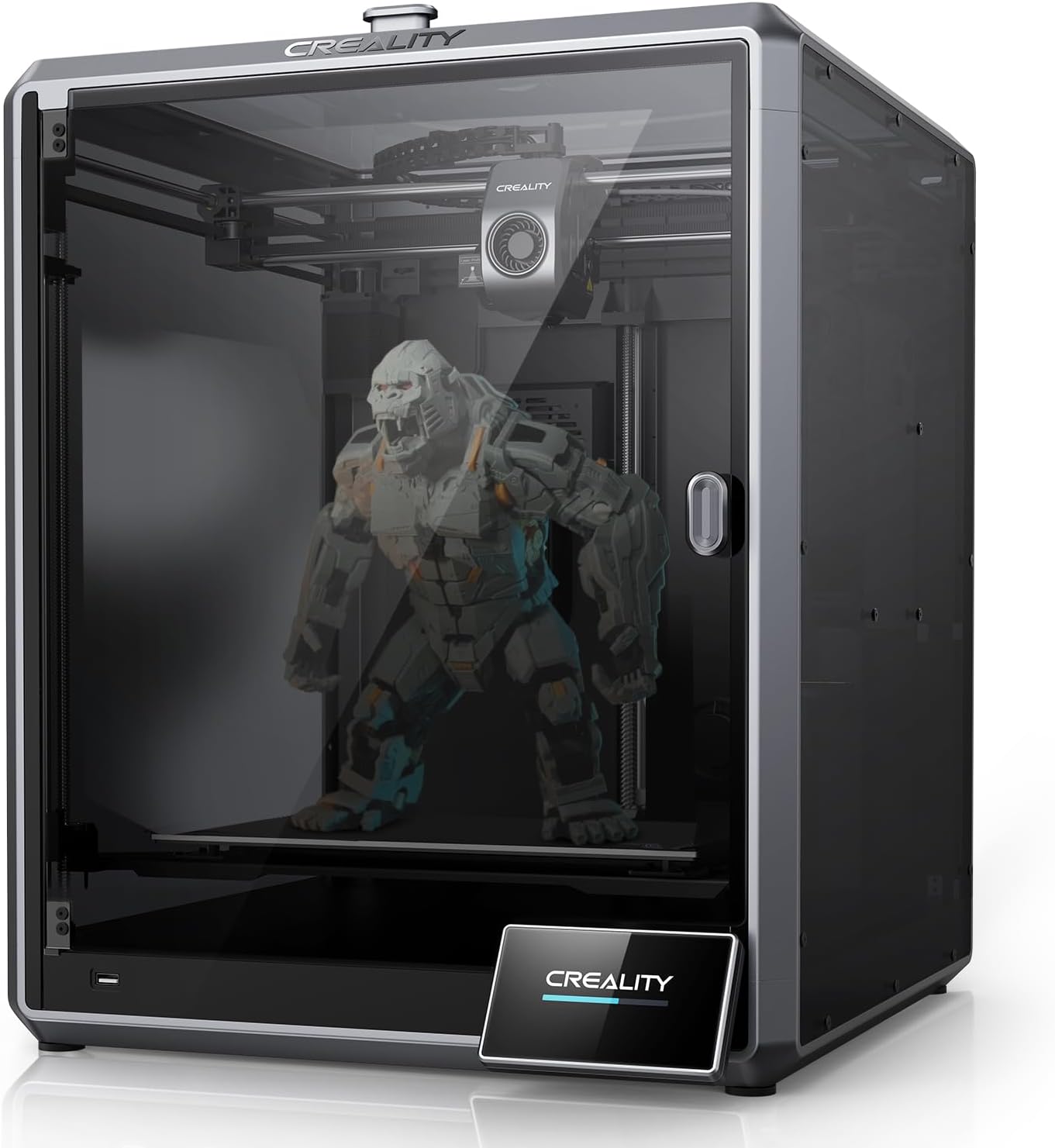
Creality K1 MAX 3D Printer
Why K1 MAX Rules Large Format
The K1 MAX is for when you NEED 300mm. Full-size helmets, large vases, armor pieces, or printing 6-8 small items simultaneously. The 36% larger build volume makes all the difference.
✓ Pros
- MASSIVE 300x300x300mm build – 2.5X volume of K1 SE
- Print multiple items at once – Efficiency for selling prints
- Full-size helmets/props – No splitting large models
- Same 600mm/s speed – Fast even on huge prints
- AI camera included – Monitor your large prints remotely
- Fully enclosed – Better temperature stability for large prints
✗ Cons
- $450 more than K1 SE – Only buy if you need the size
- Takes up significant space – Big footprint on your desk
- Heavier (15kg) – Harder to move around
- Standard hotend only – Can’t do carbon fiber like K1C
- Longer print times – Large prints = many hours
- More filament consumption – Big prints eat filament fast
👉 Best For:
- Cosplay makers – full-size helmets, armor, props
- Etsy sellers – print 6-8 items at once for efficiency
- Large vase/decor makers – no splitting big models
- Prototypers – test multiple sizes in one print
- Anyone who prints 250mm+ regularly
💡 Size Reality Check
Most people overestimate how often they need 300mm. If you print helmets weekly, get the MAX. If you “might print a helmet someday,” save $450 and get K1 SE. You can always split large models – you can’t get back wasted money.
Build Volume Comparison:
Related Comparisons:
🤔 Creality K1 (Original) – The Middle Child

Creality K1 3D Printer
The Awkward Position
The original K1 sits in an uncomfortable spot. It costs $140 more than K1 SE for AI camera and full enclosure, but the K1C is only $40 more and adds the all-metal hotend. Hard to recommend unless you specifically want these exact features.
⚠️ Honest Assessment
Most people should skip the K1 and choose:
• K1 SE if budget matters ($237)
• K1C if you want engineering materials ($419)
• K1 MAX if you need 300mm ($683)
The K1 at $379 doesn’t offer enough over the K1 SE to justify $140 extra, and for just $40 more you get the K1C’s massive material upgrade.
✓ Pros
- AI camera included – vs K1 SE which lacks it
- Fully enclosed – Better for ABS than K1 SE
- 600mm/s speed – Same as all K1 models
- More refined – Slightly better finish than SE
✗ Cons
- $140 more than K1 SE – For features many don’t need
- Same hotend as K1 SE – No material advantage
- Only $40 less than K1C – Which is much more capable
- Worst value – Stuck between better options
- Same build volume as K1 SE – Not bigger
👉 Best For:
- People who specifically want AI camera but not engineering materials
- ABS printers who don’t need carbon fiber capability
- Those with $379 budgets – not $237 or $419
Related Comparisons:
🎯 Which Creality K1 Should YOU Buy? Decision Flowchart
Step 1: What’s your budget?
Step 2: What materials will you print?
Step 3: How big are your typical prints?
Step 4: Are you a beginner or experienced?
🏆 Final Verdict: The Winners
🥇 Best Overall Value: Creality K1 SE ($237)
For 90% of people, the K1 SE is the right choice. It’s fast (600mm/s), reliable, easy to use, and costs less than any competitor with similar specs. The money you save vs the K1C or K1 MAX buys you a filament dryer, 5kg of quality filament, and a full tool kit. Unless you specifically need engineering materials or 300mm build volume, buy the K1 SE and don’t look back.
🛒 Buy K1 SE for $237🔥 Best for Serious Makers: Creality K1C ($419)
If you know you’ll be printing carbon fiber, nylon, or polycarbonate, the K1C is a no-brainer. That all-metal 300°C hotend is worth every penny of the $180 premium over the K1 SE. With $100 off for Black Friday, this is the year to grab it. Perfect for engineering students, professional prototypers, and anyone making functional parts.
🛒 Buy K1C for $419📐 Best for Large Prints: Creality K1 MAX ($683)
Cosplayers, prop makers, and Etsy sellers printing multiple items at once – the K1 MAX is your machine. That 300x300x300mm build volume is 2.5X bigger than the K1 SE and opens up possibilities impossible on smaller printers. Yes it’s expensive, but if you’re printing large regularly, it pays for itself in saved time and eliminated split-and-glue jobs.
🛒 Buy K1 MAX for $683⚠️ Skip the Original K1
Unless you find a killer deal (under $300), skip the original K1. It’s stuck in no-man’s land: too expensive vs the K1 SE, not capable enough vs the K1C. The extra $140 over K1 SE buys you AI camera and full enclosure, but most people don’t need those enough to justify the cost.
🔥 See ALL Black Friday 3D Printer Deals
Want to compare these Creality models against Bambu Lab, Anycubic, Elegoo, and Flashforge? Check out the complete Black Friday deal list:
📊 View All 33 Black Friday Deals (Printers, Filament, Accessories)Includes: 14 FDM printers • 3 resin printers • 9 filament deals • 7 dryer deals • All with Keepa price verification
Related posts:
 Live Black Friday 3D Printer Offers 2025 – Updated Hourly – Save Up to $400!
  Black Friday 3D Printer Deals Reddit – What 500+ Users Are Actually Buying (2025)
  Best Cyber Monday 3D Printer Deals 2025: Save Up to 45% on Bambu Lab, Creality & ANYCUBIC (Live Deals)
  Unbeatable Black Friday Deals on the Best 3D Printers of 2024
  8 Top 3D Printer Picks for Beginners in 2025: Budget, Mid-Range, and Premium Options
  Best 3D Printer Black Friday Deals 2025: What’s Actually Worth Buying (Based on Real Amazon Sales Data)
  Why 87% of Small Businesses Waste Money on Wrong 3D Printers (2025 Buying Guide)
  Creality Ender 3 V3 SE vs Ender 3 V3 KE: Don’t Make This Costly Mistake! ❌
  Creality K1 vs K1 SE vs K1C: Which One to Buy (2025)
  Creality Ender-3 V3 SE 3D Printer Review: The Ultimate Budget 3D Printer for Beginners
  18 Insane Black Friday 3D Printer Deals 2025 (Actually the Lowest Prices We’ve Ever Tracked with Keepa)
  Bambu Lab Black Friday Deals 2025: Save Up to 53% on A1 & A1 Mini 3D Printers