As an Amazon Associate, 3DPrintedDecor earns from qualifying purchases. The H3C and H2C are sold by Bambu Lab directly; we link to Bambu’s store without an affiliate tag and earn nothing from those links. Prices were checked on November 3, 2026 and change often. 3DPrintedDecor has not tested these printers; this comparison is based on manufacturer specs and the published reviews cited below.
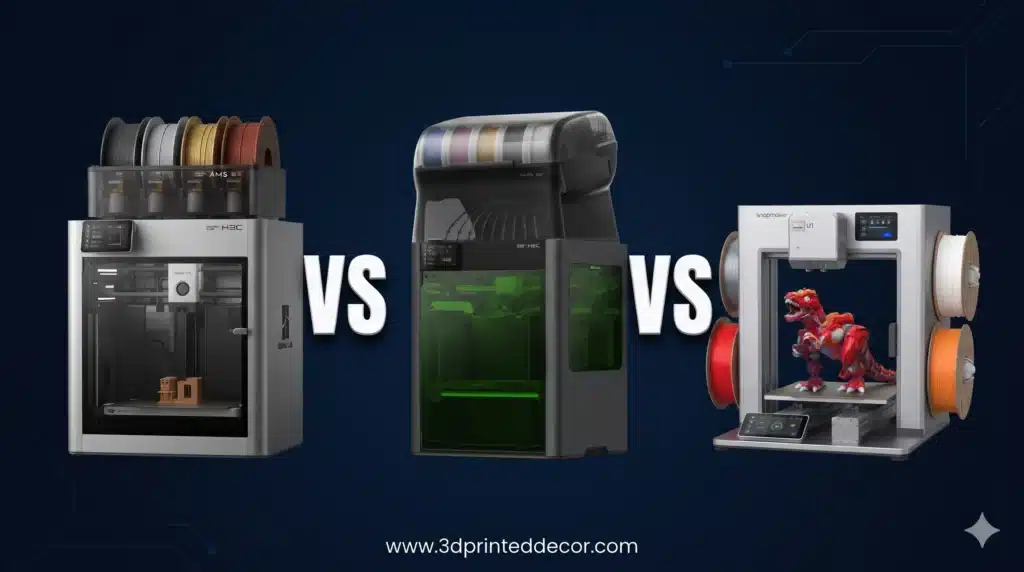
Three printers now promise multicolor printing without the waste of a single-nozzle filament changer: Bambu’s brand-new nine-tool H3C, last year’s seven-nozzle H2C, and Snapmaker’s four-toolhead U1. They cost $2,499, $1,899 and $749. The right one depends on how many colors you really use, what materials you print, and how much room you have.
Quick verdict
- Best overall for heavy multicolor, TPU and engineering materials: Bambu Lab H3C ($2,499). Nine pre-heated tools, a built-in nine-spool box and the best soft-TPU support of the three. Tall, heavy and brand-new.
- Best value flagship: Bambu Lab H2C ($1,899 on sale through Dec 1). Same build volume and engineering-grade chamber for $600 less, with a year of owner feedback. Slower and more wasteful on many-color prints.
- Best for most hobbyists: Snapmaker U1 ($749 on Amazon). A real four-tool toolchanger for under a third of the H3C’s price. Smaller, no heated chamber, and best kept to PLA, PETG and TPU.
The Three Printers at a Glance
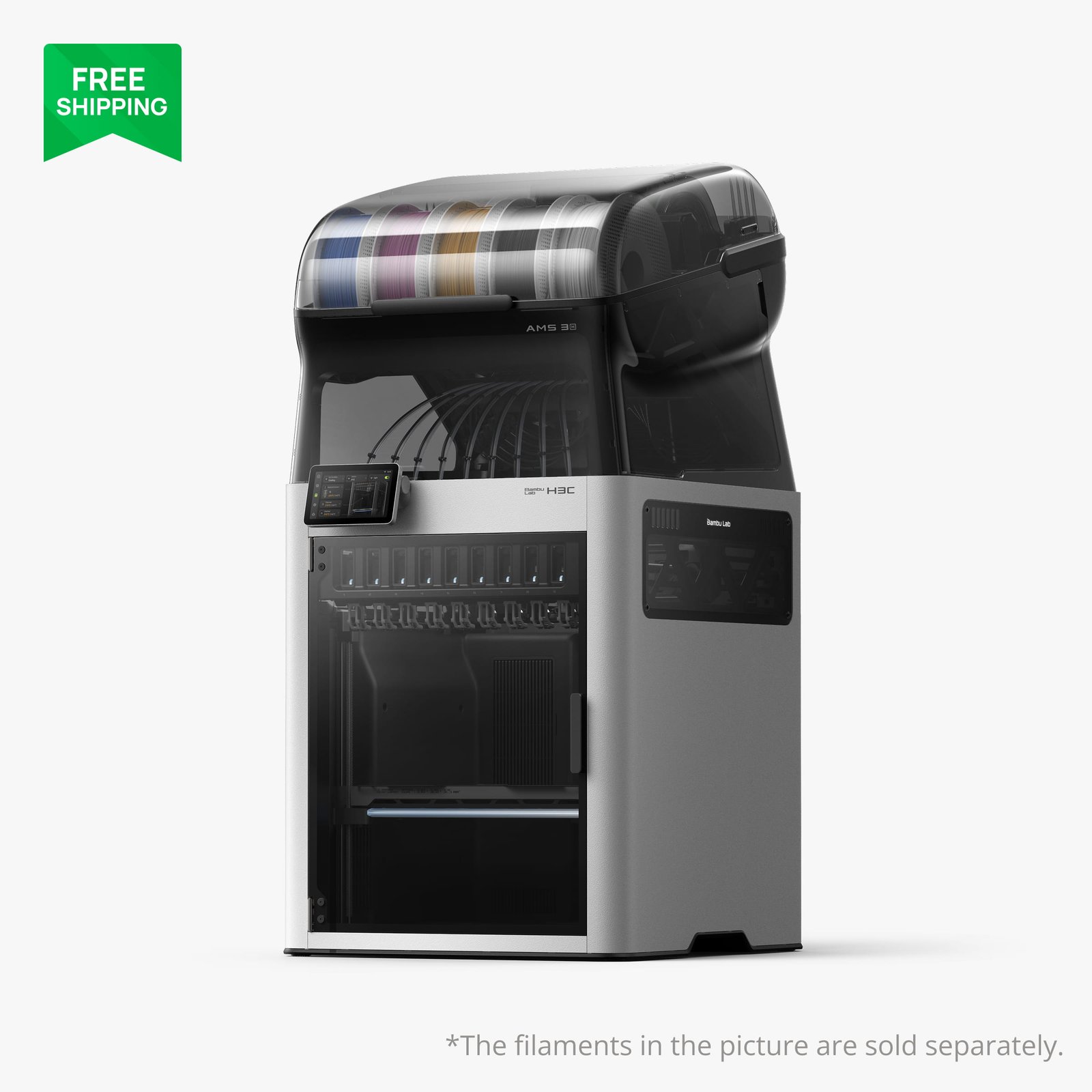
Bambu Lab H3C Combo
- Nine materials, about 6-second swaps
- Built-in sealed nine-spool AMS 3H
- Soft TPU 75A via a 2.85 mm tool
- All nozzles hardened steel
- Most expensive by far
- About 80 lb; needs over four feet of height
- Only two of nine slots dry filament
- New, with early firmware
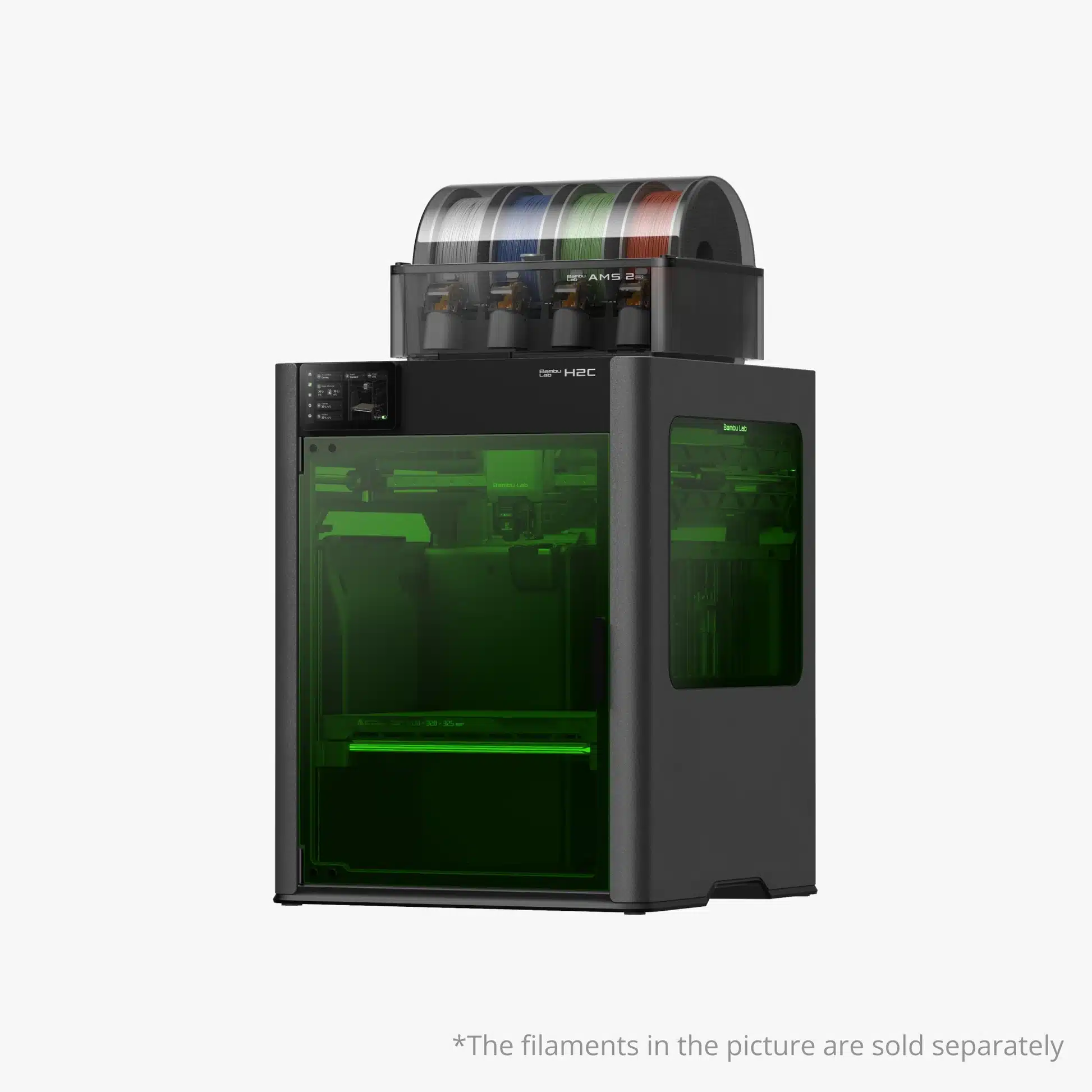
Bambu Lab H2C Combo
- Seven materials without nozzle purging
- Same 330 × 320 × 325 mm volume as the H3C
- Induction hotends heat in about 8 seconds
- A year of owner feedback; laser editions available
- Slower than the H3C on many-color prints
- Four-spool AMS 2 Pro in the box
- No dedicated soft-TPU path
- Still a big, heavy machine

Snapmaker U1
- True four-tool toolchanger under $800
- Very low purge waste
- Half the weight of the Bambus
- Works with OrcaSlicer
- Smaller 270 mm cube build volume
- No heated chamber; enclosure is extra
- Stainless nozzles limit abrasive filaments
- No built-in filament drying
H3C vs H2C vs U1: Specs Side by Side
| Spec | Bambu Lab H3C | Bambu Lab H2C | Snapmaker U1 |
|---|---|---|---|
| Price (Nov 3, 2026) | $2,499 (Combo) | $1,899 sale (list $2,199) | $749 on Amazon |
| How it switches | Swaps 9 complete PrintTools | Swaps 6 induction hotends, plus 1 fixed left nozzle | Swaps 4 complete toolheads |
| Materials without full purging | 9 | 7 | 4 |
| Material switch time | About 6 s (Bambu; Tom’s Hardware measured similar) | Seconds; induction hotends heat in about 8 s | About 5 s (Snapmaker); about 10 s with priming per Tom’s Hardware |
| Build volume | 330 × 320 × 325 mm | 330 × 320 × 325 mm total (305 mm wide with one nozzle) | 270 × 270 × 270 mm |
| Max nozzle / bed | 350 °C / 120 °C | 350 °C / 120 °C | 300 °C / 100 °C |
| Heated chamber | Active, to 65 °C | Active, to 65 °C | No (optional enclosure) |
| Nozzles included | 9 × 0.4 mm hardened steel (8 for 1.75 mm, 1 for 2.85 mm) | Induction hotends in 0.2, 0.4 and 0.6 mm | 4 × 0.4 mm stainless steel |
| Spool system included | AMS 3H: 9 sealed slots, 2 with drying to 85 °C | AMS 2 Pro: 4 slots with drying; expands to 24 filaments with more AMS units | 4-spool auto-feed, no drying |
| Soft TPU | Down to 75A with FlexFeed and 2.85 mm filament | Standard TPU | Standard TPU |
| Max speed / acceleration | 1,400 mm/s / 25,000 mm/s² | Similar H2-series motion system | 500 mm/s / 20,000 mm/s² |
| Max hotend flow | 40 mm³/s | 40 mm³/s | 32 mm³/s |
| Filtration | H11 HEPA + activated carbon | G3 pre-filter + H12 HEPA + activated carbon | Filtered top cover sold separately |
| Size and weight | About 1 m tall as a combo; 36.3 kg | 492 × 514 × 626 mm; about 31 kg | 584 × 499 × 730 mm; 18.2 kg |
| Slicer | Bambu Studio | Bambu Studio | Snapmaker Orca, OrcaSlicer |
| Extras | Cutting, drawing and debossing tools (sold later) | 10W or 40W laser editions | None |
Specs from Bambu Lab and Snapmaker product listings and the reviews cited below. Swap times are manufacturer figures from ideal conditions unless a reviewer measurement is noted.
How Each One Switches Colors
All three avoid the main weakness of a standard single-nozzle printer with a filament changer, which has to unload, reload and purge every time the color changes. They just do it differently.
- H3C: nine complete PrintTools sit in a rack at the front. Each has its own filament path, heater and cutter, stays loaded, and is pre-heated just before it’s needed. The toolhead parks one and picks up the next.
- H2C: has two nozzles. The left one is fixed. The right one can swap between six induction-heated hotends stored in a rack, giving seven materials in one print without purging nozzles. Beyond seven filaments, it falls back to AMS-style swaps with purging.
- U1: has four separate toolheads, each with its own extruder and nozzle, docked and kept warm. It’s the simplest of the three, but four materials is the limit.
One practical difference: with the H2C, filaments still travel from the AMS to whichever hotend is in use, so some reloading happens on longer multicolor jobs. On the H3C and U1, every material stays loaded in its own tool.
Real-World Speed and Purge Waste
None of these printers is completely purge-free. They all use a prime tower to get a clean start after each switch. Here’s what testing has actually shown:
| Test | Result | Source |
|---|---|---|
| Nine-color figure on the H3C | About 15 hours, 152.6 g prime tower | Tom’s Hardware |
| Same figure, five colors, on the H2C | About 24 hours 44 minutes, 111.4 g of purge | Tom’s Hardware |
| Eight-color dragon on the H3C | Just under 24 hours, 68 g of purge, versus about 37.5 hours and 267 g on a single-nozzle printer with two filament changers | Tom’s Hardware |
| Six-color model, H2C vs H2D | 532 g of waste on the H2C versus 3,032 g on the dual-nozzle H2D | Bambu Lab demo |
| U1 tool swap | About 10 seconds including nozzle priming | Tom’s Hardware |
The takeaway: on prints with lots of colors, the H3C finishes noticeably faster than the H2C. The H2C is still a huge improvement over AMS-only printers. The U1 matches the toolchanger efficiency, as long as four colors are enough.
Materials: PLA, Engineering Filaments and TPU
For PLA and PETG, all three are excellent. Unless you need more than four colors, this isn’t a reason to spend more than the U1 costs.
For engineering filaments like ABS, ASA, nylon, polycarbonate and carbon-fiber blends, the two Bambus are in a different class. Both have 350 °C nozzles, a 120 °C bed and an actively heated 65 °C chamber, which helps prevent warping. The U1 tops out at 300 °C, has no heated chamber, and ships with stainless steel nozzles that wear out quickly on abrasive filaments. Reviewers have printed ASA on it, but nylon and fiber-filled materials are a stretch.
For soft TPU, the H3C stands out. Its FlexFeed extruder and dedicated 2.85 mm tool handle very soft 75A TPU, the kind used for printed shoes and squishy grips, and Tom’s Hardware called it one of the best TPU printers it has tested. The H2C and U1 handle standard TPU.
Spool Storage, Drying and Space
Spools: the H3C holds all nine spools in a sealed box on top, but only two slots actively dry. The H2C’s AMS 2 Pro holds four and dries all four, and you can add more units. The U1 holds four with no drying at all. With any of them, our filament storage guide is worth reading, especially if you live somewhere humid.
Space: this is the H3C’s biggest practical drawback. With the AMS 3H on top, Bambu recommends about 1.3 m (over four feet) of height to operate it, and Tom’s Hardware’s reviewer needed a step stool to reach the back spools on a normal shelf. Bambu sells a rolling Bambu Station stand in a $2,799 bundle. The H2C is heavy at about 31 kg but fits on a sturdy table with its AMS beside it. The U1, at 18.2 kg, is the easiest to place.
Head-to-Head Matchups
H3C vs H2C: is the extra $600 worth it?
Choose the H3C if you regularly print with more than seven colors, want soft TPU, or want all your materials loaded and ready at once without managing external AMS units. Choose the H2C if seven materials are plenty, you want a proven machine rather than a first-batch one, or you want a laser edition. Bambu says the H2C isn’t being discontinued, and is bringing the H3C’s mixed-nozzle-size printing to it by early 2027. At $1,899 through December 1, it’s the better value for most multi-material buyers.
H3C vs Snapmaker U1: nine tools or four?
This is mostly a budget and materials question. The U1 gives you the core toolchanger experience for $749. The H3C costs over three times as much and adds five more tools, a larger heated build chamber, engineering-material support, soft TPU and built-in spool storage. If you print decorations, figures and gifts in PLA, the U1 is the smarter buy. If you sell prints or work with technical materials, the H3C pays its way.
H2C vs Snapmaker U1
The H2C wins on build volume, materials, chamber heating and filtration, and gives you three more colors. The U1 wins on price, weight and simplicity. If you’re spending under $1,000, the U1 is the clear pick. If you need ABS, nylon or carbon-fiber parts, the H2C is the cheaper way into Bambu’s flagship hardware.
Which One Should You Buy?
Buy the H3C if…
- Multicolor work is your hobby or business.
- You want soft TPU or rigid-plus-flexible prints.
- You print engineering filaments.
- You have the budget and the vertical space.
Buy the H2C if…
- Seven materials are enough.
- You want engineering-grade hardware for less.
- You’d rather buy a proven model.
- You want a laser option.
Buy the U1 if…
- Your budget is under $1,000.
- You mostly print PLA, PETG and TPU.
- Four colors cover your projects.
- You want a lighter, simpler machine.
Frequently Asked Questions
What’s the difference between the Bambu Lab H3C and H2C?
The H3C swaps between nine complete tools, each with its own filament path, and includes a nine-spool AMS 3H. The H2C swaps six induction hotends on its right nozzle plus one fixed left nozzle, for seven materials, and comes with a four-spool AMS 2 Pro. Both have the same 330 × 320 × 325 mm build volume and 65 °C heated chamber. The H3C is faster on many-color prints and handles soft TPU better; the H2C costs $600 less on sale.
Is the H3C worth it over the H2C?
Only if you regularly print with more than seven materials, want soft TPU down to 75A, or want every material loaded at once. For most multi-material buyers, the H2C at its $1,899 sale price through December 1 is the better value.
Is the Snapmaker U1 as good as the Bambu toolchangers?
For four-color PLA and PETG printing, it delivers the same core benefit of fast swaps and low waste for far less money. It falls behind on build volume, engineering materials, chamber heating and number of colors.
Can the Snapmaker U1 print ABS or nylon?
It can print ASA and similar filaments with care, but it has no heated chamber, tops out at 300 °C and ships with stainless steel nozzles. For nylon, polycarbonate or fiber-filled filaments, the H3C or H2C is a better choice.
Do toolchangers eliminate purge waste?
No. All three still print a prime tower, but waste drops sharply. In Tom’s Hardware’s testing, an eight-color model wasted 68 g on the H3C versus 267 g on a single-nozzle printer with filament changers.
Where can I buy the H3C and H2C?
Both are sold through Bambu Lab’s own store, which is where we link. The H2C’s $1,899 price is part of Bambu’s Black Friday sale through December 1. The Snapmaker U1 is sold on Amazon by Snapmaker US.
Sources
- Bambu Lab: H3C product page
- Bambu Lab Blog: H2C technical specifications
- Tom’s Hardware: Bambu Lab H3C review
- Tom’s Hardware: Snapmaker U1 review
- 3DPrinting.com: H3C launch, bundles and pricing
- 3DBite: H3C confirmed specs and H2C sale pricing
- 3DPrint.com: Snapmaker U1 review
Published November 4, 2026. Prices checked November 3, 2026 (P1S Combo on November 1). Bambu store prices are launch or sale prices as listed. 3DPrintedDecor has not tested these printers.
Free 3D printing temperature cheat sheet
Nozzle and bed temperatures for common filaments, in one page.
Keep reading
 ComparisonsFlashforge Creator 5 Pro vs Snapmaker U1: Which Four-Toolhead Printer Should You Buy in 2026?Oct 25, 2026
 ComparisonsFlashforge Creator 5 vs Creator 5 Pro: What Does the Extra $150 Actually Buy?Oct 26, 2026
 ComparisonsCreality K1 SE vs Creality K1C 3D Printer: Which One Is BetterJan 1, 2025
 ComparisonsCreality K2 Plus Combo vs Anycubic Kobra 3 Combo Review: Battle of the Multi-Color 3D PrintersMar 23, 2025
 ComparisonsKobra S1 Combo vs K1C: Best Sub-$700 Printer? (Tested)Apr 4, 2025
 ComparisonsBambu Lab P1S vs Creality K1C vs Qidi Tech Plus 4: Is an Enclosed Printer Worth It for ASA/NYLON/PC?Aug 21, 2025