

You’ve been eyeing multi-color 3D printers, but those $550+ price tags make you wince. Here’s the thing—the Flashforge AD5X just crashed into the market at $339, claiming to be the cheapest multi-color 3D printer that doesn’t sacrifice quality. But is it actually worth your cash, or just another budget letdown?
I’ve spent weeks testing the AD5X alongside competitors like the Bambu Lab A1 Mini and Creality K2 SE. After printing everything from flexi dragons to TPU footballs, I’m here to give you the unfiltered truth about whether this affordable multi-color printer delivers—or disappoints.
In this comprehensive comparison, you’ll discover exactly how the AD5X stacks up against pricier alternatives, what compromises you’re making at this price point, and most importantly—whether it’s the right multi-color printer for YOUR needs.
Quick Comparison: Cheapest Multi-Color 3D Printers
| Model | Price | Build Volume | Max Speed | Colors | Rating | Best For |
|---|---|---|---|---|---|---|
| Flashforge AD5X BEST VALUE | $339 | 220×220×220mm | 600mm/s | 4 Color | ⭐ 4.1/5 | Budget seekers |
| Bambu Lab A1 Mini Combo | $329 | 180×180×180mm | 500mm/s | 4 Color | ⭐ 4.7/5 | Ease of use |
| Creality K2 SE Combo | $499 | 220×215×245mm | 500mm/s | Multi-color | ⭐ 4.5/5 | Speed & stability |
| Anycubic Kobra S1 Combo | $519 | 250×250×250mm | 600mm/s | 8 Color | ⭐ 3.7/5 | Color variety |
Understanding Multi-Color 3D Printing Technology
Before diving into specific printers, let’s break down what you’re actually getting with multi-color printing. Unlike single-color machines, multi-material 3D printers use specialized systems to swap filaments mid-print, creating vibrant, multi-colored objects without you lifting a finger.
There are two main approaches: AMS (Automatic Material Systems) like Bambu Lab uses, and IFS (Integrated Filament Systems) that Flashforge employs in the AD5X. Both achieve the same goal—printing in multiple colors—but with different methods and waste amounts.
Key Insight: Multi-color printing generates significant waste through “purging”—the process of flushing out old filament when switching colors. You’ll typically waste more filament than you actually use in the print itself. The AD5X requires larger prime towers (that waste tower) compared to Bambu Lab’s more efficient system.
Best Overall: Flashforge AD5X Multi-Color 3D Printer
Flashforge AD5X — The Budget Multi-Color Champion

Quick Specs
- Build Volume: 220×220×220mm
- Max Speed: 600mm/s (20,000mm/s² accel)
- Hotend Temp: 300°C direct drive
- Colors: Up to 4 simultaneous
- Leveling: 1-Click Auto Leveling
- Weight: 24.25 lbs
- Connectivity: WiFi, Ethernet, USB
What Makes the AD5X Special?
The Flashforge AD5X represents a major disruption in the multi-color 3D printer market. At $339, it undercuts the popular Bambu Lab A1 Combo while offering similar core functionality. You’re getting genuine multi-color printing capabilities without the typical budget printer compromises.
The CoreXY structure delivers impressive speed—up to 600mm/s with 20,000mm/s² acceleration. That’s comparable to printers costing twice as much. The all-metal construction feels solid, and setup took me under an hour (including firmware updates and calibrations).
What really caught my attention? The print quality. Comparing the AD5X’s output directly against a Bambu A1, the differences were minimal. Both produced clean, vibrant prints with good layer adhesion. The AD5X handled flexible TPU surprisingly well, completing a 54-hour print with only minor issues related to prime tower adhesion—not the printer itself.
Pros
- Unbeatable $339 price for multi-color printing
- Solid metal construction feels durable
- Fast 600mm/s speeds with stable CoreXY design
- 300°C hotend handles advanced materials
- Intuitive touchscreen interface
- Good print quality out of the box
- Easy filament swapping system
- Includes 4-color IFS system
Cons
- Flashforge Orca slicer needs major improvements
- Purge volume controls don’t work properly (use prime tower instead)
- Higher filament waste than Bambu Lab systems
- Slightly smaller build volume (220mm vs 256mm A1)
- No camera included (cost-cutting measure)
- Louder operation during filament changes
- First-gen product has occasional random failures
Pro Tip: Don’t mess with purge volumes in the slicer—they don’t seem to work correctly yet. Instead, double or triple your prime tower size to eliminate color bleeding. This increases waste but ensures clean color transitions. Flashforge’s support confirmed this workaround until they fix the slicer.
Real-World Performance
I threw everything at this printer: flexi foxes, TPU footballs, silk PLA dogs, and bamboo PLA planters. The AD5X handled them all with varying degrees of success. Standard PLA prints? Flawless. The machine produces crisp details, clean overhangs (after tuning), and minimal Z-seam visibility.
TPU printing revealed both strengths and limitations. Simple prints like golf tees came out perfect—smooth, flexible, and clean. But that complex 54-hour football with tons of holes and retractions? It struggled. The prime tower fell over halfway through, creating stringy hair everywhere and causing a layer shift. However, the quality where it worked was genuinely impressive for flexible material.
Multi-color waste is significant. A single flexi fox (30g print) generated 141g of waste with maxed purge volumes, and 181g when I doubled the prime tower (which actually worked). Compare that to Bambu’s 141g for the same print. You’re looking at roughly 30-40% more waste with the AD5X.
Important: The filament holders shipped with early units aren’t great—Flashforge is redesigning them to be more like Bambu’s style. If you’re buying now, you should get the updated version. The original 3D-printed holders sometimes caused feeding issues.
Who Should Buy the AD5X?
This printer is perfect for budget-conscious makers who want to experiment with multi-color printing without dropping $500+. If you’re willing to do a bit more tinkering and can tolerate some first-gen quirks, the AD5X delivers genuine value.
It’s also ideal for existing 3D printing enthusiasts who want to add multi-color capabilities to their workshop without breaking the bank. You’ll appreciate the fast speeds and solid construction, even if the software experience isn’t quite as polished as Bambu’s ecosystem.
However, absolute beginners might find the software issues frustrating. If you want the most plug-and-play experience possible, save up for the Bambu Lab A1 instead. But if you’re comfortable troubleshooting and learning a new slicer, the AD5X offers incredible bang for your buck.
Get the Best Price Now →Premium Alternative: Bambu Lab A1 Mini Combo
Bambu Lab A1 Mini Combo — The Polished Experience
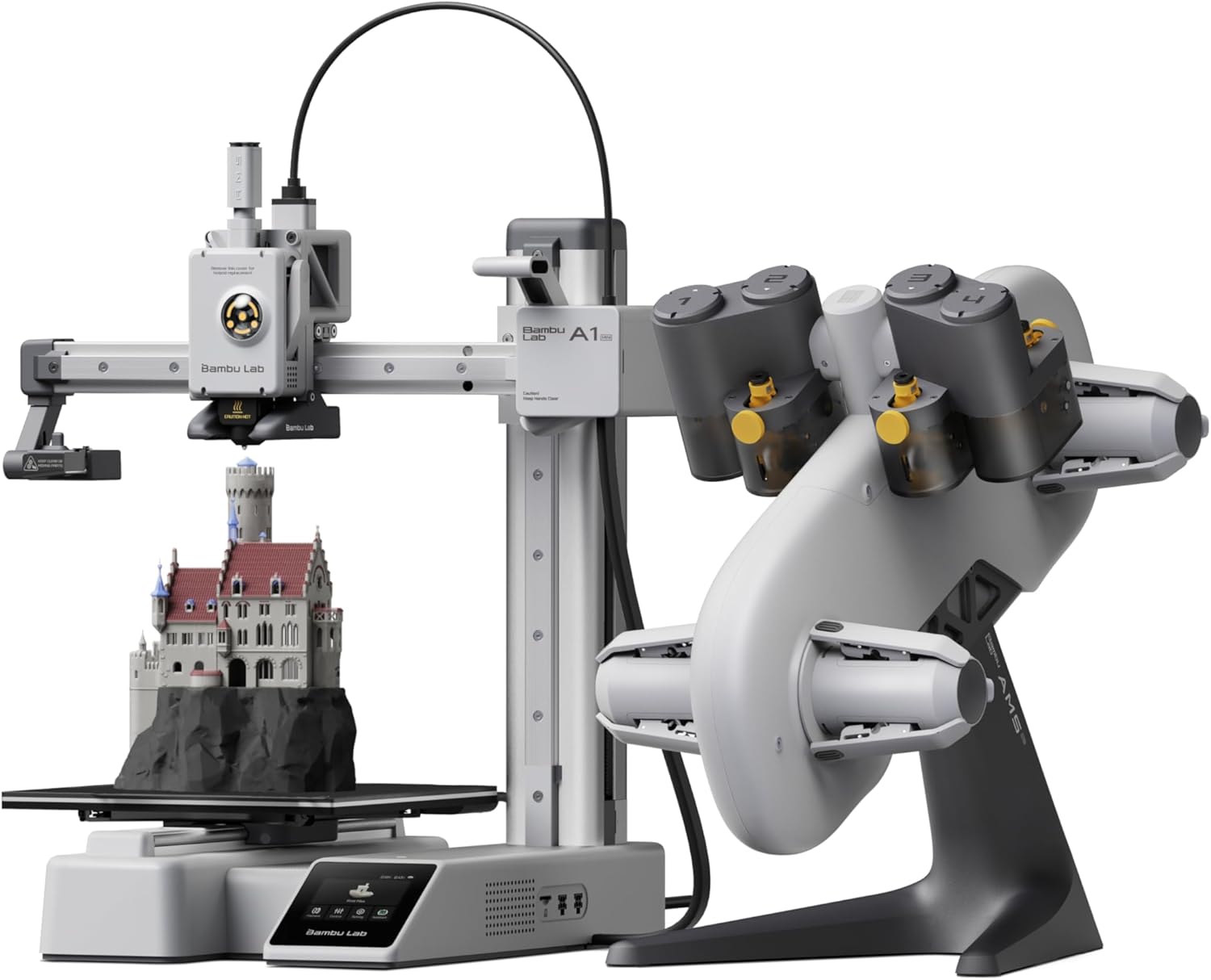
Quick Specs
- Build Volume: 180×180×180mm
- Max Speed: 500mm/s
- Hotend Temp: 300°C
- Colors: 4 with AMS Lite
- Leveling: Automatic calibration
- Special Features: Built-in camera, Bambu Studio
- Connectivity: WiFi, LAN, microSD
The Bambu Lab Difference
If the Flashforge AD5X is the scrappy underdog, the Bambu Lab A1 Mini Combo is the polished professional. At just $329 (now matching the AD5X price), it delivers a genuinely refined user experience that just works.
I’ve been running my A1 Mini for over a year now, and it’s been rock-solid reliable. The Bambu Studio slicer is light-years ahead of Flashforge’s Orca clone—everything simply makes sense. Purge volumes work as expected, prints send wirelessly without drama, and the built-in camera lets you monitor prints from anywhere.
The AMS Lite system is more efficient than the AD5X’s IFS setup. You’ll still generate waste (multi-color printing is inherently wasteful), but typically 20-30% less than the Flashforge. A flexi fox that used 181g total on the AD5X only consumed 141g on the A1—same print, less waste.
Pros
- Best-in-class software (Bambu Studio)
- Rock-solid reliability and consistency
- Lower filament waste than competitors
- Built-in camera for remote monitoring
- Massive community support and resources
- Exceptional print quality out of the box
- Quieter operation overall
- Better first layer adhesion and leveling
Cons
- Smaller build volume (180mm vs 220mm)
- Cloud-dependent for some features
- Proprietary ecosystem (less hackable)
- Still generates significant waste in multi-color
Head-to-Head: AD5X vs A1 Mini
Comparing prints side-by-side, both machines produce excellent quality. The A1 Mini has slightly better overhangs and bridging, but the differences are minimal—you’d struggle to tell which printer made which part in a blind test.
Where the A1 Mini pulls ahead is consistency and ease of use. Every print comes out predictably good. The AD5X occasionally throws curveballs—random failures, adhesion issues that require bed cleaning, odd under-extrusion spots. Nothing catastrophic, but enough to make you babysit it more.
The build volume difference matters for some users. The AD5X’s 220mm cube gives you about 40mm more space per side than the A1 Mini’s 180mm cube. If you’re printing large decorative planters or want to maximize bed usage, that extra space is valuable.
Real Talk: At the same $329 price point, the A1 Mini is the smarter choice for most users. You get better software, lower waste, and higher reliability. The AD5X’s only advantage is the larger build volume.
Who Should Choose the A1 Mini?
Buy the Bambu Lab A1 Mini Combo if you want the smoothest possible entry into multi-color 3D printing. It’s perfect for beginners, busy professionals who don’t have time for troubleshooting, or anyone who values their time and wants a “just works” experience.
It’s also the better choice if you’re building a print farm or need maximum reliability for production work. The consistency and lower failure rate make it more economical long-term.
Check Latest A1 Mini Pricing →Speed Demon: Creality K2 SE Combo
Creality K2 SE Combo — Fast Multi-Color Performer

Quick Specs
- Build Volume: 220×215×245mm
- Max Speed: 500mm/s (20,000mm/s² accel)
- Hotend Temp: 300°C
- Colors: Multi-color with CFS
- Leveling: Smart auto leveling
- Extruder: Dual-gear direct drive
- Frame: Solid metal build
The Professional-Grade Option
The Creality K2 SE Combo at $499 positions itself as the professional middle ground. It combines Creality’s proven reliability with genuine multi-color capability through the CFS (Creality Filament System), offering smooth color transitions and stable performance.
What sets the K2 SE apart is its solid metal frame construction. Built with die-cast aluminum alloy, this printer minimizes vibration and delivers consistent print quality even during high-speed runs. The reinforced structural gussets and crossbeams make it ideal for engineering applications and educational use where reliability matters.
The smart auto leveling system only probes the required print area, speeding up preparation significantly. Combined with the “Skip the failure model” function for batch printing, this makes the K2 SE a practical choice for users who need to print multiple items reliably.
Pros
- Solid metal frame for superior stability
- 500mm/s high-speed printing with quality
- Smart CFS for smooth multicolor transitions
- Generous build volume (220×215×245mm)
- Next-gen modular direct-drive extruder
- Smart auto leveling saves time
- Upgraded Creality OS with LAN control
- Fully assembled out of the box
Cons
- $499 is 47% more than AD5X
- Proprietary Creality slicer required
- Larger footprint takes more space
- CFS system adds complexity
- No built-in camera
Smart Move: The K2 SE’s solid metal construction and filament run-out sensor make it ideal for overnight prints and batch production. If you need reliability for small business or educational use, the extra $170 over the AD5X is worth it for peace of mind.
Who Should Choose the K2 SE?
The K2 SE makes sense if you’re primarily interested in reliable, high-quality multi-color printing for small business or professional use. The solid construction and smart features justify the higher price when print failures cost you time and money.
Choose this over the AD5X if you value rock-solid stability and don’t mind paying extra for a more robust machine. It’s also great if you’re printing engineering materials that benefit from the reinforced frame structure. For more comparisons, check out the Creality K2 Pro Combo review.
Check K2 SE Pricing →Maximum Color: Anycubic Kobra S1 Combo
Anycubic Kobra S1 Combo — 8-Color Powerhouse

Quick Specs
- Build Volume: 250×250×250mm
- Max Speed: 600mm/s
- Hotend Temp: 320°C
- Colors: Up to 8 simultaneous
- System: ACE Pro with drying
- Construction: Fully enclosed CoreXY
- Special: Built-in camera, 44dB quiet mode
When You Need More Colors
Four colors not enough? The Anycubic Kobra S1 Combo supports up to 8 simultaneous colors (expandable to 8 with dual ACE Pro units) through its intelligent filament management system. At $519, it’s significantly pricier than the AD5X, but you’re getting double the color capability plus a larger 250mm build volume and full enclosure.
The standout feature is the ACE Pro system with its dual PTC heating module and 360° hot air circulation. This doesn’t just swap filaments—it actively dries them during printing, ensuring perfect layer adhesion and eliminating moisture-related print failures. The anti-tangling system and automatic feeding boost efficiency significantly.
The 320°C hotend is a game-changer if you work with engineering materials. ABS, ASA, nylon, and other high-temp filaments print effortlessly. Combined with the fully enclosed CoreXY construction, you get professional-grade temperature control that budget printers simply can’t match.
Pros
- 8-color capability (16 with dual ACE Pro)
- Largest build volume (250×250×250mm)
- 320°C hotend for engineering materials
- ACE Pro dries filament during printing
- Fully enclosed for ABS/ASA printing
- Ultra-quiet 44dB operation
- Built-in camera for monitoring
- 600mm/s with resonance compensation
Cons
- $519 is 53% more than AD5X
- Mixed user reviews (3.7/5 rating)
- Higher filament waste with more colors
- Larger footprint requires more space
- Heavier unit (57.2 lbs)
- Overkill for simple projects
Real-World 8-Color Usage
Based on verified user reviews, the Kobra S1 delivers impressive results for multi-color PETG printing. One user reported excellent results with challenging small keycaps featuring fine text lines—the kind of detail that reveals a printer’s true capabilities. The ACE Pro worked well with both standard and cardboard reels.
The bed leveling proved reliable in most cases, though occasional calibration quirks were reported. The key takeaway from experienced users: always monitor your first layers until you’re confident in your machine’s consistency. Once dialed in, the quality rivals more expensive competitors like Bambu Labs.
However, the 3.7/5 rating reflects real challenges. Some users experienced quality control issues, and the learning curve is steeper than plug-and-play options like the A1 Mini. This isn’t a “set it and forget it” printer—it rewards users who invest time in optimization.
Consider This: The jump from 4 to 8 colors costs you $190 more than the AD5X. Ask yourself: will you actually use 5+ colors regularly? If not, save your money and stick with a 4-color system. You can always paint details by hand if needed.
Who Needs 8 Colors?
The Kobra S1 Combo makes sense for advanced users and semi-professional creators who regularly print complex decorative pieces. If you’re selling 3D printed products or doing commissioned work where color variety matters, the investment pays off.
It’s also excellent for users who need the 320°C hotend for engineering materials. The combination of high-temp capability, active drying, and full enclosure makes it one of the best options for printing ABS, ASA, and nylon with multi-color accents. For more options, see our guide on the best multicolor 3D printers of 2025.
View Kobra S1 Deals →Comprehensive Buyer’s Guide: Choosing Your Multi-Color Printer
Key Factors to Consider
1. Actual Color Needs vs. Marketing Hype
Be brutally honest: how many colors will you actually use? Marketing teams love touting 8-color or 12-color systems, but most projects use 2-3 colors maximum. A flexi dragon looks great with 2 colors (body + eyes). A planter needs maybe 3 (base + accent + details).
Four-color systems like the AD5X and A1 Mini handle 95% of projects perfectly. Unless you’re specifically planning rainbow gradients or extremely detailed miniatures, save your money and stick with 4 colors.
2. Filament Waste Reality
Nobody talks about this enough: multi-color printing wastes a shocking amount of filament. You’ll typically waste 3-5x more material than the actual print weighs. A 30g print can easily consume 150-200g total with purging and prime towers.
Systems with lower waste (like Bambu Lab) will save you money long-term. Even though the A1 Mini now costs the same as the AD5X, it pays for itself through reduced waste.
3. Software Experience Matters
Don’t underestimate how much the slicer software impacts your experience. Bambu Studio is currently the gold standard—intuitive, reliable, and constantly updated. Flashforge’s Orca clone feels unfinished and has frustrating bugs (like non-functional purge volumes).
If you’re technical and don’t mind workarounds, the AD5X’s software issues are manageable. But if you want smooth sailing, the A1 Mini’s ecosystem is worth choosing.
4. Build Volume Sweet Spot
The 220mm build volume on the AD5X is actually perfect for most users. You can print large vases, decent-sized planters, and full bed layouts of smaller items. The A1 Mini’s 180mm cube feels cramped in comparison.
However, if you’re printing truly large decorative pieces, consider upgrading to something like the Kobra S1 (250mm) or checking out our Flashforge AD5M comparison guide.
5. Noise Levels
Open-frame printers like the AD5X are noticeably louder than enclosed models. The filament changing mechanism creates loud clunking sounds. If you’re printing in a shared space, bedroom, or office, this matters.
Enclosed printers (K2 SE, Kobra S1) dampen sound significantly. The Kobra S1’s 44dB quiet mode is impressively silent. The A1 Mini is relatively quiet for an open design. Consider where you’ll actually use the printer.
Common Mistakes to Avoid
Mistake #1: Buying Based on Max Speed Alone
Every printer here claims 500-600mm/s speeds, but you’ll rarely print that fast. Real-world speeds are 200-400mm/s for good quality. Don’t pay extra for speed specs you won’t use.
Mistake #2: Ignoring First-Layer Adhesion
The AD5X occasionally struggles with first-layer adhesion—you’ll need to clean the bed regularly and potentially adjust Z-offset. The A1 Mini is more consistent here. Factor maintenance time into your decision.
Mistake #3: Forgetting About Filament Costs
Multi-color printing consumes filament fast. Budget for 2-3kg of filament monthly if you’re printing regularly. The initial printer price is just the beginning—ongoing filament costs add up quickly. Check our advanced filaments guide for tips.
Must-Have Accessories
Regardless of which printer you choose, invest in these from day one:
- Filament dryer: Essential for consistent quality, especially with multi-color printing ($30-80)
- Quality PLA: Don’t cheap out on filament—poor filament causes more headaches than it saves ($20/kg)
- Spare nozzles: Keep 0.4mm backups on hand ($10-20)
- Isopropyl alcohol: For bed cleaning and maintenance ($10)
- Spatula/scraper: For removing prints without damaging the bed ($10)
Frequently Asked Questions
Is the Flashforge AD5X still the cheapest multi-color 3D printer?
The AD5X at $339 and Bambu Lab A1 Mini Combo at $329 are now neck-and-neck for the title of cheapest quality multi-color printer. The A1 Mini is actually $10 cheaper currently, but the AD5X offers a larger build volume. Both are legitimate options from major brands with proper support.
How much filament waste should I expect with multi-color printing?
Expect to waste 3-5 times more filament than the actual print weight. A 30g model typically uses 150-200g total including purge waste and prime towers. The AD5X generates roughly 30% more waste than Bambu Lab’s more efficient AMS system. If you’re printing 6+ items at once, the waste percentage decreases since purging happens per color change, not per item.
Can I use the AD5X with standard Orca Slicer instead of Flashforge’s version?
Yes, you can use regular Orca Slicer with the AD5X following setup tutorials on YouTube. Many users report better results with standard Orca than Flashforge’s modified version. However, you’ll lose some Flashforge-specific features. The trade-off is worth it for most users since standard Orca is more stable and better supported.
Is multi-color printing worth it for beginners?
It depends on what you want to print. If you’re making decorative pieces, figurines, or artistic prints, multi-color adds significant value. For functional prints, tools, or mechanical parts, single-color is usually fine. The A1 Mini Combo at $329 makes multi-color accessible enough that beginners can start with it if desired. Check our A1 Mini vs AD5X comparison for details.
Which printer has the best software experience?
Bambu Lab’s Bambu Studio is currently the best slicer software for multi-color printing. It’s intuitive, reliable, and feature-rich. Flashforge’s modified Orca Slicer has significant issues including non-functional purge volume controls. If software experience is your priority, the A1 Mini is the clear winner.
Can the AD5X print flexible TPU reliably?
Yes, the AD5X handles TPU reasonably well with its direct drive extruder. Simple TPU prints like phone cases or grips work great. Complex prints with many retractions (like the reviewer’s 54-hour football) are more challenging and may have issues with stringing and prime tower adhesion. For occasional TPU printing, it’s adequate. For frequent TPU use, consider a printer with better documented TPU profiles.
How loud is the AD5X compared to enclosed printers?
The AD5X is noticeably louder than enclosed printers, especially during filament changes which create loud clunking sounds. The Kobra S1’s 44dB quiet mode is significantly quieter. If noise is a concern and you’re printing in a bedroom or office, consider enclosed alternatives like the Kobra S1 or K2 SE.
Final Verdict: Which Multi-Color Printer Should You Buy?
🏆 Best Overall Value: Bambu Lab A1 Mini Combo ($329)
Choose if: You want the smoothest multi-color experience at the lowest price. The superior software, lower waste, and built-in camera make it the best choice for most users—especially now that it’s $10 cheaper than the AD5X.
💪 Best Build Volume: Flashforge AD5X ($339)
Choose if: You need the larger 220mm build volume and don’t mind occasional software quirks. Perfect for makers who value size and are comfortable with troubleshooting.
🔧 Best for Professionals: Creality K2 SE Combo ($499)
Choose if: You need rock-solid reliability for small business or educational use. The metal frame construction and smart features justify the premium when print failures cost you money.
🎨 Best for Color Variety: Anycubic Kobra S1 Combo ($519)
Choose if: You regularly need 5+ colors and work with engineering materials. The 320°C hotend, active drying, and full enclosure make it ideal for advanced users and semi-professionals.
My Personal Recommendation
The game has changed with the A1 Mini’s price drop. At $329—$10 less than the AD5X—the Bambu Lab A1 Mini Combo is now the obvious choice for most people. You get better software, lower filament waste, a built-in camera, and rock-solid reliability. The only reason to choose the AD5X is if you absolutely need the larger 220mm build volume.
The bottom line? Both the AD5X and A1 Mini are excellent choices. Pick based on your budget and tolerance for tinkering. You can’t really go wrong with either.
Note: Prices and availability are subject to change. We update this article monthly to reflect current market conditions. Last updated: January 8, 2026. This article contains affiliate links. When you purchase through these links, we may earn a commission at no additional cost to you, which helps us continue creating detailed comparison guides like this one.
Want More 3D Printing Guides?
Check out our comprehensive comparisons and reviews:
Related posts:
 Anycubic Kobra S1 Combo vs QIDI PLUS4 3D Printer : Which One Wins for 3D-Printed Decor?
  Anycubic Kobra S1 Combo vs Kobra 3 Combo: Final Review Before You Buy in 2025
  Why Everyone’s Raving About the Bambu Lab A1 Combo – Get It Before It’s Gone!
  2025’s Best Multi-Color 3D Printer: AD5X Full Review
  18 Insane Black Friday 3D Printer Deals 2025 (Actually the Lowest Prices We’ve Ever Tracked with Keepa)
  Creality K2 Pro Combo vs K2 Plus Combo: Which Multi-Color 3D Printer Delivers Better Value in 2025?
  Creality K2 Plus Combo 3D Printer Review: Is It Worth Your Investment?
  Kobra S1 Combo vs K1C: Best Sub-$700 Printer? (Tested)
  Best Multicolor 3D Printers of 2025 for Etsy Sellers Boosting Sales
  5 Top Multimaterial 3D Printers for Beginners and Pros Trending in 2025
  Top 10 Multi-Extruder 3D Printers in 2025: Find Your Perfect Color-Mixing Machine
  Ultimate Flashforge 3D Printer Guide 2025: Compare All Models