

For anyone in the 3D printing world, Bambu Lab has been a seismic shift. They made high-speed, reliable, and multicolor printing genuinely accessible. But with innovation comes choice, and for home users and small boutique businesses, the decision often boils down to two contenders: the robust, enclosed, CoreXY-based Bambu Lab P1S and the budget-friendly, user-friendly Bambu Lab A1 Mini/A1.
Affiliate Disclosure
As an Amazon Associate I earn from qualifying purchases.
I needed to push beyond the standard four colors and was eager to experience the P1S’s CoreXY speed and precision. So, I added the P1S (with AMS combo) to my existing fleet of A1 and A1 Mini printers. The total investment, including a second AMS unit I planned to add, was pushing $1,300.
But after just four days, the thrill was gone.
The allure of expanded color palettes did not translate into a superior, more efficient, or even more profitable experience for my specific needs. I quickly discovered that the A1 Mini, a machine significantly lower in cost, was delivering nearly identical print quality with far less friction.
In this unfiltered guide, I share my real-world regrets and hands-on experience, providing the insights you need to decide if the P1S is truly a professional workhorse or if the reliable, quieter, and more affordable A1 series is your perfect match.
Why I Took the Leap: CoreXY and Beyond Four Colors
My decision to purchase the P1S was driven by a genuine technical curiosity and a desire to expand my creative boundaries:
- A Deep Dive into CoreXY: My existing A1 machines are “bed slingers.” I wanted to experience the P1S’s CoreXY motion system, celebrated for its superior speed and reduced ghosting, hoping for a tangible improvement in the surface finish of my detailed designs.
- Expanding Beyond Four Colors: This was the primary draw. The P1S allows the connection of multiple AMS units for 8, 12, or even 16 colors. This capability felt like unlocking a new dimension of creativity for my intricate crystal and decorative projects.
I purchased the P1S with its AMS combo for $699 (closer to $1,000 after financing and tax). The core purpose of this review is to rigorously weigh whether this added expense genuinely delivered superior benefits.
Related: Sovol SV08 vs Creality K1 Max vs Qidi Max 3
Related: Bambu Lab AMS System Guide
Related: Multi-Material Printing Tips
Related: Best 3D Printers for Home Decor 2025Related:
First Impressions: Excitement Met Noise and Tinkering
The P1S looks professional, but integrating it into my workflow proved significantly more complex than the near-silent, true plug-and-play experience of the A1 Mini.
1. The Unexpected Noise Factor (The Biggest Shock)
The P1S is noticeably louder—I’d venture to say it’s louder than my other four Bambu Lab printers combined. The combination of high-speed fans and robust motor movements was significantly more intrusive and persistent. For anyone printing in a home office, shared living space, or any environment where ambient noise is a critical concern, the P1S’s acoustic profile is a major drawback.
2. Setup Challenges: Essential Mods for PLA
The P1S is enclosed, making it ideal for high-temperature materials like ABS or ASA. However, for PLA, the excessive heat inside the chamber causes problems like heat creep, stringing, and clogs.
I quickly realized that for efficient and reliable PLA printing, I immediately needed to print and install several mods, such as vent risers or fan shrouds, to manage the internal chamber temperature. This was an unbudgeted “tinkering” phase that the A1 Mini never required.
3. Maintenance Friction: Poop Chute and Wiper Blade Woes
The P1S demands a more involved and meticulous maintenance regimen:
- The Persistent Problem of the “Poop Shoot”: The designated exit path for purged filament experienced surprisingly frequent clogs. This demanded constant vigilance and often meant interrupting prints to physically clear the chute, significantly disrupting my workflow.
- Wiper Blade Woes: The integrated wiper blade, vital for cleaning the nozzle during color changes, required consistent adjustment and cleaning to prevent imperfections or clogs.
This level of daily attention was not something I commonly encountered with my A1 Minis, underscoring a less autonomous experience.
Head-to-Head Print Quality Showdown
To determine if the P1S’s CoreXY system offered superior output, I ran four rigorous printing tests using FlashForge PLA on both machines.
| Model Name | Printer Used | Observations During Print & Final Quality Assessment |
|---|---|---|
| Glow Troll (4-Color) | A1 Mini | Printed flawlessly. Layers were incredibly smooth, and the color transitions (using 4 colors via AMS Lite) were crisp and clean. Client-ready straight off the plate. |
| Fire Dragon (4-Color) | A1 Mini | Handled this complex, multi-part model with remarkable ease. Detail on the scales was impeccable, with no issues with stringing or warping. Quality was consistently high. |
| Puffer Fish (6-Color) | P1S | While the final print was good, I noticed minor banding traced back to filament drag within the AMS. Required more fine-tuning and oversight. |
| BFF In (Word Art) | P1S | Experienced an initial print failure. The recovered print showed minor imperfections on overhangs. Poop chute needed constant clearing, and temperature management remained a consideration. |
Key Takeaway: Quality vs. Effort
The most surprising observation was how close the print quality was. For small-to-medium prints and those utilizing up to four colors, the A1 Mini delivered nearly identical, if not subjectively superior, quality compared to the P1S.
The A1 Mini achieved this fantastic, reliable result while operating much quieter and without the added setup challenges and constant tinkering that the P1S demanded.
Related: Best Filaments for Bambu Lab Printers or even PLA vs PETG vs ABS for 3D Printing.
Related: Top 10 Filaments for Multicolor Printing
Pros and Cons of the Bambu Lab P1S
After extensive use and comparison, it’s clear that the Bambu Lab P1S offers a compelling set of features, but it also comes with its own share of challenges. Here’s a balanced look at what makes it shine and where it might fall short for some users.
| Pros (Where the P1S Shines) | Cons (Where the P1S Falls Short) |
|---|---|
| Prints More Than Four Colors (with multiple AMS units). | Noticeably Loud Operation, not ideal for quiet home use. |
| CoreXY System allows for fast, stable, and precise prints. | Requires Mods for smooth, reliable PLA printing and heat management. |
| Enclosed Design is essential for printing engineering-grade materials (ABS, ASA, Nylon, PC). | Poop Shoot/Wiper Blade Issues frequently interrupt prints and slow down workflow. |
| Great for Advanced Projects that genuinely require 5+ colors and/or demanding materials. | Expensive, especially when adding the required extra AMS units. |
| Immediate Availability in some brick-and-mortar stores. | More Colors Increase Waste and significantly escalate print time (purging). |
Related: Bambu Lab AMS System Guide
Related: Creality K2 Pro Combo 3D Printer Review
Related: Multi-Material Printing Tips
Cost Analysis: The True Value
The cost of the P1S is often not justifiable for the home user or small business, especially compared to the A1 Mini’s value proposition.
| Printer Model (with Multi-Color System) | Typical Price Point | Key Takeaway on Value |
|---|---|---|
| Bambu Lab A1 Mini (with AMS Lite) | $299 | Champion of Value. Delivers nearly identical print quality, quieter operation, and much lower entry cost for 4-color prints. |
| Bambu Lab A1 (with AMS Lite) | $399 | Great Mid-Ground. Larger build volume than the Mini, same low-friction operation, and excellent 4-color printing. |
| Bambu Lab P1S (with AMS Combo) | $699+ | Questionable Value. The true cost (with tax and one extra AMS for 8 colors) quickly hits $1,300. The incremental benefit for non-industrial use rarely justifies the cost and complexity. |
For the vast majority of enthusiasts creating decorative items, the A1 Mini is undeniably the more cost-effective choice. It delivers the results you need without the significant financial outlay, noise, or operational friction of the P1S.
Conclusion: Which Printer is Right For You?
Bambu Lab A1 Mini 3D Printer
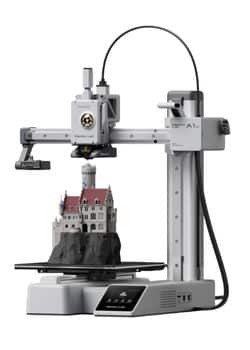
Sub Title
- Multi-Color Printing with AMS lite (supports up to 4 colors)
- Acceleration of 10,000 mm/s²
- Open design
- Set Up in 20 Minutes
- Supported Filament: PLA, PETG, TPU, PVA
Bambu Lab P1S 3D Printer
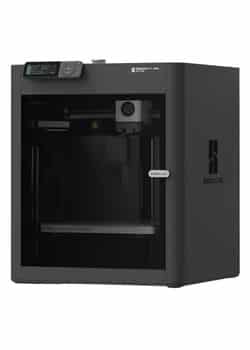
Ready-to-Use FDM 3D Printers
- Up to 16 Colors
- 500mm/s and 20000 mm/s² Acceleration True High Speed
- Enclosed Design
- Set Up in 15 Minutes
- Supported Filament: PLA, PETG, TPU, PVA, PET ABS, ASA, PA, PC
My P1S was sold after only a few weeks. The decision came down to two simple facts: Noise and Friction. It was too loud for my home office, and the constant need to clear clogs, install mods, and troubleshoot temperature issues was a drag on my productivity.
- Choose the Bambu Lab A1 Mini/A1 If You:
- Need a printer for a shared or quiet living space (low noise).
- Mainly print in PLA, PETG, or TPU (no enclosure needed).
- Rarely need more than four colors in a single print.
- Value an easy, low-maintenance, and cost-effective printing experience.
- This is the better machine for 90% of home users.
- Choose the Bambu Lab P1S If You:
- Must print in engineering-grade filaments (ABS, ASA, PC) that require a heated chamber.
- Genuinely need more than four colors on a regular, justifiable basis.
- Have a dedicated, non-shared workshop where noise is not a concern.
- Are willing to tinker with mods and perform more frequent maintenance.
Related posts:
 3D Printer Filament Compatibility Guide 2025: Top Picks CFPLA, TPU, Nylon, PETG, ABS, PC, Wood PLA & More
  Anycubic Kobra S1 Combo vs Kobra 3 Combo: Final Review Before You Buy in 2025
  Adventurer 5M VS 5M Pro – Which 3D Printer Should You Choose?
  Creality K1 SE vs Creality K1C 3D Printer: Which One Is Better
  Kobra S1 Combo vs K1C: Best Sub-$700 Printer? (Tested)
  Creality K1 SE vs ELEGOO Neptune 4 Pro: Which 3D Printer Should You Choose in 2025?
  Best Multicolor 3D Printers of 2025 for Etsy Sellers Boosting Sales
  What is the Best Multi-Material 3D Printer?
  Creality K2 Pro Combo: Your Gateway to Pro-Level Multicolor 3D Printing
  Anycubic Photon Mono M7 Pro vs Elegoo Saturn 4 Ultra vs Creality HALOT-MAGE S 14K: The Best Large Resin Printer for Your 2025 Masterpieces
  Live Black Friday 3D Printer Offers 2025 – Updated Hourly – Save Up to $400!
  Why 87% of Small Businesses Waste Money on Wrong 3D Printers (2025 Buying Guide)