

Anycubic ACE 2 Pro vs Original ACE Pro: Which Should You Buy in 2026?
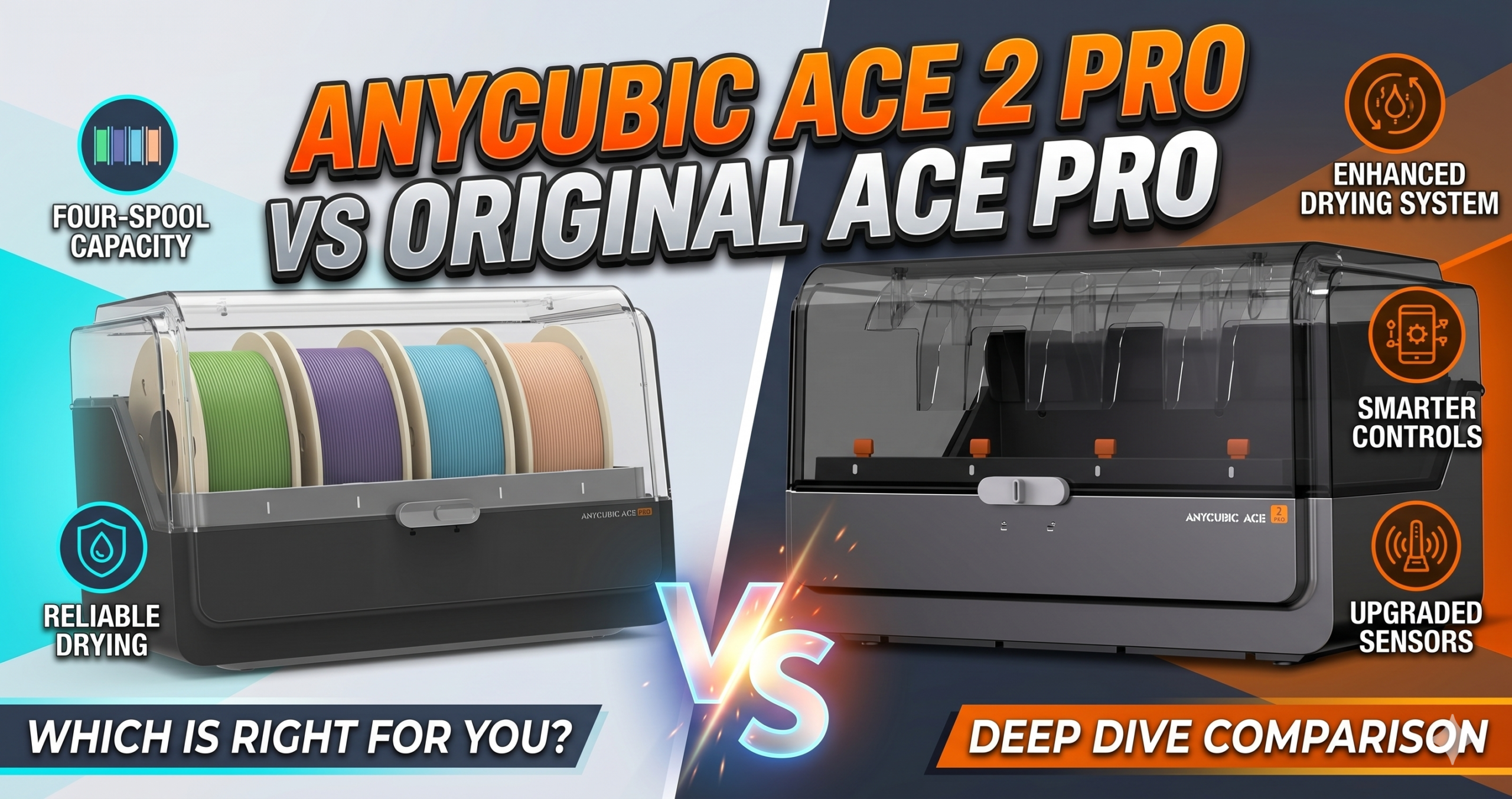
Both cost exactly $289.99. The ACE 2 Pro wins on drying power and motor longevity. The original ACE Pro wins on review volume and Kobra 3 Max track record. Your printer model is the deciding factor — not the feature list.
ACE 2 Pro vs ACE Pro: What Actually Changed?
Anycubic released both units at the same price, which immediately raises the obvious question: if the original works, why bother with version two? The answer is specific — and matters only if you care about two things: drying temperature and motor reliability.
The ACE 2 Pro bumps active drying from roughly 55°C to 65°C. That 10-degree gap is not a marketing footnote. For anyone printing in a humid climate — coastal cities, monsoon seasons, basement workshops — it’s the difference between bubble-free surfaces and the characteristic crackling that ruins overnight prints. The ACE 2 Pro also swaps to brushless motors across all four channels, which means less maintenance and measurably quieter operation at 48dB.
One verified buyer with a Kobra 3 Max tried two original ACE Pros and couldn’t complete a single successful print. Switched to the ACE 2 Pro and reported it worked “flawlessly right from the start.” That’s not a sample size to ignore when both units cost $290.
 ACE 2 Pro — New $289.99
 Original ACE Pro $289.99
7-Point Comparison: ACE 2 Pro vs Original ACE Pro
Same price, different priorities. Here’s every meaningful difference in one table.
| Feature | ACE 2 Pro | Original ACE Pro | Winner | Why It Won |
|---|---|---|---|---|
| Max Drying Temp | 65°C active | ~55°C / 131°F | ACE 2 Pro | 10°C more heat = better moisture removal for PETG and TPU in humid climates |
| Motor Type | 4× brushless, 48dB | Standard motors | ACE 2 Pro | Brushless = longer lifespan, quieter overnight prints, smoother retractions |
| Kobra S1 / Kobra X Support | Native — up to 19 colors | Not compatible without adapter | ACE 2 Pro | The only logical choice for Kobra S1 and X owners |
| Kobra 3 Max Support | Works (user-confirmed) | Officially designed for it | Original ACE Pro | 129 reviews on Kobra 3 Max. Officially supported, firmware-tested ecosystem |
| Filament Change Speed | 100% faster vs Gen 1 | Standard | ACE 2 Pro | Saves ~47 minutes per 100 color swaps — significant for complex prints |
| Nozzle Clog Detection | Runout detection + auto-resume | Full nozzle clog detection, pause + alert | Original ACE Pro | Active clog detection is more proactive than passive runout sensing |
| Review Track Record | 11 reviews (new product) | 129 reviews, 4.2 stars | Original ACE Pro | More community data means known failure modes and documented fixes |
Is the ACE 2 Pro’s 65°C Drying Worth It?
Yes — if you use PETG or live anywhere with relative humidity above 60%. The original ACE Pro tops out around 55°C, which handles PLA in moderate conditions but starts to struggle with absorbed PETG. At 65°C, the ACE 2 Pro pushes well past the threshold needed to drive moisture out of most common filaments, including TPU (note: the feeding mechanism still doesn’t work well with TPU — this is about storage drying only).
Real-world impact: one user printing large-format pieces with the Kobra X noted zero surface bubbling after switching to the ACE 2 Pro’s sealed bays during a high-humidity week. That’s not a lab result — it’s a print sitting on a desk looking clean.
Multicolor Printing Configurations: How Far Can Each Scale?
The multicolor scalability between these two units is dramatically different. The ACE 2 Pro was designed with expansion in mind — especially for the Kobra X, where a single unit already unlocks 7-color printing without any hub accessory.
ACE 2 Pro Multicolor Scaling (Kobra S1)
One unit delivers 4-color printing. Add a second ACE 2 Pro plus an 8-Color Filament Hub and you’re at 8 colors. Four units plus two hubs scales to a full 16 colors — a legitimate professional-grade setup.
ACE 2 Pro Multicolor Scaling (Kobra X)
This is where it gets interesting. The Kobra X architecture allows one ACE 2 Pro to drive 7 colors natively. Two units jump to 11 colors. Four units reach 19 colors — without any additional hub hardware.
Setup gotcha (read this): When you first connect the ACE 2 Pro to the Kobra X, a dialog appears on the printer screen. It shows two options with the word “Example” beside them — it looks like a step-by-step process. It isn’t. Select the top option and close the dialog. Miss this and you’ll think 7-color printing is broken. It isn’t. The setting can also be changed later under Settings → ACE 2 Pro.
Original ACE Pro Multicolor Scaling (Kobra 3 Max)
One unit gives you 4 colors. Two units plus an 8-Color Hub reaches 8 colors. The 8-Color Hub was officially released in June 2025, so full expansion is now available.
ACE 2 Pro: Honest Pros and Cons
- +65°C active drying handles humid climates properly
- +Brushless motors run quieter and last significantly longer
- +100% faster filament loading vs Gen 1 — saves ~47 min per 100 swaps
- +Up to 19 colors on Kobra X with 4 units
- +Sealed moisture control with active humidity management
- +Auto-resume and runout detection protect long prints
- −Setup instructions are genuinely poor — dialog screen is confusing
- −Cannot mix with original ACE Pro units on same printer
- −Only 11 reviews — less community troubleshooting data
- −Multi-color printing is slow (not a unit fault — an AMS-style limitation)
- −TPU feeding still unreliable — drying works, feeding doesn’t
Original ACE Pro: Honest Pros and Cons
- +129 reviews — established community of fixes and tips
- +Official pick for Kobra 3 Max — firmware optimized
- +Active nozzle clog detection pauses print automatically
- +Filament backup: auto-switches to next spool of same color
- +Dual PTC heating system at 200W
- +Anycubic’s customer support replaced one user’s faulty unit entirely
- −Lower max drying temperature (~55°C)
- −Standard brushed motors — louder, higher wear over time
- −Not compatible with Kobra S1 without additional accessories
- −Cable can be too short for some printer placements
- −Removing filament requires manual re-rolling through Bowden tubes
- −Only 3-month warranty (vs 1-year on ACE 2 Pro)
The Reality of Long-Term Ownership
Maintenance & Wear
The original ACE Pro’s standard motors begin showing wear-related quirks after extended multicolor sessions. Users running 8-color configurations report inconsistent retraction tension around the 6-month mark — not catastrophic, but noticeable in layer quality. The ACE 2 Pro’s brushless motors are rated significantly higher for cycle longevity, though the short review window means we don’t have multi-year field data yet.
Hidden Costs
The 8-Color Filament Hub is a required purchase if you want to scale beyond 4 colors on the Kobra S1 at 8 colors (or beyond the native 7 on Kobra X). That’s an additional cost Anycubic doesn’t lead with in the listing headline. Power consumption runs continuously during active drying sessions — worth factoring in if you run the unit 24/7 in a home workshop.
The Tinkerer’s Hack
The ACE Pro’s Bowden tube ports can be fitted with third-party quick-release couplings (standard PC4-M6 fittings work on both units). This eliminates the most-complained-about frustration: manually re-spooling filament through the tubes to remove it. A set of four couplings costs under $5 and saves significant time per filament swap session. It’s not in any Anycubic documentation.
Who Should Buy Which Unit?
Buy the ACE 2 Pro if:
You own a Kobra S1 or Kobra X — there’s no meaningful debate here. The ACE 2 Pro is the purpose-built unit for both printers, and the one-year warranty plus brushless motors make it the better long-term investment at the same price. It’s also the better choice if you print in a humid climate regardless of printer model, given the 65°C drying advantage.
Buy the Original ACE Pro if:
You have a Kobra 3 Max and want maximum community support, established firmware integration, and active nozzle clog detection. With 129 reviews, you’ll find solutions to almost any issue on Reddit or the Anycubic forum before you even need to contact support. It’s also the correct unit if you need the filament backup feature — automatic spool switching is a genuine time-saver on large production prints.
Frequently Asked Questions
No. Anycubic explicitly states that the two units cannot be used simultaneously. Mixing them in a single setup is unsupported and will cause errors.
Yes, despite not being officially listed as compatible. Multiple verified purchasers confirmed it works well with the Kobra 3 Max — and for users who couldn’t get the original ACE Pro to work reliably, it fixed their issues entirely. That said, official compatibility remains the Kobra S1 and Kobra X.
This is a setup dialog issue. When first connected, the Kobra X shows a screen with two options labeled “Example.” Select the top option — don’t treat the two options as sequential steps. If you’ve already closed it incorrectly, go to Settings → ACE 2 Pro and change it there.
No. TPU is too flexible and will jam in the feed system of both units. You can dry TPU in the sealed bays, but do not attempt to feed it through the motors for printing.
Yes, specifically for Kobra 3 Max owners. The original ACE Pro has a larger support community, nozzle clog detection the ACE 2 Pro lacks, and automatic spool backup — features that matter on longer, production-style prints. At the same price, it remains the right choice for that printer ecosystem.
On the Kobra X: 19 colors using 4× ACE 2 Pro units. On the Kobra S1: 16 colors using 4× ACE 2 Pro plus 2× 8-Color Filament Hubs.
Still comparing? Both units are currently in stock on Amazon with Prime shipping.
Related posts:
 Anycubic ACE 2 Pro Review: The Filament Dryer That Finally Gets Multicolor Right
  Creality Space Pi Plus Filament Dryer Review: Say Goodbye to Moisture Issues
  Comgrow Filament Dryer Box Review: Is This the Best Budget Dryer for 3D Enthusiasts?
  Creality Space Pi Plus Filament Dryer vs Comgrow Filament Dryer Box: Which One Boosts Your 3D Prints Best?
  SUNLU FilaDryer SP2: 2-in-1 Dryer Drops May 19!
  Creality Official Filament Dryer Box 2.0 Review
  Sovol SH01 Filament Dryer 2025 Review: Best Budget Pick for 3D Printing?
  Polymaker PolyDryer Review: Top Filament Dryer to Buy in 2025
  Sunlu Filadryer S4 vs Polymaker PolyDryer: Which Filament Dryer Perfects Your Decor Prints in 2025?
  SUNLU Filament Dryer E2 Review: A Reliable Tool for 3D Printing
  3D Printer Filament Dryer | The Ultimate Guide | No More Failed Prints
  Bambu Lab Hack: Dry Filament Mid-Print with SUNLU AMS Heater – 2026 Review & $102 Upgrade Guide