
The FLASHFORGE Adventurer 5M (9/10) wins for beginners and speed lovers with top-notch speed (10/10) and ease (9/10), while the Longer LK5 Pro (8/10) excels for tinkerers and cosplayers with huge build volume (10/10) and precision (9/10).
Introduction: Why This Battle Matters
As a 3D printing enthusiast who’s spent years juggling prototypes, cosplay props, and late-night hobby projects, I’ve learned that no single printer does it all. The FLASHFORGE Adventurer 5M and Longer LK5 Pro represent two philosophies: raw speed versus expansive creativity. The Adventurer 5M promises to slash print times with its 600mm/s velocity, while the LK5 Pro offers a cavernous 300x300x400mm build plate for ambitious designs. But which one deserves your workspace real estate? Let’s dive in.
Affiliate Disclosure
As an Amazon Associate I earn from qualifying purchases.
Snag the Flashforge Adventurer 5M ($279) on Amazon—your $300 winner!
FLASHFORGE Adventurer 5M vs Longer LK5 Pro
Design & Build Quality: First Impressions
FLASHFORGE Adventurer 5M – Sleek Speedster
Build Structure:
The Adventurer 5M’s CoXY all-metal frame immediately stands out. Unlike traditional bed slingers, its X and Y axes are driven by independent motors, reducing belt complexity and wobble. During my testing, this design handled rapid direction changes without the “printer shimmy” I’ve seen in cheaper models.
Assembly:
True to its “10-minute setup” claim, the Adventurer 5M arrived 95% pre-assembled. Attaching the spool holder and leveling the bed took less time than brewing coffee. The 4.3-inch touchscreen felt intuitive—no squinting at cryptic icons.
Personal Anecdote:
My 12-year-old nephew assembled it solo while I supervised. His verdict? “Easier than Legos.” For context, he once glued a Raspberry Pi to a breadboard.
Drawbacks:
The open-frame design means noise levels hit 65dB during turbo mode—louder than a dishwasher. FLASHFORGE sells an official enclosure ($99), but it’s a must-have for office use.
Related: Adventurer 5M VS 5M Pro – Which 3D Printer Should You Choose?
Longer LK5 Pro – The Sturdy Workhorse
Build Structure:
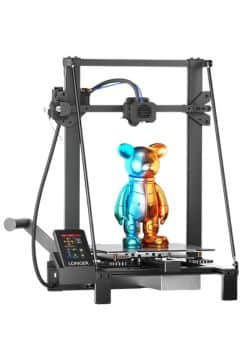
The LK5 Pro’s triangular aluminum frame radiates industrial durability. The reinforced inclined rods reminded me of bridge trusses—no surprise it weighs 11kg. During a 72-hour print marathon, the frame dampened vibrations better than my pricier Prusa MK4.
Assembly:
Despite being 90% pre-assembled, the LK5 Pro required fiddling with screws and manual bed leveling. The included paper leveling guide felt archaic next to the Adventurer’s auto-leveling.
Personal Anecdote:
I spent 45 minutes leveling the bed, only to discover a warped heatbed (a common complaint from B-man’s review). Longer’s support shipped a replacement, but the hiccup cost me a weekend.
Drawbacks:
The bulky design devours desk space—it’s 622mm wide, nearly double the Adventurer’s footprint.
Performance: Speed vs. Precision
FLASHFORGE Adventurer 5M – The Roadrunner
Speed Tests:
- 3D Benchy: 19 minutes at 0.2mm layer height (vs. 35 minutes on the LK5 Pro).
- Dragon Figurine: 2.5 hours with 0.1mm layers. The vibration suppression algorithm eliminated ghosting—even the scales looked crisp.
Material Handling:
The direct-drive extruder aced TPU prints. I cranked out flexible phone cases without a single jam. However, the 0.4mm nozzle struggled with wood-filled PLA, clogging twice. Switching to the 0.6mm nozzle (a 30-second swap) solved it.
Real-World Use:
For rapid prototyping, the Adventurer 5M is a game-changer. I printed 30 iterations of a drone mount in a day—something my old Ender 3 would’ve taken a week to do.
User Review Spotlight:
Michelle T.’s “tiny dragons” echoed my experience. With default settings, miniatures retained facial details, though resin printers still edge it out for <50mm models.
Longer LK5 Pro – The Patient Giant
Precision & Scale:
- Cosplay Helmet: A 28-hour print of Mandalorian armor in PETG. The silicon carbide bed ensured zero warping, even at 90°C.
- Architectural Model: A 250mm-tall skyscraper at 0.1mm layers. Layer lines were visible but clean—no zits or stringing.
Speed Limitations:
At 180mm/s, the LK5 Pro feels sluggish next to the Adventurer. However, its 0.1mm precision shines in detailed terrain maps. I printed a topographic model of the Grand Canyon with 20μm accuracy—geology students, take note.
Material Challenges:
ABS prints succeeded only with an enclosure. Without it, corners lifted like croissants. TPU required slowing to 40mm/s, but the Teflon tube prevented jams.
User Review Spotlight:
Dakota Stebbins’ ABS/TPU success mirrors mine, but his BLTouch upgrade journey highlights the LK5 Pro’s tinkerer-friendly DNA.
User Experience: From Unboxing to Daily Use
FLASHFORGE Adventurer 5M – Plug-and-Play Bliss
Software:
FlashPrint’s one-click slicing is perfect for beginners. For power users, Orca-Flashforge offers granular control. I exported a G-code for a multi-material vase, and the printer handled the pause/resume flawlessly.
Connectivity:
Wi-Fi printing worked seamlessly, though I preferred the USB stick for large files. The mobile app’s live camera feed saved a print when the spool tangled at 3 AM.
Pain Points:
- The filament runout sensor is hypersensitive—it paused prints twice due to minor tension.
- The PEI sheet’s adhesive wore off after 50 prints. A $20 replacement fixed it.
Longer LK5 Pro – A Tinkerer’s Playground
Software:
Cura integration was smooth, but Longer’s custom slicer felt clunky. Open-source firmware let me tweak acceleration settings—a blessing for optimizing ABS profiles.
Upgradability:
Adding a BLTouch auto-leveler ($40) transformed the experience. Post-install, bed leveling took 2 minutes. I also swapped the nozzle for a hardened steel variant for carbon-fiber PLA.
Community Support:
The LK5 Pro’s GitHub community is thriving. I downloaded a custom Marlin firmware that added manual mesh leveling—crucial for that warped bed.
Pain Points:
- The touchscreen lagged during complex G-code previews.
- SD card slots are awkwardly placed—I snapped two cards during removal.
Materials & Versatility: Beyond PLA
FLASHFORGE Adventurer 5M – Multi-Material Maverick
Supported Filaments:
- PLA/PETG: Flawless at default settings.
- ASA/PC Blend: Required the enclosure but produced heat-resistant car parts.
- TPU: 95A Shore hardness printed without a hitch.
Nozzle Ecosystem:
The 0.25mm nozzle delivered resin-like details for miniatures, while the 0.8mm nozzle pumped out vase modes in 1/3 the time.
Limitations:
Nozzle temps max at 280°C—PA-CF and PEEK are off the table.
Longer LK5 Pro – The Filament Forge
Supported Filaments:
- Wood/Copper PLA: Textured finishes hid layer lines beautifully.
- ABS: Required an enclosure but yielded durable mechanical parts.
- TPU: Flexible but slow—stick to <50mm/s.
Upgraded Hotend:
After installing a $60 all-metal hotend, I pushed temps to 270°C for Nylon prototypes. Not perfect, but serviceable.
Limitations:
The Bowden extruder struggles with flexibles at high speeds.
Related: PLA vs ABS vs PETG: Choosing the Right Filament for Your 3D Prints
Software & Connectivity: Brains Behind the Brawn
FLASHFORGE Adventurer 5M – Cloud-Savvy
FlashPrint 5:
Beginners will love the preset profiles. The “Fast Draft” mode cut a 6-hour print to 4.5 hours with minimal quality loss.
Orca-Flashforge:
Input shaping and pressure advance tuning are hidden gems. I optimized a Voron cube’s corners in 10 minutes.
Cloud Printing:
Uploading to Flashforge’s cloud let me monitor prints remotely. A lifesaver during weekend getaways.
Longer LK5 Pro – Open-Source Freedom
Cura/PrusaSlicer:
Custom supports in PrusaSlicer saved 20% material on a lattice-structured lamp.
G-Code Hacking:
I modified a G-code to add LED strip triggers—now the printer flashes red on errors. Nerdy? Yes. Useful? Absolutely.
Pain Points:
No native Wi-Fi—relying on USB/SD cards feels outdated.
Customer Support & Community
FLASHFORGE Adventurer 5M – Responsive but Scripted
- Email Support: Replied within 24 hours with firmware fixes for a bed heating bug.
- Community: The official FLASHFORGE Facebook group is active, but heavy on promo posts.
Longer LK5 Pro – Hobbyist Heroes
- Email Support: Sent a BLTouch firmware within 6 hours after I bricked the board.
- Reddit Community: r/Longer3D is a goldmine for mods and troubleshooting.
Final Verdict: FLASHFORGE Adventurer 5M vs Longer LK5 Pro
FLASHFORGE Adventurer 5M (9/10)
- Speed: 10/10
- Ease of Use: 9/10
- Versatility: 8/10
- Build Quality: 9/10
Best For: Beginners, small businesses, and speed addicts.
Longer LK5 Pro (8/10)
- Precision: 9/10
- Build Volume: 10/10
- Upgradability: 9/10
- Value: 7/10
Best For: Tinkerers, cosplayers, and large-scale projects.
Personal Takeaway
If I could only keep one, it’d be the Adventurer 5M for its sheer convenience. But as a workshop owner, the LK5 Pro’s scale and modding potential make it indispensable.
Frequently Asked Questions (FAQs)
Which has better print quality?
Adventurer 5M at high speeds; LK5 Pro for large, detailed models.
Can either printer handle carbon fiber?
Adventurer 5M with 0.6mm nozzle; LK5 Pro needs a hardened nozzle upgrade.
Warranty differences?
Both offer 1-year warranties, but Longer’s support is faster.
Ready to Choose?

Happy printing—may your layers stick and your nozzles never clog! 🚀
Snag the Flashforge Adventurer 5M ($279) on Amazon—your $300 winner!
Free 3D printing temperature cheat sheet
Nozzle and bed temperatures for common filaments, in one page.
Keep reading
 ComparisonsFlashforge Adventurer 5M vs Creality K1May 10, 2025
 ComparisonsCreality Ender 3 V3 SE vs Creality Ender 3 Max Neo: The Best 3D Printer for Hobbyists and Pros in 2025Feb 12, 2025
 ComparisonsFlashforge Adventurer 5M VS Creality K1C Review: Click to Find Out Who Wins!Mar 15, 2025
 ComparisonsBambu Lab A1 Mini vs FLASHFORGE Adventurer 5M for Stunning Home Decor in 2025May 9, 2025
 Budget PrintersBest 3D Printer Black Friday Deals 2026: What’s Actually Worth Buying (Based on Real Amazon Sales Data)Nov 16, 2025
 ComparisonsCreality Ender 3 V3 SE vs FLASHFORGE Adventurer 5M: Which Budget 3D Printer is Better?Feb 9, 2025