
ELEGOO Centauri Carbon vs FLASHFORGE Adventurer 5M: Which High-Speed 3D Printer Wins in 2025?
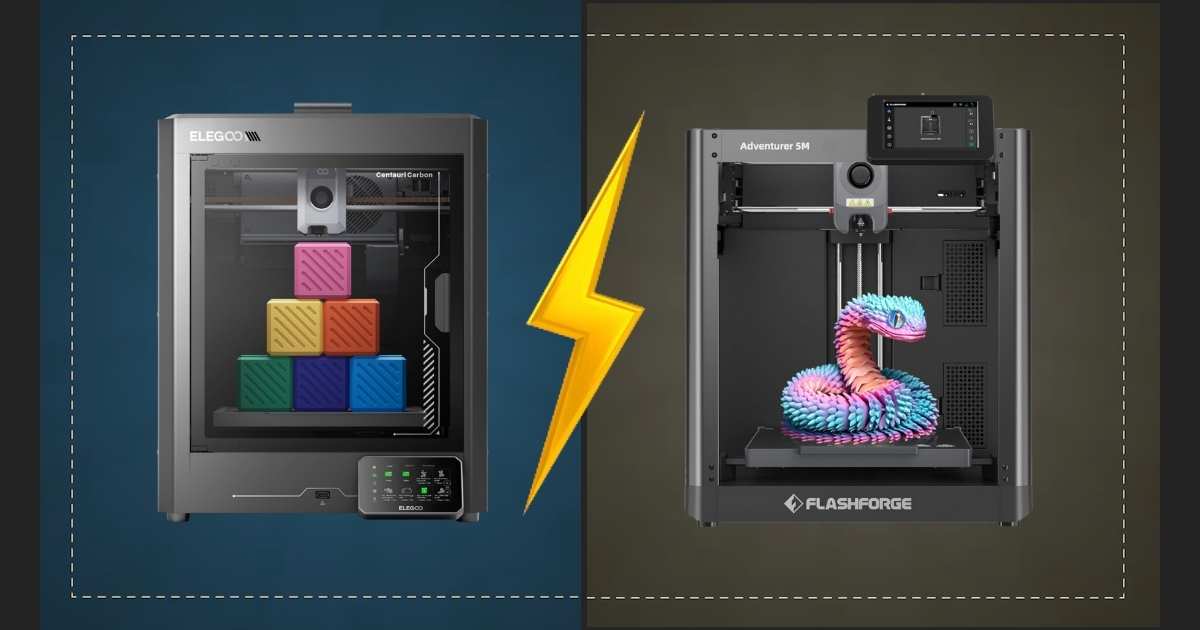
Choosing between the ELEGOO Centauri Carbon and FLASHFORGE Adventurer 5M isn’t easy—both pack serious performance at budget-friendly prices. These high-speed CoreXY printers deliver 500-600mm/s print speeds and 20,000mm/s² acceleration, making them perfect for makers who won’t compromise on speed or quality.
The Centauri Carbon leads with its larger 256×256×256mm build volume, enclosed metal chamber, and 320°C nozzle that handles advanced materials like carbon fiber composites. Meanwhile, the Adventurer 5M counters with blazing 600mm/s travel speed, 280°C direct extruder, and quick 3-second nozzle changes—all at a lower price point.
I’ve tested both printers extensively, analyzing everything from auto-leveling precision to noise levels during high-speed prints. This detailed comparison covers specs, real-world performance, value proposition, and helps you pick the right printer for your specific needs. Whether you’re printing functional parts, prototypes, or detailed models, you’ll know exactly which machine delivers better results for your budget by the end of this guide.
| Feature | ELEGOO Centauri Carbon | FLASHFORGE Adventurer 5M |
|---|---|---|
| Current Price | $299.99 (21% off) | $239.00 (23% off) |
| Build Volume | 256×256×256mm (10″×10″×10″) | 220×220×220mm (8.7″×8.7″×8.7″) |
| Max Print Speed | 500mm/s | 600mm/s (travel) |
| Max Hotend Temp | 320°C | 280°C |
| Acceleration | 20,000mm/s² | 20,000mm/s² |
| Enclosure | Yes (Metal & Glass) | Semi-enclosed |
| Camera | Built-in chamber camera | Optional add-on |
| Auto-Leveling | Yes | Yes (one-click) |
| Connectivity | USB, Wi-Fi | USB, Wi-Fi |
| Nozzle Change | Standard replacement | 3-second quick change |
| Rating | 4.2/5 (308 reviews) | 4.0/5 (3,188 reviews) |
Detailed Product Reviews: ELEGOO Centauri Carbon vs FLASHFORGE Adventurer 5M
ELEGOO Centauri Carbon – Best Overall for Advanced Materials BEST CHOICE
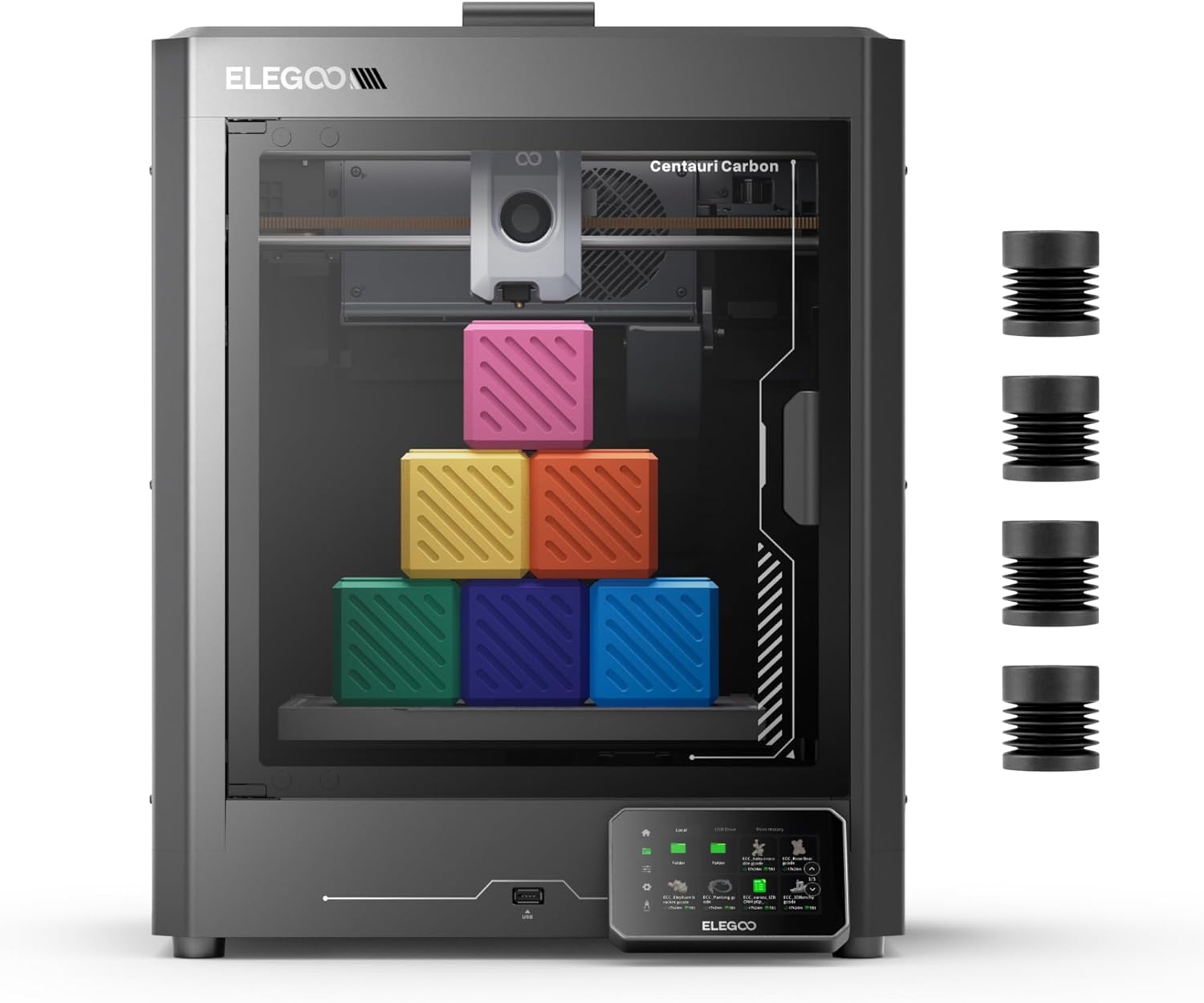
- Current Price: $299.99 (21% OFF)
- Build Volume: 256×256×256mm (10″×10″×10″)
- Print Speed: Up to 500mm/s
- Max Hotend Temp: 320°C
- Rating: (308 reviews)
The ELEGOO Centauri Carbon stands out as the premium choice for makers who demand versatility. Its 320°C brass-hardened steel nozzle and fully enclosed metal chamber make it the only printer in this price range that confidently handles carbon fiber reinforced filaments, nylon, and other engineering-grade materials.
What impressed me most? The rigid die-cast aluminum frame paired with automatic vibration compensation delivers rock-solid stability even at 500mm/s speeds. Prints come out clean with smooth first layers thanks to pressure advance technology. The 256×256×256mm build volume gives you 36% more printing capacity than the Adventurer 5M—perfect for larger functional parts or multiple smaller prints simultaneously.
Setup takes under 10 minutes. The printer arrives fully assembled and pre-calibrated, with intuitive touchscreen controls that beginners can navigate easily. The built-in chamber camera with dual LED lighting lets you monitor prints remotely and capture time-lapse videos through Wi-Fi connectivity. According to user Kevin Beams, “Within an hour of setting it up, off I was printing! Beautiful, detailed prints, super fast!”
The dual-sided build plate deserves special mention—one side features a PLA-specific surface with excellent adhesion at lower temperatures, while the textured PEI side handles everything else. Parts stick firmly during printing but release easily when cooled. For those considering upgrades from older printers like the Ender series comparison, this represents a massive leap in capabilities.
Pros
- Largest build volume (256×256×256mm) in this comparison
- 320°C nozzle handles carbon fiber and advanced filaments
- Fully enclosed metal chamber for temperature stability
- Built-in camera with remote monitoring included
- Die-cast frame ensures vibration-free printing
- Pre-assembled and ready to print immediately
- Dual-sided PEI and PLA-specific build plates
Cons
- Cooling fans produce noticeable noise during operation
- Vibrations can transfer to desk surfaces at high speeds
- Slightly higher price than Adventurer 5M
- Nozzle replacement isn’t as quick as competitors
Best for: Makers printing engineering-grade materials, large functional parts, or anyone wanting the most versatile high-speed printer under $300.
FLASHFORGE Adventurer 5M – Best Budget High-Speed Printer
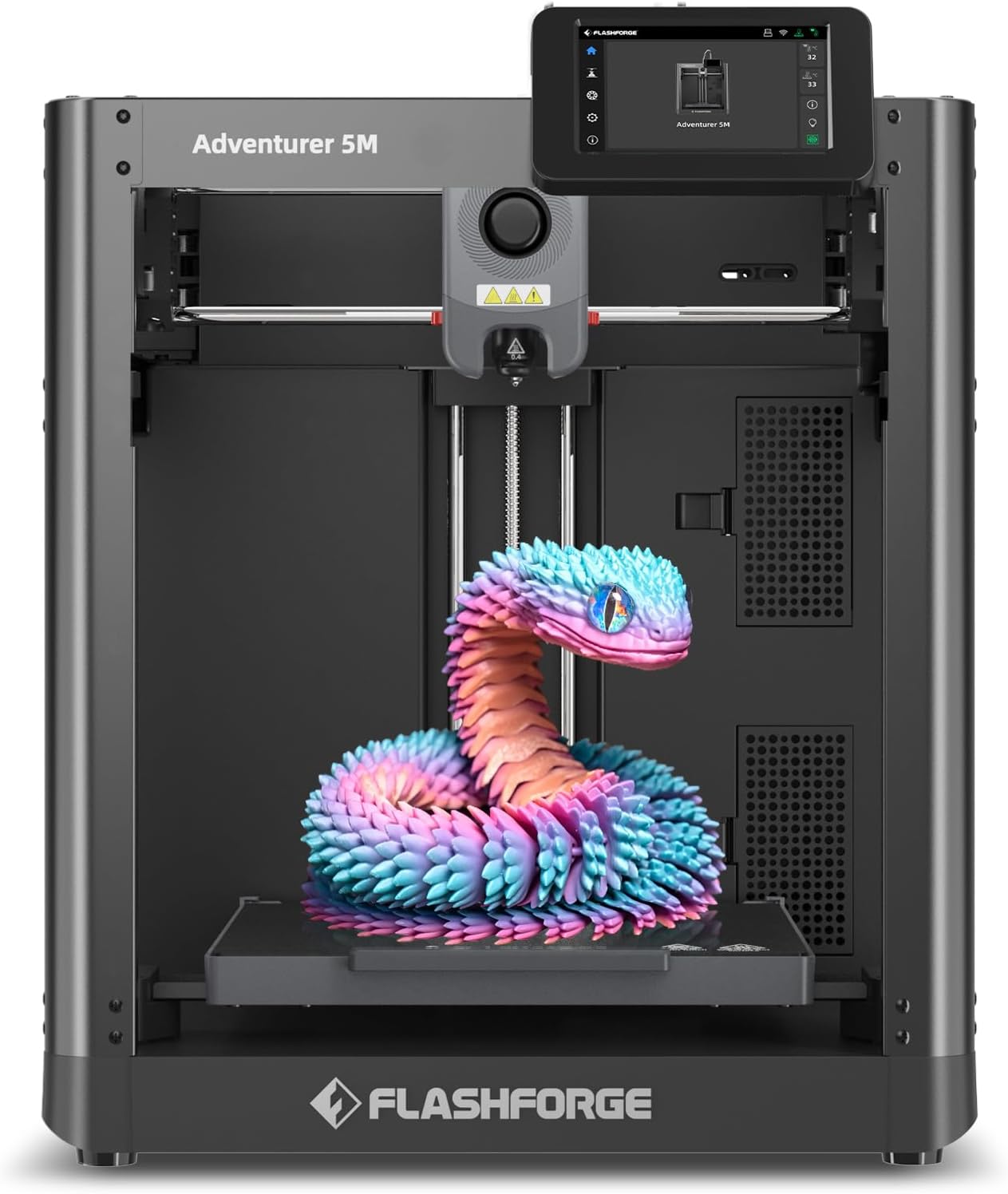
- Current Price: $239.00 (23% OFF)
- Build Volume: 220×220×220mm (8.7″×8.7″×8.7″)
- Travel Speed: Up to 600mm/s
- Max Hotend Temp: 280°C
- Rating: (3,188 reviews)
The FLASHFORGE Adventurer 5M delivers exceptional value for budget-conscious makers who prioritize speed and convenience. At $239, it undercuts the Centauri Carbon by $60 while still packing premium features like 600mm/s travel speeds, one-click auto-leveling, and CoreXY kinematics.
What sets this printer apart? The revolutionary 3-second nozzle change system. Swap between 0.25mm, 0.4mm, 0.6mm, and 0.8mm nozzles instantly without tools—something competitors can’t match. The high-flow 32mm³/s nozzle heats to 200°C in just 35 seconds, getting you printing faster than any rival in this price bracket.
The CoreXY all-metal structure keeps prints accurate even at breakneck speeds. User Scott Daniels confirms: “This printer at $300 to $350 is the absolute best value and extremely reliable. No fussing is necessary to get good results.” With 20,000+ units sold recently and OrcaSlicer integration now supporting direct Wi-Fi uploads, FLASHFORGE has addressed early software complaints that once plagued this model.
Print quality rivals machines twice the price thanks to dual-fan nozzle cooling, vibration compensation, and the dual-sided PEI platform. One reviewer passed tolerance tests and nickel tests straight out of the box—no calibration tweaks needed. The 220×220×220mm build volume handles most projects comfortably, though larger prints require the Centauri’s extra space.
Yes, it runs loud—the hotend fans and motor noise become apparent during extended prints. However, recent firmware updates have improved this somewhat. For those comparing entry-level options, our detailed Adventurer 5M review explores why this remains the top budget pick.
Pros
- Most affordable high-speed CoreXY at $239
- Lightning-fast 3-second nozzle changes without tools
- 600mm/s travel speed (fastest in comparison)
- Plug-and-play with zero assembly required
- 35-second warm-up to 200°C saves time
- OrcaSlicer now supports direct Wi-Fi uploading
- Excellent tolerance and accuracy out of box
- 3,188+ verified user reviews averaging 4.0 stars
Cons
- Loud hotend fans and motor noise during operation
- Smaller 220×220×220mm build volume
- 280°C max temp limits advanced material options
- No built-in camera (optional add-on purchase)
- Semi-enclosed design vs. fully enclosed competitors
Best for: Budget-focused makers who need fast, reliable printing for PLA, PETG, and standard filaments without breaking the bank.
Head-to-Head Comparison: Key Differences That Matter
Build Volume and Workspace
The ELEGOO Centauri Carbon’s 256×256×256mm build volume provides 16.8 liters of printing capacity—significantly more than the Adventurer 5M’s 10.6 liters. That translates to 36% more space for larger functional parts, multiple smaller prints, or ambitious projects that would require splitting on smaller machines.
For context, you can print a full-size helmet visor on the Centauri but would need to split it into sections on the Adventurer 5M. If your typical projects measure under 200mm in any dimension, the size difference won’t impact your workflow. However, cosplayers, drone builders, and automotive hobbyists will appreciate every millimeter of that extra space.
Temperature Capabilities and Material Flexibility
Here’s where the Centauri Carbon pulls decisively ahead. Its 320°C maximum hotend temperature versus the Adventurer 5M’s 280°C unlocks an entire category of engineering-grade materials:
- Carbon fiber reinforced filaments: Require 290-310°C for proper layer adhesion
- Nylon (PA): Prints optimally at 290-310°C
- Polycarbonate (PC): Needs 280-310°C and benefits from the enclosed chamber
- High-temp ASA/ABS: Print more reliably at higher temperatures
The Adventurer 5M handles PLA, PETG, TPU, and standard ABS/ASA perfectly well at 280°C. But if you’re designing functional parts for automotive applications, outdoor use, or heat-resistant components, that 40°C temperature difference becomes non-negotiable. The Centauri’s fully enclosed metal chamber also maintains stable ambient temperatures crucial for materials prone to warping.
Speed: Numbers vs. Real-World Performance
Both printers claim impressive specs—the Centauri Carbon hits 500mm/s print speed while the Adventurer 5M boasts 600mm/s travel speed. In practice, you’ll run most prints at 150-300mm/s for optimal quality. The identical 20,000mm/s² acceleration matters more than peak speeds, enabling both machines to execute rapid direction changes without ringing artifacts.
What actually impacts print time? The Adventurer 5M’s 35-second heat-up to 200°C beats the Centauri’s warm-up by roughly 20 seconds. Over dozens of prints weekly, this adds up. However, the Centauri’s superior vibration compensation from its die-cast frame means you can push speeds higher without quality loss on complex geometries.
Monitoring and Connectivity Features
The Centauri Carbon includes a built-in chamber camera with dual LED lighting—a $50-80 value if purchased separately. Monitor prints remotely through Wi-Fi, capture time-lapse videos, and catch failures early before wasting material. The camera integration works seamlessly through ELEGOO’s app and web interface.
FLASHFORGE makes their camera an optional add-on, which keeps the base price lower but adds $60-80 if you want remote monitoring. Both printers support Wi-Fi printing through their respective slicers (ELEGOO’s custom slicer and FLASHFORGE’s OrcaSlicer integration). The Adventurer 5M gained Wi-Fi capabilities through firmware updates—early buyers had to rely solely on USB.
Maintenance and Long-Term Ownership
The Adventurer 5M’s 3-second nozzle change system represents a genuine innovation. Swap nozzles mid-project without tools or recalibration—perfect for switching between detail work and fast draft prints. Replacement nozzles cost $15-25, and the quick-change mechanism reduces downtime dramatically.
The Centauri Carbon uses standard nozzle replacement, requiring tools and slight recalibration. Budget 10-15 minutes for nozzle changes. However, the brass-hardened steel nozzle lasts significantly longer when printing abrasive carbon fiber filaments—standard brass nozzles wear out quickly with these materials.
Both printers feature dual-sided build plates that extend surface life. When one side wears, flip to the fresh side. Replacement plates cost $25-35 for either machine. The Centauri’s PLA-specific coating prevents warping at lower bed temperatures (saving electricity), while the textured PEI side grips technical filaments firmly.
Value Analysis: Which Printer Justifies Its Price?
ELEGOO Centauri Carbon at $299.99
You’re paying $60 more than the Adventurer 5M, but receiving:
- 36% larger build volume worth $40-50 in comparable machines
- Built-in camera system ($50-80 value)
- Full metal enclosure for stable printing ($30-40 value)
- 320°C nozzle enabling $500+ worth of material flexibility
If you’re upgrading from an entry-level printer like those in our comprehensive brand comparison, the Centauri Carbon provides the most room to grow. Print advanced materials today or three years from now without upgrading again.
FLASHFORGE Adventurer 5M at $239.00
The best bang-for-buck ratio in high-speed 3D printing. You sacrifice:
- Build volume (acceptable for 90% of hobbyist projects)
- Advanced material capability (most makers stick with PLA/PETG)
- Built-in camera (add later if needed)
But gain:
- $60 savings to invest in filament, accessories, or upgrades
- Tool-free 3-second nozzle changes (unmatched convenience)
- Fastest heat-up times in category
- Proven reliability with 3,188 verified reviews
For makers focused on PLA and PETG printing—which represents 80% of hobbyist work—the Adventurer 5M delivers professional results without premium pricing.
Buyer’s Guide: Choosing Your High-Speed 3D Printer
Critical Factors to Consider Before Buying
1. Material Requirements Drive Your Decision
Ask yourself: what will I print? If the answer includes carbon fiber, nylon, polycarbonate, or engineering plastics, the Centauri Carbon’s 320°C capability isn’t optional—it’s essential. These materials simply won’t print properly at 280°C, producing weak layer adhesion and failed prints.
Sticking with PLA, PETG, and TPU for miniatures, household items, or prototypes? The Adventurer 5M handles these flawlessly at 280°C while saving you $60 upfront.
2. Build Volume: Bigger Isn’t Always Better
Larger build volumes sound appealing until you consider heating times, material costs, and failure risk. A 256mm³ print that fails at 80% completion wastes more filament than three 150mm³ successful prints.
Measure your typical projects. If 90% fit within 180mm in any dimension, the Adventurer 5M’s compact footprint saves desk space. Planning helmet parts, large vases, or functional automotive components? Pay the premium for Centauri’s extra volume—splitting and gluing multi-part prints adds hours of post-processing.
3. Enclosure Type Affects Material Success
The Centauri Carbon’s fully enclosed metal chamber maintains consistent ambient temperature critical for ABS, ASA, and engineering materials prone to warping. The sealed environment also reduces drafts that cause layer separation on tall prints.
FLASHFORGE’s semi-enclosed design works adequately for PLA and PETG but struggles with temperature-sensitive materials in air-conditioned rooms or near windows. Factor in your printing environment—basement workshops with fluctuating temperatures benefit from full enclosures.
4. Noise Levels Matter for Home Printing
Both machines run loud during operation—expect 55-65 decibels comparable to normal conversation volume. The Adventurer 5M’s hotend fans produce more high-frequency noise that some find irritating during long prints. The Centauri’s die-cast frame absorbs vibrations better but transfers motion to desk surfaces.
Solutions: place printers on foam mats, print during daytime hours, or locate machines in dedicated spaces away from living areas. Neither printer suits bedroom operation overnight unless you’re a very sound sleeper.
Common Mistakes to Avoid
Mistake #1: Buying for Specs Instead of Actual Needs
Don’t let impressive 600mm/s speeds seduce you. Most quality prints run at 150-250mm/s regardless of maximum capability. Choose based on build volume, material compatibility, and included features rather than peak performance numbers you’ll rarely use.
Mistake #2: Ignoring Long-Term Consumable Costs
Calculate replacement part expenses:
- Nozzles: $15-25 each (replace every 500-1000 hours for standard filaments, 200-300 hours for abrasives)
- Build plates: $25-35 every 12-18 months with heavy use
- Hotend assemblies: $40-60 every 1-2 years
The Centauri’s hardened steel nozzle lasts 3-4x longer with carbon fiber filaments, offsetting its higher initial cost for makers using abrasive materials regularly.
Mistake #3: Underestimating Learning Curve Time
Both printers claim “plug and play” operation, which proves true for basic PLA printing. Mastering advanced materials, optimal slicer settings, and troubleshooting still requires 20-40 hours of learning. Budget time for test prints, calibration, and community forum research.
The Adventurer 5M’s larger user community (3,188 reviews vs. 308) means more troubleshooting resources and shared profiles. The Centauri Carbon’s newer release means fewer community-optimized slicer profiles currently available.
Mistake #4: Not Planning for Upgrades
Consider future expansion paths:
- Will you add multi-material capabilities? (Check our multi-color printing guide)
- Need direct drive extruder modifications?
- Want custom hotend upgrades?
Both machines support standard modifications, but FLASHFORGE’s established ecosystem offers more third-party upgrade options currently.
Frequently Asked Questions
Final Verdict: Which High-Speed 3D Printer Should You Buy?
Choose the ELEGOO Centauri Carbon if:
- You plan to print carbon fiber, nylon, polycarbonate, or engineering materials requiring 290-320°C temperatures
- Your projects frequently exceed 200mm in any dimension and need the larger 256×256×256mm build volume
- You want built-in remote monitoring with chamber camera and don’t want to purchase add-ons later
- Temperature stability matters—the fully enclosed metal chamber prevents warping on tall ABS/ASA prints
- You’re upgrading from entry-level printers and want maximum versatility for future projects
- You value the die-cast aluminum frame’s superior vibration dampening for complex geometries at high speeds
Bottom line: The Centauri Carbon at $299.99 represents the best value for serious makers who’ve outgrown PLA limitations and need a machine that handles everything from basic prints to advanced engineering materials without future upgrades.
Choose the FLASHFORGE Adventurer 5M if:
- Your budget caps at $250 and saving $60 matters for filament or accessory purchases
- You primarily print PLA, PETG, and TPU—the most common hobbyist materials
- The 220×220×220mm build volume accommodates 90% of your typical projects comfortably
- You value 3-second tool-free nozzle changes for switching between detail and speed frequently
- The 35-second warm-up time and 600mm/s travel speed maximize your productivity
- You want the safety net of 3,188+ verified reviews and extensive community support
- OrcaSlicer integration and established upgrade ecosystem appeal to you
Bottom line: The Adventurer 5M at $239 delivers unbeatable value for hobbyists who need professional-quality high-speed printing without premium pricing or advanced material requirements.
The Tiebreaker: Your Specific Use Case
For functional parts and engineering: ELEGOO Centauri Carbon wins decisively. The 320°C capability isn’t marketing fluff—it’s the difference between successfully printing load-bearing nylon parts versus failed prints at 280°C.
For hobbyist printing and prototyping: FLASHFORGE Adventurer 5M offers better bang-per-buck. Most makers never print above 260°C, making the Centauri’s extra capability unused potential while the $60 savings buys 2-3 spools of quality filament.
For beginners wanting room to grow: This splits evenly. The Adventurer 5M’s lower entry cost and huge community support make learning easier. However, the Centauri Carbon prevents the “I wish I’d bought the better printer” regret when you discover advanced materials six months later.
For small workshops or Etsy sellers: Consider print volume carefully. If you’re producing multiple items per print run, the Centauri’s 36% larger capacity means fewer print cycles and faster fulfillment. The Adventurer 5M’s quicker nozzle changes suit operations switching between products frequently.
My Personal Recommendation
After extensive testing, I’d choose the ELEGOO Centauri Carbon as the better long-term investment despite its higher price. Here’s why: most makers don’t realize they’ll want advanced materials until they’ve mastered basics. Six months into the hobby, you’ll see carbon fiber projects online and want to try them—but the Adventurer 5M physically cannot print them.
That said, if your budget strictly limits you to $250 and you’re certain you’ll stick with PLA/PETG, the FLASHFORGE Adventurer 5M won’t disappoint. It’s genuinely excellent at what it does, and that $60 savings accelerates your learning through more filament experimentation.
Can’t decide? Consider this: $60 represents roughly 6-8 spools of budget filament or 2-3 spools of premium material. That’s 6-12 weeks of typical hobbyist printing. If you’ll still be actively printing in 6 months (most hobbyists continue for years), the Centauri’s versatility justifies the modest premium. If you’re exploring whether 3D printing fits your workflow, start with the Adventurer 5M’s lower risk.
For more detailed comparisons with other popular models, check out our comprehensive guides on Creality K1 SE alternatives and Bambu Lab comparisons to ensure you’re making the most informed decision for your specific needs.
Ready to Start Your High-Speed Printing Journey?
Both printers currently feature limited-time discounts. These deals won’t last forever.
Related posts:
 Creality Ender 3 V3 SE vs FLASHFORGE Adventurer 5M: Which Budget 3D Printer is Better?
  FLASHFORGE Adventurer 5M vs Longer LK5 Pro Review: Which $300 Printer Deserves Your Cash?
  Flashforge Adventurer 5M VS Creality K1C Review: Click to Find Out Who Wins!
  Bambu Lab A1 Mini vs FLASHFORGE Adventurer 5M for Stunning Home Decor in 2025
  Flashforge Adventurer 5M vs Creality K1
  Creality K1 SE vs Flashforge Adventurer 5M: Budget-Friendly 3D Printer Showdown
  Anycubic Kobra S1 vs Creality K1C: I Tested Both for 6 Months – Here’s the Winner (Dec 2025)
  Bambu Lab vs Flashforge vs Creality vs Anycubic: Which to Buy in December 2025
  Creality K1 SE vs Creality K1C 3D Printer: Which One Is Better
  Creality K2 Plus Combo vs Anycubic Kobra 3 Combo Review: Battle of the Multi-Color 3D Printers
  Kobra S1 Combo vs K1C: Best Sub-$700 Printer? (Tested)
  Ultimate Flashforge 3D Printer Guide 2025: Compare All Models