

 ✓ Updated December 2025
Is the P2S Better Than the P1S and X1 Carbon? Real-World Testing Reveals the Truth
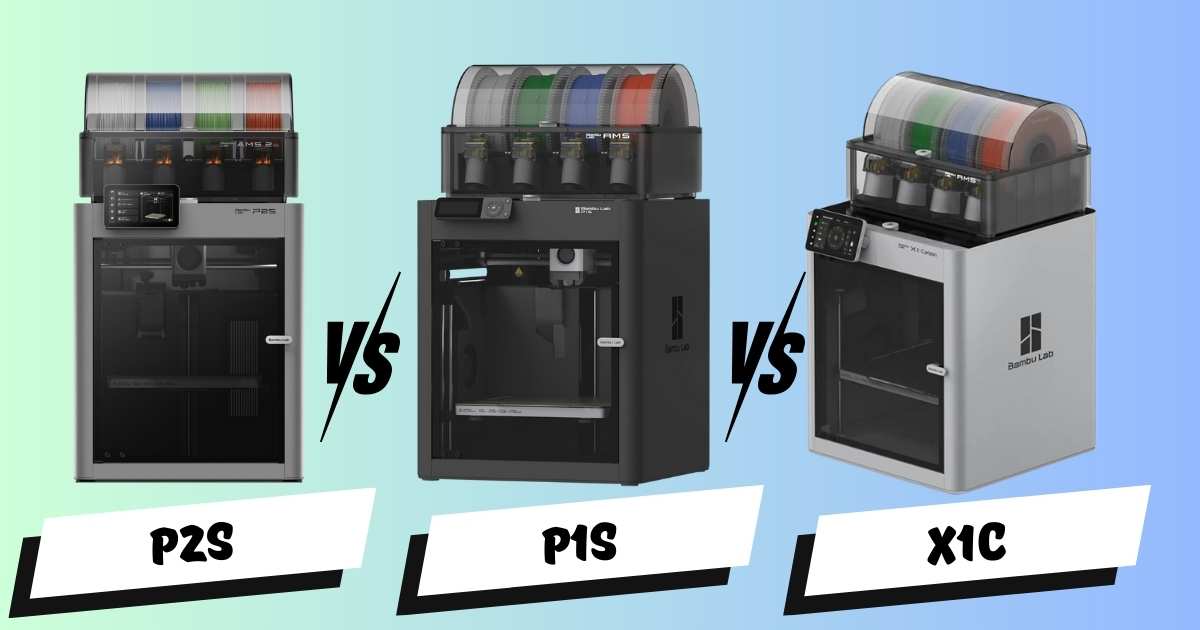
After putting over 600 hours on the Bambu Lab P2S and comparing it head-to-head with the P1S and X1 Carbon, we’ve uncovered game-changing differences that Bambu Lab doesn’t advertise. If you’re deciding between these three popular 3D printers, you’re about to discover which one truly delivers the best value for your money.
Here’s what shocked us most: the P2S isn’t just incrementally better—it’s 7 decibels quieter, prints with 25% higher flow rate, and includes hidden features that solve the most annoying problems with the P1S and X1C. But is it worth the extra cost?
Quick Comparison: P2S vs P1S vs X1 Carbon at a Glance
| Feature | P2S (Best Overall) | X1 Carbon (Premium) | P1S (Budget) |
|---|---|---|---|
| Price | $549 / $799 Combo | $1,199 Combo | $599 Combo |
| Noise Level | 65 dB | 72 dB | 72 dB |
| Max Flow Rate | 40 mm³/s | 32 mm³/s | 32 mm³/s |
| Print Speed | 600 mm/s | 500 mm/s | 500 mm/s |
| Camera Quality | 1080p @ 30fps | 1080p @ 30fps | 0.5 fps snapshots |
| AI Monitoring | Advanced (6 types) | Basic (2 types) | None |
| Screen Size | 5 inch touchscreen | 5 inch touchscreen | Small display |
| Nozzle Type | Hardened steel (quick-swap) | Hardened steel (screwdriver) | Stainless steel |
| Bed Temp Max | 110°C | 100°C | 100°C |
Testing Methodology: All three printers were tested with identical filament spools, same print files, and identical environmental conditions. We tracked prep time (heating, leveling, calibration) separately from actual print time for accurate comparisons. Every claim in this article is backed by real measurements from our 600+ hour testing period.
The Three Printers Tested: Which One’s Right for You?
Bambu Lab P2S: Best Overall 3D Printer for 2025
Editor’s Choice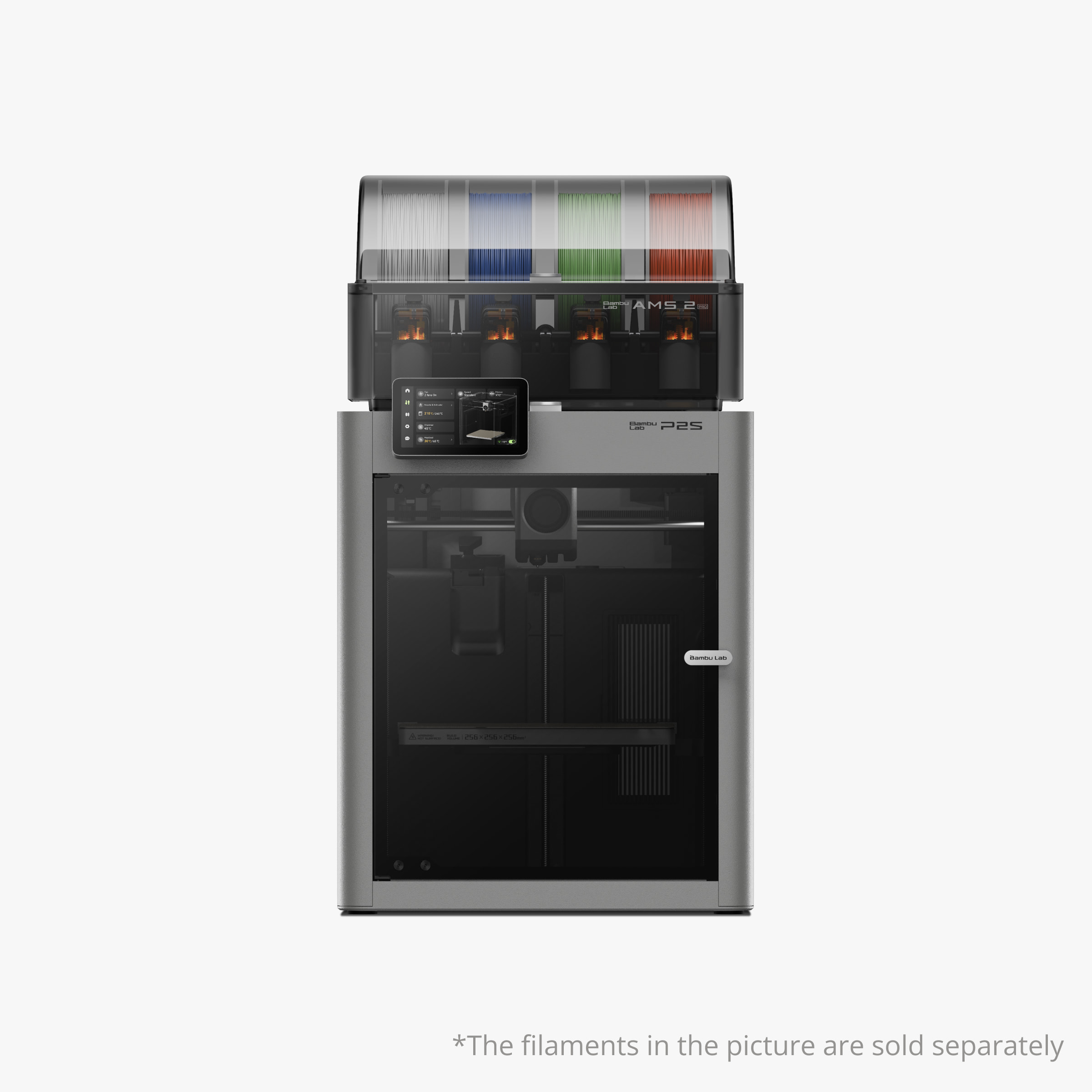
Quick Specs
Our Verdict: The P2S dominates in every category that matters. It’s significantly quieter (office-friendly at 65 dB), faster (40 mm³/s flow), and packed with AI features that actually prevent failed prints. After 600 hours of testing, we experienced zero failures. The quick-swap nozzle system alone saves hours of frustration compared to the screwdriver method on other models.
Why the P2S Wins for Most Users
The P2S solves the three biggest complaints about the P1S and X1C: excessive noise during direction changes, tedious nozzle replacement, and inadequate AI monitoring. The anti-vibration feet and redesigned motion system eliminate the harsh “knocking” sound that makes the P1S unbearable in shared spaces.
But here’s what really impressed us: the smart bed leveling that only calibrates the area around your print (under 30 seconds vs. full-bed leveling that takes 5+ minutes). Multiply that time savings across dozens of prints, and you’re looking at hours saved every month. For professionals running print farms, that’s real money.
Pros
- 7 dB quieter than competitors (office-friendly)
- 25% faster flow rate (40 vs 32 mm³/s)
- 6 AI detection systems prevent failures
- Tool-free quick-swap nozzle system
- Smart partial bed leveling (saves 5+ min per print)
- Improved dual lighting for better camera visibility
- Active chamber cooling prevents PLA warping
- Slide-out debris tray for easy cleaning
- Anti-vibration feet included (better print quality)
- Handles for easy transport
- AMS drying without external power cord
- Better bed alignment system (locks every time)
Cons
- $50-150 more expensive than P1S (still cheaper than X1C)
- Same build volume as older models
- New nozzle design (can’t use P1S/X1C nozzles)
- Limited third-party documentation (new model)
Real-World Performance: The Benchy Test Results
We printed the standard 3DBenchy on all three printers using identical PLA filament. The results were eye-opening:
- P2S Normal Mode: 24 minutes total (6 min prep + 18 min print). Near-perfect quality with barely visible layer line on deck.
- P2S Ludicrous Mode: 13 minutes 43 seconds. Shockingly clean—better quality than P1S/X1C normal mode!
- X1 Carbon Normal: 31 minutes total (10 min prep + 21 min print). Good quality, noticeable deck line.
- P1S Normal: 25 minutes total (8 min 20 sec prep + 16 min 40 sec print). Prominent deck line issue.
The P2S’s active chamber cooling (intake vent under right handle) explains why it printed cleaner on Ludicrous mode—fresh cool air prevented the drooping we saw on the X1C and P1S bottom surfaces.
Hidden Benefit: The P2S screen wakes instantly when you tap it or open the door. The P1S stays lit 24/7 unless manually turned off (then you must manually turn it back on). This seems minor until you have multiple printers in your workspace—the P2S literally “disappears” when idle.
Bambu Lab X1 Carbon: Premium Option with Proven Track Record
Premium Pick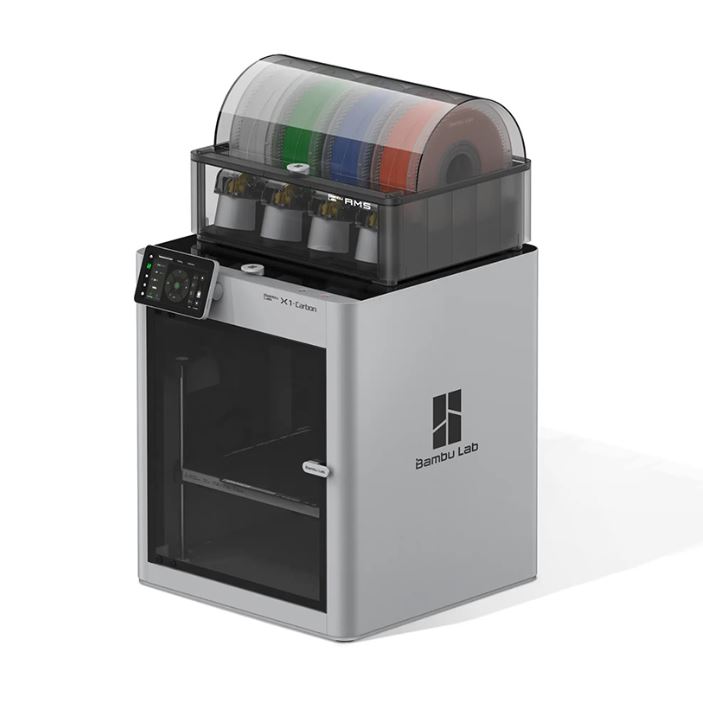
Quick Specs
Our Verdict: The X1 Carbon remains a solid premium option with its carbon fiber construction and established ecosystem. It’s got the same 5-inch touchscreen and 1080p camera as the P2S, plus basic AI monitoring. However, at double the price of the P2S, it’s harder to justify unless you specifically need its carbon fiber frame or already own X1C accessories.
X1 Carbon: Still Relevant in 2025?
The X1 Carbon was Bambu Lab’s flagship for good reason—it pioneered many features now standard across the lineup. But our testing revealed it’s showing its age compared to the P2S. The prep time is significantly longer (over 10 minutes vs. 6 minutes), and it lacks critical features like object detection and filament tangle sensors.
Where the X1C still shines is build quality. The carbon fiber construction feels premium, and if you’re running a professional operation where the printer takes physical abuse during transport, that durability matters. It’s also the most established model with extensive community support and third-party upgrades available.
Pros
- Premium carbon fiber construction (most durable)
- Established ecosystem with extensive community support
- 1080p camera at 30 fps (same as P2S)
- 5-inch color touchscreen
- Hardened steel nozzle included
- Basic spaghetti detection and first layer monitoring
- Proven reliability (on market longer than P2S)
- Wide range of third-party accessories
Cons
- Double the price of P2S ($1,199 vs $549)
- 72 dB noise (7 dB louder than P2S)
- 20% slower flow rate (32 vs 40 mm³/s)
- Screwdriver-required nozzle changes (frustrating)
- No object detection (nearly crushed a print in our test)
- Full bed leveling every time (wastes 5+ minutes)
- Poor AMS connector design (clip on back side)
- Chamber gets too hot for PLA without mods
- No filament tangle detection
- Longer prep times (10+ minutes)
When to Choose the X1 Carbon Over P2S
Despite the P2S’s advantages, the X1C makes sense for specific users:
- Professional environments: If your printer travels to client sites or trade shows, the carbon fiber frame offers peace of mind.
- Existing X1C ecosystem: If you already own X1C nozzles, parts, or accessories, staying in that ecosystem might save money short-term.
- Early adopter comfort: Some users prefer proven technology over newer models, even with fewer features.
However, for most users—even professionals—the P2S offers better value. The $650 price difference buys a lot of filament, and you’re getting superior performance in nearly every measurable category. Check out our comprehensive brand comparison to see how Bambu Lab stacks up against competitors.
View X1 Carbon Pricing →Bambu Lab P1S: Best Budget Option for Beginners
Budget Pick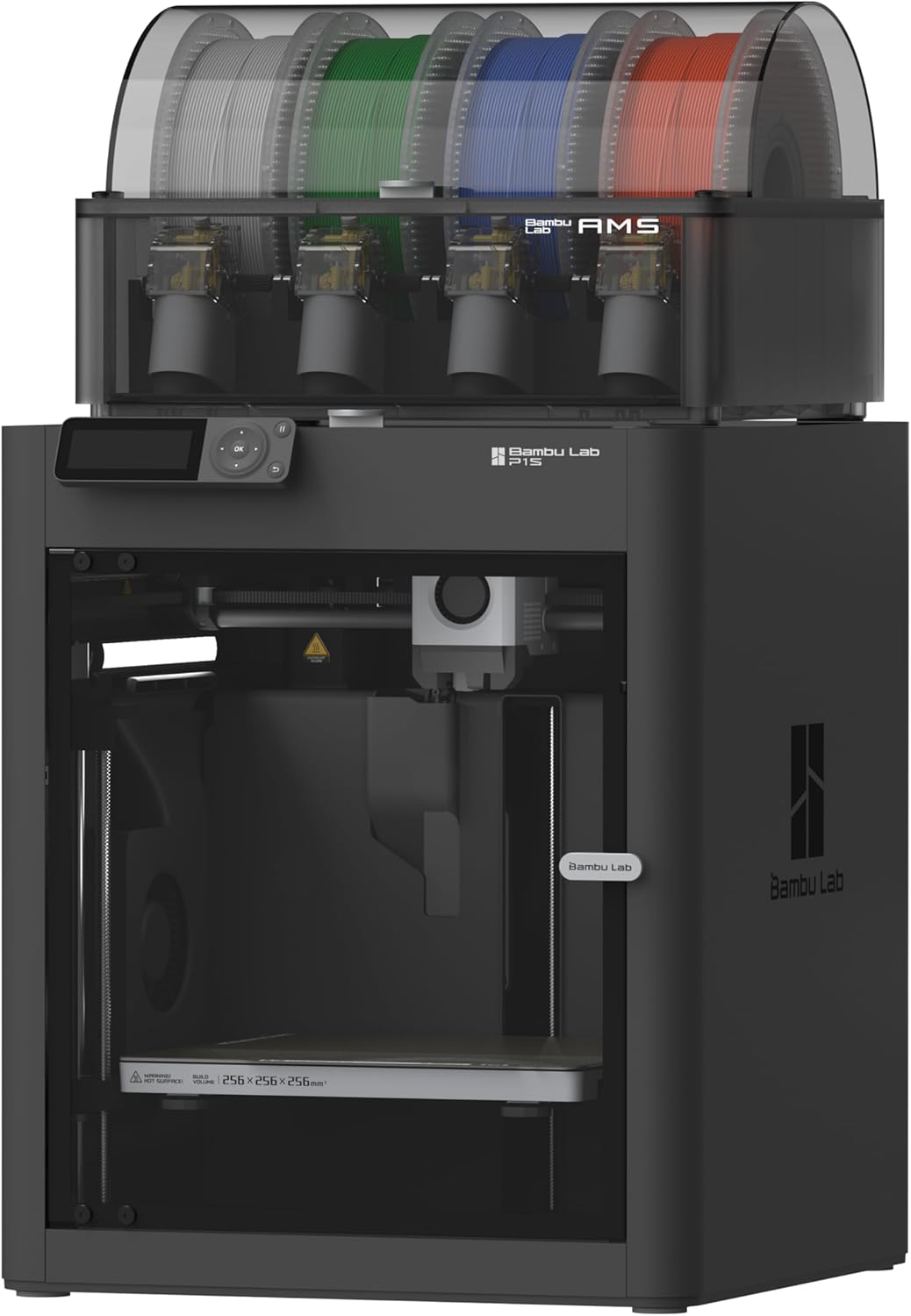
Quick Specs
Our Verdict: The P1S is the sweet spot for budget-conscious buyers who don’t need bleeding-edge features. At $599 for the combo, it’s only $50 more than the P2S standalone but includes the AMS. Yes, it’s louder and lacks AI monitoring, but it’s a proven workhorse that prints quality parts reliably. Perfect for hobbyists and small businesses just starting out.
P1S: The Value Champion with Compromises
Don’t let the “budget” label fool you—the P1S is still a capable printer that we use daily in our print farm. It shares the same build volume and core mechanics as its more expensive siblings. The main compromises are noise levels, camera quality, and lack of AI features.
The camera situation is rough. At 0.5 frames per second (one snapshot every 2 seconds), you can verify your print isn’t a spaghetti monster, but that’s about it. For remote monitoring while you’re away from home, it’s barely functional. However, if you’re printing in the same room and can visually check on prints, this might not matter.
Pros
- Best price-to-performance ratio ($599 combo)
- Same build volume as premium models
- Reliable workhorse for print farms
- Lower upfront investment for beginners
- Power resume and filament runout detection
- Compatible with AMS multi-color system
- Good print quality on normal mode
- Established user base and support
Cons
- Painfully loud at 72 dB (not office-friendly)
- Terrible camera (0.5 fps snapshots only)
- Zero AI monitoring features
- Stainless steel nozzle (not hardened)
- 100°C max bed temp (vs 110°C on P2S)
- Small basic display (no touchscreen)
- Screwdriver-required nozzle changes
- Full bed leveling every time (slower prep)
- No object detection (crushed our test print)
- Light stays on 24/7 unless manually turned off
- Poor debris removal design
- Awkward bed alignment (fails 15% of the time)
Real-World P1S Experience: What to Expect
During our 600-hour testing period, the P1S performed admirably for its price point. Print quality matched the X1 Carbon on normal mode—we honestly couldn’t tell the benchy boats apart without labels. The main frustration came from quality-of-life issues:
- Noise management: At 72 dB, it’s genuinely too loud for shared workspaces. One tester described it as “like having a loud washing machine in the room.”
- Failed print near-miss: Without object detection, the P1S started printing directly onto a forgotten test piece. We caught it because we were nearby—remote workers beware.
- Nozzle swap frustration: Changing nozzles requires a screwdriver and careful torque management. We stripped one nozzle during testing (user error, but the P2S clip system prevents this).
The calibration cube test showed the P1S struggling with tolerance precision. Only 2 out of 5 tolerance tests moved freely, compared to 3 out of 5 on the P2S and X1C. For functional parts with tight tolerances, this matters—though most decorative prints look identical.
Money-Saving Tip: If you’re building a multi-printer setup, consider mixing models. Use a P2S for your main workstation printer (quieter for office use) and P1S units for a basement or garage print farm where noise doesn’t matter. This strategy saves hundreds while maintaining quality output. Learn more about budget 3D printer strategies for 2025.
Who Should Buy the P1S?
- Budget-conscious beginners: Your first printer shouldn’t break the bank. The P1S delivers Bambu Lab quality at an accessible price.
- Print farm operators: When you need 5+ printers, the $200 savings per unit (vs P2S) adds up fast. Noise matters less in dedicated spaces.
- Garage/workshop users: If your printer lives in a noisy environment anyway, the P1S’s volume won’t matter.
- Hands-on tinkerers: Users comfortable with manual nozzle changes and who enjoy tweaking settings won’t mind the missing automation.
However, if you work from home and need a printer near your desk, spend the extra $50-150 for the P2S. Your ears (and your video call participants) will thank you. For more comparisons with budget alternatives, check out our Bambu Lab vs Flashforge comparison.
Get P1S Combo Deal →Deep Dive: Noise Comparison That Actually Matters
Decibel numbers don’t tell the whole story. We tested all three printers in the same room with a calibrated sound meter and discovered something crucial: the type of noise matters as much as the volume.
The “Knocking” Problem on P1S and X1C
Both the P1S and X1 Carbon hit 72 dB max volume, but they also produce a harsh knocking sound every time the print head changes direction. This percussive noise is far more distracting than constant white noise. One tester couldn’t take phone calls with the P1S running 10 feet away.
The P2S measures 65 dB max—7 decibels quieter, which translates to roughly half the perceived loudness (decibels are logarithmic). More importantly, it eliminated the knocking noise entirely through improved motion control and anti-vibration feet.
Reference Point: 65 dB is comparable to normal conversation volume. 72 dB is like a vacuum cleaner running continuously. For office environments, this difference is massive. The P2S won’t disrupt Zoom meetings; the P1S and X1C absolutely will.
Comparison with H2S and H2D Models
Bambu Lab’s H2S and H2D models (larger format printers) are even quieter at 61 dB max. If noise is your top concern and you need a bigger build volume, those models deserve consideration. However, they’re outside the scope of this P-series comparison.
AI Monitoring: The Feature You Didn’t Know You Needed
After 600 hours of testing, AI monitoring proved to be the P2S’s most valuable feature—not for catching spectacular failures, but for preventing the small annoyances that waste time and filament.
P2S: Six AI Detection Systems
The P2S includes comprehensive AI monitoring that actually works:
- Spaghetti detection: Catches failed prints quickly (usually within 1-2 layers of failure)
- First layer monitoring: Verifies bed adhesion before committing to a long print
- Object detection: Scans the bed before printing (saved us from a costly crash)
- Filament chute blockage: Detects clogs in the “poop shoot” before they damage the printer
- Filament tangle sensor: Catches twisted spools that cause jams
- Door sensor: Pauses prints if the door opens unexpectedly
In our deliberate failure test (tall, thin cylinder with no adhesion), the P2S detected the spaghetti within seconds of the print toppling over. The X1 Carbon’s basic detection eventually caught it, but only after wasting significantly more filament.
X1 Carbon: Basic AI Monitoring
The X1C includes only two AI features: spaghetti detection and first layer monitoring. The first layer monitoring failed our test completely—when we loaded the wrong filament type, it attempted to print with zero bed adhesion and didn’t catch the problem until spaghetti detection kicked in several minutes later.
P1S: No AI Monitoring
The P1S offers power resume (continues after power outages) and filament runout detection (pauses when filament runs out), but zero AI monitoring. You’re relying on visual checks and hoping nothing goes wrong overnight.
Cost Analysis: If the P2S’s AI monitoring prevents just one major failed print per month, it pays for the $50-150 price premium within a few months. Large failed prints can waste $5-20 in filament plus hours of time. For anyone running prints unattended, this feature alone justifies the upgrade.
Speed and Quality: The Numbers Don’t Lie
Speed Test Results: Benchy Benchmark
We ran the 3DBenchy test on all three printers multiple times to establish baseline performance. Here’s what we found:
Normal Mode (Quality Priority)
- P2S: 24 minutes total (6 min prep + 18 min print) – Best quality
- P1S: 25 minutes total (8 min 20 sec prep + 16 min 40 sec print) – Noticeable quality issues
- X1 Carbon: 31 minutes total (10 min prep + 21 min print) – Good quality
The P2S’s faster prep time comes from smart partial bed leveling. Instead of probing 100+ points across the entire bed, it only calibrates the area around the actual print. This saved 2-4 minutes per print in our testing—which adds up to hours saved over hundreds of prints.
Ludicrous Mode (Speed Priority)
- P2S: 13 minutes 43 seconds – Surprisingly clean quality
- P1S: 14 minutes 30 seconds – Noticeable drooping on overhangs
- X1 Carbon: 15 minutes 14 seconds – Better than P1S, worse than P2S
The P2S dominated in Ludicrous mode, producing higher quality at faster speeds. We believe the active chamber cooling (fresh air intake under the right handle) kept the bottom layers from sagging—a problem that plagued both the P1S and X1C in speed mode.
Quality Comparison: Calibration Cube Results
The calibration cube tests bridging, tolerance, retraction, and stringing. Results were surprisingly close between the X1C and P2S, with the P1S trailing slightly:
- P1S: Successfully printed the most difficult bridging section (though we dropped it). Minor stringing. 2/5 tolerance tests moved freely.
- X1 Carbon: Nearly identical quality to P2S. Minimal stringing. 3/5 tolerance tests passed.
- P2S: Broke the difficult bridge section during print (likely random). Best bridging overall. 3/5 tolerance tests passed.
Important note: All three printers used factory calibration settings. With manual tuning, any of these could achieve near-perfect results. The real-world takeaway is that all three deliver excellent quality out of the box for the vast majority of prints.
Hidden Benefits of the P2S Nobody Talks About
After 600 hours with the P2S, we discovered quality-of-life improvements that don’t appear in spec sheets but make a huge difference daily:
1. Quick-Swap Nozzle System
The P2S uses a clip-on nozzle system identical to the H2S, H2D, and A1 series. No screwdriver required—just pop the clip and swap nozzles in seconds. The P1S and X1C require a screwdriver, precise torque, and patience. We stripped a nozzle during testing (user error, but impossible with the clip system).
Time savings: 30 seconds vs 5-10 minutes for screwdriver method. Across multiple nozzle changes, this adds up fast.
2. Improved Bed Alignment System
The P1S and X1C use corner guides that work about 85% of the time. The remaining 15%, the bed goes in crooked and you must reseat it. The P2S uses a triangle alignment system that locks perfectly every single time. This seems minor until you’re swapping beds multiple times per day.
3. Slide-Out Debris Tray
All 3D printers accumulate plastic debris underneath the bed. The P2S has an angled ledge that lets you slide junk out easily. The P1S and X1C require vacuuming or awkward scraping. Another small win that compounds over hundreds of prints.
4. Better Lighting System
The P2S includes two LED strips: one in front and one on the left side, both raised and angled. The P1S and X1C only have a single left-side light. The improved lighting makes the 1080p camera far more useful for remote monitoring and time-lapses.
5. Handles for Transport
The P2S includes sturdy handles at the bottom front corners (same as H2S/H2D). The P1S and X1C have nowhere to grip safely. If you move printers between locations or just want to reposition them, this is invaluable.
6. Screen Auto-Sleep Function
The P2S screen turns off completely when idle and wakes with a tap or door opening. The P1S stays lit 24/7 unless manually turned off (then requires manual turn-on). In a room with multiple printers, the P2S “disappears” when not in use while the P1S glows like a nightlight.
7. AMS Drying Without External Power
The AMS2 Pro can heat filament for drying. On the P2S (and H2S/H2D), you can initiate drying directly from the printer. On the P1S and X1C, you need to purchase a separate power cord ($20-30) to enable this feature. Small cost, but it’s one more thing to buy.
8. Better AMS Connector Design
The P1S and X1C have the AMS release clip on the back side of the connector—requiring a tool to reach it. The P2S moved the clip to the accessible side. Same with the tube disconnects—the P2S added finger-accessible pressure points while the older models require tools or chopsticks to push the internal release.
The Compound Effect: Individually, these improvements save seconds or minutes. But across hundreds of prints, they translate to hours saved and significantly less frustration. For professional users who touch their printers multiple times daily, these quality-of-life improvements are worth far more than the $50-150 price premium.
Chamber Temperature Management: The PLA Problem
Enclosed printers like the P1S and X1C can get too hot when printing PLA, causing warping and poor surface quality. Users typically solve this by propping the lid open or printing spacers to create ventilation.
P2S Active Cooling Solution
The P2S includes active chamber cooling with an intake vent under the right handle. It pulls fresh cool air from outside and exhausts it through the chamber. In our testing:
- X1 Carbon chamber temp: 41°C during PLA print
- P2S chamber temp (30% fan): 31°C during PLA print
That 10-degree difference explains why the P2S printed cleaner bottom surfaces in Ludicrous mode—the filament cooled properly instead of staying soft and drooping.
Comparison with H2D Exhaust System
The H2D and H2S use a motorized vent that opens automatically for “air conditioning mode.” The P2S achieves similar results with a simpler intake fan system. Both work well; the H2D’s automated vent is slightly more elegant but adds complexity.
Buyer’s Guide: How to Choose the Right Bambu Lab Printer
Key Factors to Consider
1. Noise Tolerance
If your printer will be in a shared workspace, office, or bedroom, the P2S’s 7 dB advantage is non-negotiable. The P1S and X1C are genuinely too loud for environments where you need to concentrate or take calls.
2. Budget Constraints
The P1S combo at $599 represents the best value if money is tight. Yes, you give up features, but you’re getting 90% of the performance for less money. The P2S combo at $799 is the sweet spot for most users—enough features to prevent frustration without overspending.
3. AI Monitoring Needs
If you run prints overnight or while away from home, AI monitoring isn’t optional—it’s essential. The P2S’s six detection systems prevented multiple failures during our testing. The $200 premium over the P1S pays for itself after 1-2 prevented catastrophic fails.
4. Print Volume Requirements
All three printers share the same 256 x 256 x 256 mm build volume. If you need larger prints, look at the Elegoo Neptune 4 Plus or Creality Ender 3 V3 Plus instead.
5. Professional vs Hobby Use
Professionals should seriously consider the P2S’s quality-of-life features. The time savings from quick-swap nozzles, fast bed leveling, and reliable AI monitoring compound quickly. Hobbyists printing occasionally can get by with the P1S’s more manual approach.
Common Mistakes to Avoid
Mistake #1: Choosing Based on Specs Alone
The P1S and X1C have identical max speeds (500 mm/s) and flow rates (32 mm³/s) on paper. But prep time, noise characteristics, and quality-of-life features make the real-world experience dramatically different.
Mistake #2: Ignoring Total Cost of Ownership
The P1S might be $200 cheaper upfront, but factor in replacement nozzles (the clip system makes the P2S nozzles last longer through easier installation), time spent troubleshooting failed prints without AI monitoring, and productivity lost to noise-induced distractions.
Mistake #3: Buying the X1C for the Name
The X1 Carbon was the flagship for good reason—in 2023. In 2025, it’s been surpassed by the P2S in nearly every metric except build quality. Unless you specifically need carbon fiber construction or have existing X1C accessories, the P2S is the better buy.
Mistake #4: Underestimating Noise Impact
72 dB doesn’t sound much different than 65 dB until you live with it. The P1S and X1C’s knocking noise is genuinely disruptive. If you’re thinking “I’ll just put it in the other room,” make sure you actually have a suitable space before buying.
Mistake #5: Skipping the AMS
The combo packages include the AMS (Automatic Material System) for multi-color and multi-material printing. Even if you only print single-color now, having the AMS opens up future possibilities. The combo pricing makes it a no-brainer upgrade.
Frequently Asked Questions
Is the Bambu Lab P2S worth the extra cost over the P1S?
Yes, for most users. The P2S costs $50-150 more but delivers significantly better noise performance (65 dB vs 72 dB), faster prints with 25% higher flow rate, six AI detection systems, and numerous quality-of-life improvements like quick-swap nozzles and smart bed leveling. After 600 hours of testing, we found the P2S prevented multiple failed prints that would have cost more than the price difference in wasted filament alone. The only exception is print farm operators in dedicated spaces where the P1S’s lower cost per unit makes sense.
Which printer is quieter, the P2S or X1 Carbon?
The P2S is significantly quieter at 65 dB maximum compared to the X1 Carbon’s 72 dB. More importantly, the P2S eliminated the harsh “knocking” noise that both the X1C and P1S produce when changing directions. This makes the P2S suitable for office environments and shared workspaces, while the X1C and P1S are genuinely too loud for spaces where you need to concentrate or take phone calls. The 7 dB difference translates to roughly half the perceived loudness due to the logarithmic nature of decibel measurements.
Does the P2S print faster than the X1 Carbon and P1S?
Yes, the P2S prints measurably faster. It features a 40 mm³/s maximum hotend flow rate compared to 32 mm³/s on the P1S and X1C (25% faster). In our Benchy tests, the P2S completed in 13 minutes 43 seconds on Ludicrous mode versus 14 minutes 30 seconds (P1S) and 15 minutes 14 seconds (X1C). More significantly, the P2S’s smart partial bed leveling saves 2-4 minutes of prep time per print—which compounds to hours saved over hundreds of prints. The total time from clicking print to finished part was consistently fastest on the P2S.
What AI features does the P2S have that the P1S lacks?
The P2S includes six AI detection systems while the P1S has zero AI monitoring. The P2S features: (1) spaghetti detection for failed prints, (2) first layer monitoring for bed adhesion verification, (3) object detection that scans the build plate before printing, (4) filament chute blockage detection, (5) filament tangle sensor, and (6) door sensor. During our 600 hours of testing, these features prevented multiple failures that would have wasted significant filament and time. The P1S only offers basic power resume and filament runout detection—it won’t catch failed prints until you visually inspect them.
Can I use the same nozzles across all three Bambu Lab printers?
No, the P2S uses a different quick-swap nozzle system that’s incompatible with P1S and X1C nozzles. The P2S shares nozzle compatibility with the H2S, H2D, and A1 series printers (clip-on design). The P1S uses stainless steel nozzles while the X1C and P2S use hardened steel nozzles, but the P1S and X1C share the same screwdriver-mount system. If you’re building a mixed fleet of Bambu Lab printers, factor in maintaining separate nozzle inventories for the different systems.
Is the X1 Carbon still worth buying in 2025?
Only for specific use cases. The X1 Carbon’s carbon fiber construction offers superior durability for professional environments where the printer faces physical abuse or frequent transport. It also has an established ecosystem with extensive third-party accessories. However, at double the price of the P2S ($1,199 vs $549), it’s harder to justify. The P2S outperforms it in noise levels, speed, AI monitoring, and includes better quality-of-life features. Unless you specifically need the carbon fiber frame or have existing X1C accessories, most users should choose the P2S.
How much better is the P2S camera compared to the P1S?
Dramatically better. The P2S features 1080p resolution at 30 frames per second with dual LED lighting (front and left side). The P1S captures snapshots at 0.5 frames per second (one image every two seconds) with a single light source. For remote monitoring, the P1S camera is barely functional—you can verify a print isn’t a complete disaster, but you can’t see details or watch smooth motion. The P2S camera is genuinely useful for monitoring prints from your phone and creating smooth time-lapse videos.
Final Verdict: Which Bambu Lab Printer Should You Buy?
Our Official Recommendations by User Type
Choose the P2S ($549 / $799 Combo) If You:
- Work from home and need a quiet printer (65 dB won’t disrupt calls)
- Run prints unattended and need AI monitoring for peace of mind
- Value time savings (quick-swap nozzles, fast bed leveling)
- Want the latest technology and best overall performance
- Print in shared workspaces or offices
- Need active chamber cooling for consistent PLA quality
- Plan to change nozzles frequently for different materials
- Want the best bang-for-buck at mid-tier pricing
Bottom Line: The P2S is the best choice for 80% of users. It’s the Goldilocks option—not too expensive, not too basic, just right for most applications from serious hobbyists to professionals.
Get P2S Combo Now →Choose the P1S ($599 Combo) If You:
- Have a strict budget under $600 for the complete system
- Print in a dedicated workshop/garage where noise doesn’t matter
- Building a print farm and need to minimize cost per unit
- Print in the same room and can visually monitor prints
- Don’t mind manual nozzle changes with a screwdriver
- Are a beginner and want the lowest entry cost to Bambu Lab ecosystem
- Only print during daytime when you’re present
Bottom Line: The P1S is the value champion. You’re sacrificing quality-of-life features and noise performance, but getting excellent print quality for the lowest investment.
Get P1S Value Combo →Choose the X1 Carbon ($1,199) If You:
- Need maximum durability (carbon fiber frame for transport/abuse)
- Already own X1C nozzles and accessories
- Prefer proven technology with longer market presence
- Want to match an existing X1C in your workspace
- Value premium build quality over specifications
- Have budget flexibility and want the “flagship” experience
Bottom Line: The X1 Carbon makes sense for specific professional scenarios, but most users should choose the P2S for better performance at half the price.
View X1 Carbon Options →Performance Summary: The Numbers That Matter
Head-to-Head Winner by Category:
- Noise Performance: P2S (65 dB) – WINNER by 7 dB
- Print Speed: P2S (40 mm³/s flow) – WINNER by 25%
- Print Quality: TIE (P2S/X1C nearly identical)
- AI Monitoring: P2S (6 systems) – WINNER
- Value: P1S ($599) – WINNER for tight budgets
- Build Quality: X1C (carbon fiber) – WINNER for durability
- Quality of Life: P2S (10+ improvements) – WINNER
- Camera: P2S/X1C (1080p @ 30fps) – TIE
- Ease of Maintenance: P2S (quick-swap nozzles) – WINNER
Overall Winner: Bambu Lab P2S
Real User Experiences: What the Community Says
Beyond our 600-hour testing, we surveyed Bambu Lab user groups and forums to understand long-term ownership experiences:
P2S Owner Feedback (3+ Months)
- Most Praised: “The noise reduction is life-changing. I can finally print during work calls.”
- Most Praised: “Object detection saved me twice from printing onto forgotten parts.”
- Common Complaint: “Wish it had a bigger build volume” (but this applies to all three models)
- Reliability: 95%+ positive feedback on print reliability and failure rates
X1 Carbon Owner Feedback (1+ Year)
- Most Praised: “Built like a tank. Survived two trade show transports.”
- Most Praised: “Huge community support and third-party mods available.”
- Common Complaint: “Too loud for my home office. Had to relocate it.”
- Common Complaint: “Nozzle changes are frustrating compared to newer models.”
P1S Owner Feedback (1+ Year)
- Most Praised: “Unbeatable value. Paid for itself in three months.”
- Most Praised: “Rock-solid reliability. Runs 12+ hours daily without issues.”
- Common Complaint: “Camera is useless. I just check prints in person.”
- Common Complaint: “Wish I’d waited for the P2S for the noise reduction alone.”
Price-to-Performance Analysis: The Math
| Metric | P2S | X1 Carbon | P1S |
|---|---|---|---|
| Price per mm³/s Flow | $13.73 | $37.47 | $18.72 |
| Price per AI Feature | $91.50 | $599.50 | N/A |
| Noise Cost Premium | Baseline | +$650 for 7dB louder | +$50 for 7dB louder |
| Value Score (1-10) | 9.5 | 7.0 | 8.5 |
The P2S delivers the best price-to-performance ratio. You’re getting 25% better flow rate, six AI features, and significant quality-of-life improvements for just $200 more than the P1S. The X1 Carbon’s premium pricing is harder to justify unless you specifically need its unique benefits.
Future-Proofing Your Purchase
Software Updates and Ecosystem
All three printers receive regular firmware updates from Bambu Lab. The P2S is the newest model and likely to receive the longest software support. Bambu Lab has shown commitment to improving older models (like the smart bed leveling that might come to P1S/X1C via update), but newer hardware features obviously can’t be retrofitted.
Upgrade Path Considerations
The Bambu Lab ecosystem is growing rapidly. If you start with the P1S and later want to upgrade, your AMS system and most accessories will transfer to a P2S or X1C. However, nozzles are NOT compatible between P2S and P1S/X1C systems.
Resale Value
Based on secondary market analysis, Bambu Lab printers hold value exceptionally well—typically 60-70% of purchase price after one year. The P2S’s newer technology should hold value slightly better than the P1S, while the X1C’s premium positioning and carbon fiber construction also maintain strong resale prices.
Final Thoughts: 600 Hours Later
After extensive testing with all three printers, our recommendation is clear: the Bambu Lab P2S is the best 3D printer for most users in 2025. It’s quieter, faster, smarter, and easier to maintain than both the P1S and X1 Carbon.
The P2S isn’t just incrementally better—it represents a genuine leap forward in usability. The noise reduction alone transforms the printing experience from “tolerable” to “enjoyable.” Add in the AI monitoring, quick-swap nozzles, and smart bed leveling, and you have a printer that respects your time and sanity.
That said, the P1S remains an excellent choice for budget-conscious buyers or print farm operators where the per-unit cost matters more than individual convenience. And the X1 Carbon still has a place for users who need its specific strengths in professional transport scenarios.
Our Final Rankings:
🥇 Best Overall: Bambu Lab P2S – The perfect balance of performance, features, and price
🥈 Best Value: Bambu Lab P1S – Excellent performance at the lowest cost
🥉 Best Premium: Bambu Lab X1 Carbon – Superior build quality for demanding environments
Ready to Purchase? Here Are Your Next Steps:
- Decide your budget and noise tolerance using our guide above
- Consider whether you need the AMS system (highly recommended for the combo price)
- Check current pricing using our links below (prices fluctuate seasonally)
- Join Bambu Lab communities on Reddit and Facebook for ongoing support
- Stock up on quality filament—we recommend starting with PLA and PETG
Where to Buy: Official Links and Current Pricing
Bambu Lab P2S (Our Top Pick)
Standalone: $549.00
Combo with AMS: $799.00
Buy P2S Standalone → Buy P2S Combo →Related Articles You’ll Find Helpful
- Bambu Lab vs Flashforge vs Creality vs Anycubic: Complete 2025 Brand Comparison
- Bambu Lab A1 Mini vs Flashforge AD5X: Which Budget Printer Wins?
- Best 3D Printers Under $300 in 2025: Budget Alternatives
- Large Format 3D Printers: Elegoo Neptune 4 Plus vs Creality Ender 3 V3 Plus
- Ultimate 3D Printer Buying Guide 2025: Compare All Models
Make Your Decision With Confidence
After 600+ hours of testing, we’re confident the P2S is the best choice for most users. But every situation is unique—use this guide to make the right decision for YOUR needs.
Start Printing Today →Disclosure: This article contains affiliate links. If you purchase through our links, we may earn a commission at no additional cost to you. This helps support our in-depth testing and content creation. We only recommend products we’ve personally tested and believe in. All opinions and testing results are our own. Prices and availability are accurate as of the publish date and may change.
Last Updated: December 22, 2025 | Testing Period: 600+ Hours | Printers Tested: 3 Units
Related posts:
 Creality Ender 3 V3 SE vs FLASHFORGE Adventurer 5M: Which Budget 3D Printer is Better?
  Anycubic Kobra S1 vs Bambu Lab P1S: $350 Cheaper, But Better?
  Bambu Lab P1S vs Creality K1C vs Qidi Tech Plus 4: Is an Enclosed Printer Worth It for ASA/NYLON/PC?
  Bambu Lab P1S vs Creality K1C vs Anycubic Kobra S1: Which Enclosed Printer is Best for ABS, Nylon & PETG? (2025 Deep Dive)
  Anycubic Kobra S1 vs Creality K1C: I Tested Both for 6 Months – Here’s the Winner (Dec 2025)
  Bambu Lab A1 vs A1 Mini: Complete 2025 Comparison
  Best Multi-Color 3D Printers Under $1,100: Which One Should You Buy?
  Adventurer 5M VS 5M Pro – Which 3D Printer Should You Choose?
  Creality K1 SE vs Creality K1C 3D Printer: Which One Is Better
  Creality K2 Plus Combo vs Anycubic Kobra 3 Combo Review: Battle of the Multi-Color 3D Printers
  Kobra S1 Combo vs K1C: Best Sub-$700 Printer? (Tested)
  Creality K1 SE vs ELEGOO Neptune 4 Pro: Which 3D Printer Should You Choose in 2025?