

QIDI Q2 vs QIDI Q2C: Which Enclosed 3D Printer Deserves Your Money?
You’re standing at a crossroads. Two powerful enclosed 3D printers from QIDI Technology sit before you—the QIDI Q2 and the QIDI Q2C. Both promise professional-grade prints, high-speed performance, and beginner-friendly operation. But which one’s actually worth your hard-earned cash?
I’ve spent weeks analyzing customer reviews, comparing specs, and diving deep into what real users are saying about both machines. Spoiler alert: the differences between these printers matter way more than you’d think, and choosing wrong could cost you hundreds in frustration.
Whether you’re upgrading from an entry-level Creality Ender printer or adding to your print farm, this QIDI Q2 vs QIDI Q2C comparison will help you make the smartest decision. Let’s cut through the marketing fluff and figure out which printer actually delivers.
Quick Answer: The QIDI Q2 wins for users who need the heated chamber and premium filtration for ABS/ASA printing. The Q2C offers better value for PLA/PETG-focused makers who don’t need chamber heating and want to save $60+.
Quick Comparison: QIDI Q2 vs QIDI Q2C at a Glance
| Feature | QIDI Q2 Premium Choice | QIDI Q2C Best Value |
|---|---|---|
| Price | $499 (was $549) | $439 |
| Heated Chamber | ✓ 65°C PTC | ✗ None |
| Air Filtration | Triple System (G3 + H12 HEPA + Carbon) | Standard Filtration |
| Build Volume | 270 x 270 x 256mm | 270 x 270 x 256mm |
| Enclosure Material | ABS + Metal (Glass doors) | Plastic (Standard doors) |
| Max Speed | 600mm/s | 600mm/s |
| Max Nozzle Temp | 370°C | 370°C |
| AI Camera | ✓ Included | ✗ Not Included |
| Best For | ABS, ASA, Engineering Filaments | PLA, PETG, TPU |
| Rating | 4.4/5 (63 reviews) | 4.3/5 (1,630 reviews) |
Both printers share the same CoreXY structure, precision linear rails, and QIDI’s exclusive nozzle-based leveling sensor. The real difference? The Q2 packs premium features for serious makers, while the Q2C strips away the extras to hit an aggressive price point.
QIDI Q2: Premium Enclosed 3D Printer with Heated Chamber
QIDI Q2 – Best for Engineering Filaments & Multi-Material Printing
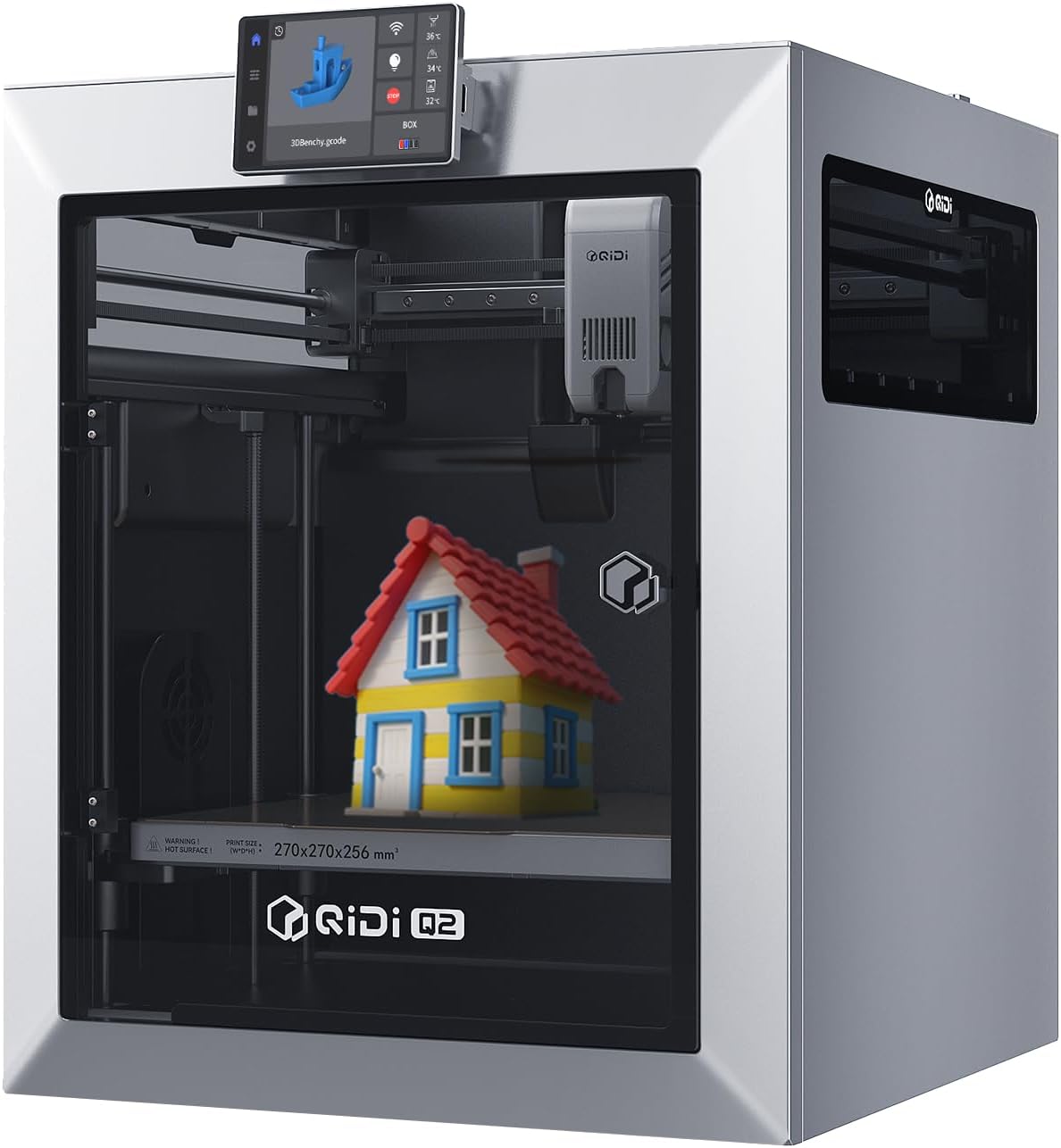
QIDI Q2 Quick Specs
- Price: $499 $549
- Build Volume: 270 x 270 x 256mm
- Heated Chamber: Yes, 65°C PTC
- Air Filtration: Triple system with HEPA
- Max Speed: 600mm/s
- Rating: 4.4/5 (63 reviews)
Why the QIDI Q2 Stands Out
The QIDI Q2 isn’t messing around. This machine’s built for makers who’ve graduated from basic PLA printing and want to tackle engineering-grade materials without the headaches. That 65°C heated chamber? It’s a game-changer for ABS, ASA, and carbon fiber composites.
Real users rave about the printer’s stability. Ryan (verified buyer, October 2025) called it his “new workhorse,” praising how it handles complicated prints with overhangs better than his entire fleet of printers. Marx echoed this, noting he prints ABS without any bed adhesives—something that’d be impossible on most machines.
The glass doors and aluminum exterior aren’t just for looks. They provide superior heat retention and give the printer a premium feel that justifies the price difference. Plus, the sliding glass top is genius for PLA printing—you can vent heat without completely removing panels.
What We Love About the Q2
- 65°C heated chamber eliminates warping on ABS/ASA prints
- Triple air filtration system (HEPA + carbon) for safe indoor use
- Premium glass doors and metal construction feel rock-solid
- AI camera monitoring included for remote print tracking
- Handles 16-color prints with QIDI BOX compatibility
- Silicone nozzle cleaner and built-in fan filters standard
- Setup takes under 1 hour from box to first print
Q2 Drawbacks to Consider
- $60+ more expensive than the Q2C
- 12-minute warm-up time before printing starts
- Some firmware bugs reported (network connectivity issues)
- Z-offset adjustment isn’t exposed in the UI clearly
- Heavier than Q2C due to metal construction (18.1kg)
Our Verdict on the QIDI Q2
Bottom line: The Q2 earns its premium price if you’re serious about printing engineering materials or plan to use the QIDI BOX for multi-color projects. The heated chamber alone saves countless hours of print failures when working with ABS or carbon fiber filaments.
However, one critical warning: User M. Black (verified buyer, November 2025) had a nightmare experience with firmware bugs, network drops, and poor UI design. While his review’s an outlier, it’s worth noting that QIDI’s customer support responsiveness will matter if you hit issues.
QIDI Q2C – Best Value for PLA/PETG Enthusiasts
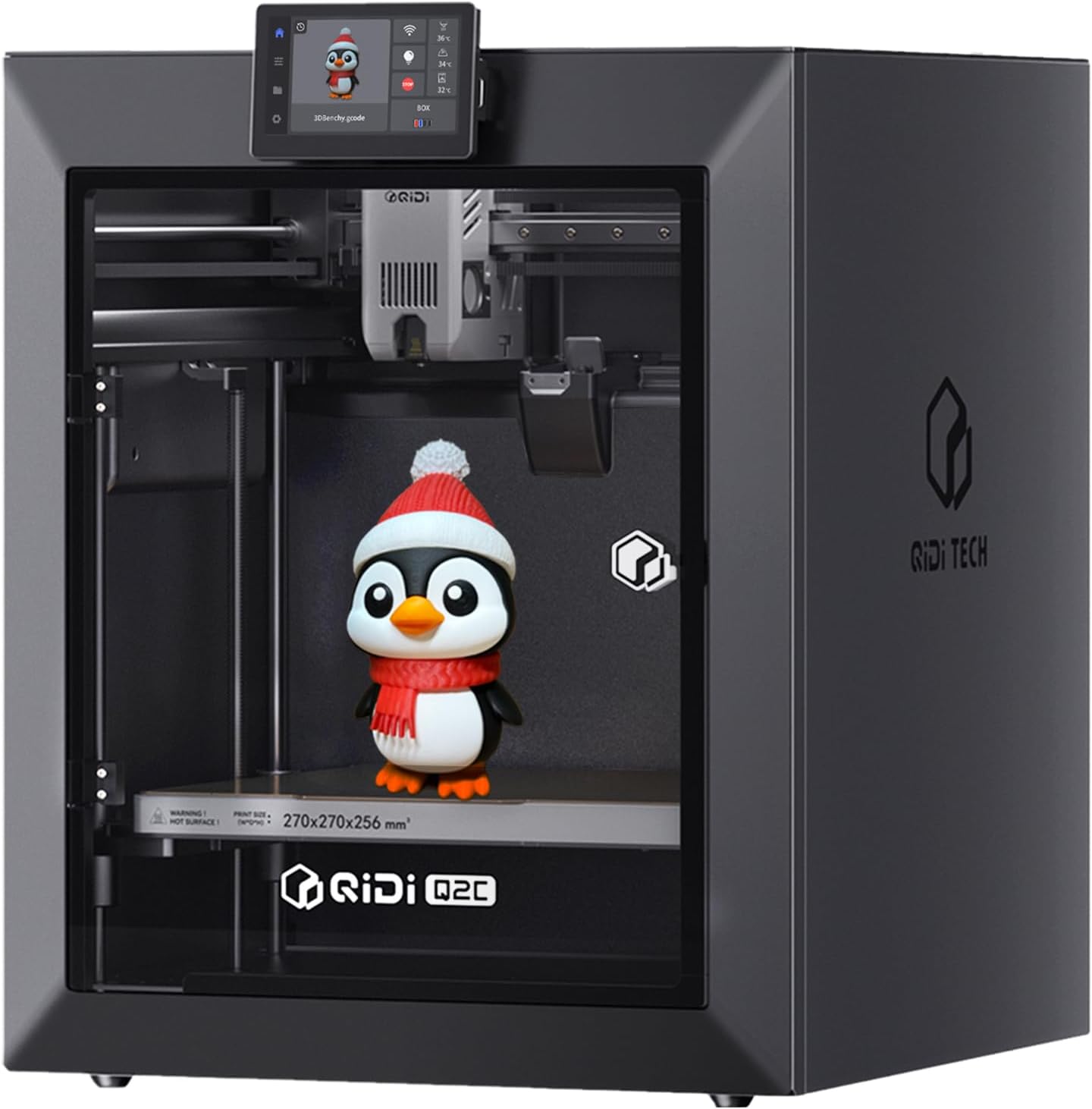
QIDI Q2C Quick Specs
- Price: $439.00
- Build Volume: 270 x 270 x 256mm
- Heated Chamber: No
- Air Filtration: Standard
- Max Speed: 600mm/s
- Rating: 4.3/5 (1,630 reviews)
What Makes the Q2C a Smart Buy
Don’t let the lower price fool you—the Q2C packs serious performance. Dennis Wright Jr. (verified buyer, December 2025) compared it directly to his Bambu Lab X1C and declared the build quality “that of the X1C and some!” That’s high praise from someone who owns premium machines.
The Q2C’s secret weapon? It’s open-source. You’re not locked into QIDI’s ecosystem like with closed systems. Tinkers and modders love this flexibility, and it means better community support long-term.
Scott G., who owns both a Q1 Pro and Plus 4, says the Q2C “outperforms them” for functional printing. He’s logged 60+ hours across PLA, PETG, and ASA without a single failure. Zero calibration needed out of the box—just unpack and print.
The 15-minute setup claim? Users confirm it’s legit. Remove four screws, cut some zip ties, and the printer walks you through initial bed leveling automatically. Compare that to the multi-hour assembly nightmares of budget competitors like Creality’s Ender 3 V3 series.
Q2C Strengths
- $60 cheaper than Q2 with same core performance
- Open-source firmware for unlimited customization
- Massive 1,630+ review sample size validates reliability
- Prints PLA, PETG, TPU, ASA flawlessly without chamber
- 15-minute setup—fastest in its price class
- Metal body panels despite lower cost
- Compatible with QIDI BOX for 16-color printing
- Excellent customer support (1-year warranty)
Q2C Limitations
- No heated chamber limits ABS/Nylon performance
- Standard filtration vs. Q2’s triple HEPA system
- No AI camera for remote monitoring
- Plastic enclosure panels instead of glass
- Setup instructions poorly written (video tutorials help)
- QIDI slicer software can crash (use Orca instead)
Real talk: If you’re not printing engineering filaments daily, the Q2C is the smarter buy. You’re getting 95% of the Q2’s performance for 88% of the cost. That $60 saved buys you quality filament or accessories.
Isaac L., who owns two Q1 Pros, upgraded to the Q2C and calls it “even better.” He specifically notes the metal body panels (despite the lower price) and “noticeably less play/wiggle” in the print head compared to previous models.
The open-source aspect matters more than most realize. When QIDI inevitably moves on to newer models, the Q2C community will keep developing updates and mods. Closed systems become obsolete; open systems evolve.
Head-to-Head: Critical Differences Between Q2 and Q2C
Heated Chamber: The $60 Question
Here’s the deal: the Q2’s 65°C heated chamber isn’t marketing hype. When printing ABS or ASA, ambient temperature fluctuations cause warping and layer separation. The chamber maintains consistent heat, resulting in stronger parts with better layer adhesion.
Marx’s review proves this—he prints ABS with zero bed adhesives on the Q2. Try that on the Q2C and you’ll fight warping constantly. If you’re serious about advanced 3D printing filaments like carbon fiber nylon or polycarbonate, the chamber justifies the cost.
But if your workflow centers on PLA and PETG? You’re paying for features you won’t use. Several Q2C users successfully print ASA without the chamber—it just requires better bed prep and enclosure management.
Build Quality Differences Explained
The Q2 sports an aluminum exterior with tempered glass doors. This isn’t just aesthetic—glass provides superior heat retention and visibility compared to plastic panels. The sliding top panel is particularly clever for PLA printing where you need ventilation.
The Q2C uses metal body panels (confirmed by multiple reviewers) but standard plastic for door/window sections. It’s still sturdy, just less premium-feeling. For a printer living in your garage or workshop, this distinction matters less than for one sitting on your office desk.
Air Filtration: Health vs. Budget
The Q2’s triple filtration (G3 pre-filter + H12 HEPA + activated carbon) actively removes VOCs and ultrafine particles—critical when printing ABS indoors. The carbon layer specifically targets the styrene fumes ABS releases.
The Q2C has basic filtration. If you’re printing PLA (minimal fumes) or have good workshop ventilation, no problem. But printing ABS in your home office without HEPA filtration? That’s a health risk the $60 savings won’t offset.
For safer 3D printing spaces, check out our guide on the best air purifiers for 3D printing workspaces.
AI Camera: Nice-to-Have or Essential?
The Q2 includes an AI camera for remote monitoring and time-lapse creation. It’s genuinely useful for catching print failures early or checking progress from your phone.
The Q2C lacks this. You can add a third-party camera like a Wyze Cam for $25-30, but it won’t integrate with QIDI’s software. If remote monitoring matters, factor that cost into your Q2C total.
Buyer’s Guide: Choosing Between QIDI Q2 and Q2C
Key Factors to Consider
1. Material Requirements Drive Your Choice
Let’s be blunt: what you print determines which printer you need. Here’s the breakdown:
- PLA, PETG, TPU only: Q2C saves you money without sacrificing quality
- Occasional ABS/ASA: Q2C works with proper enclosure management
- Regular engineering filaments (Nylon, PC, CF-anything): Q2’s chamber is non-negotiable
- Multi-material with QIDI BOX: Q2’s chamber ensures consistent extrusion across materials
2. Environment Matters More Than You Think
Printing in a climate-controlled office? The Q2C performs beautifully. Working in a drafty garage where temps swing 20°F daily? The Q2’s chamber compensates for environmental instability.
Similarly, indoor printing in living spaces demands the Q2’s superior filtration. The Q2C belongs in workshops, garages, or well-ventilated spaces.
3. Long-Term Cost Analysis
Don’t just compare sticker prices. Factor in:
- Filament waste: Q2’s chamber reduces failed ABS prints (easily $50+ savings over 6 months)
- Air purifier costs: If buying separately for Q2C ($100-200), that erases the price gap
- Replacement parts: Both use identical hotends, belts, and nozzles
- Resale value: Q2’s premium features hold value better
4. Common Mistakes to Avoid
Mistake #1: Buying the Q2 “just in case” you print ABS someday. If you haven’t printed engineering materials on your current printer, you probably won’t start.
Mistake #2: Choosing the Q2C then struggling with ABS because you underestimated how often you’d need it. Be honest about your material needs.
Mistake #3: Ignoring the open-source advantage of the Q2C. Long-term, this flexibility outweighs premium hardware features for many users.
Mistake #4: Not reading the actual setup instructions (seriously, watch YouTube tutorials—QIDI’s written guides are terrible on both models).
5. Upgrade Path Considerations
Both printers support the QIDI BOX for 16-color printing. This $300+ accessory transforms either machine into a multi-material powerhouse. If multi-color is your endgame, the Q2C’s lower entry cost makes more sense—invest savings into the BOX instead.
Looking to expand your printing capabilities? Our comparison of the best multi-color 3D printers explores options beyond QIDI’s ecosystem.
Performance in Real-World Use
Print Quality Comparison
Here’s what actual users report about print quality on both machines:
Surface Finish: Both excel. The upgraded 1.5GT synchronous belt eliminates VFAs (vertical fine artifacts) that plague cheaper printers. Isaac L. specifically noted “sooo smooth” surfaces with “no Z layer artifacts basically at all” on his Q2C.
First Layer Accuracy: The nozzle-integrated leveling sensor (identical on both) delivers flawless first layers automatically. Dennis Wright Jr. got a perfect Benchy on his Q2C’s maiden print with zero calibration.
Overhangs: Ryan found the Q2 handles overhangs better than his entire print farm. The Q2C matches this performance—it’s the CoreXY precision, not the chamber, delivering results.
Speed vs. Quality Trade-off: Both hit 600mm/s maximums, but realistic printing happens at 200-400mm/s. At these speeds, quality remains exceptional on both printers.
Reliability and Uptime
The Smichart logged 650+ hours on his first QIDI before buying the Q2C. His new machine’s at 40+ hours with zero failures. Fady Habib reports 1,700 hours on his X-Plus 3, which shares the Q2/Q2C’s core architecture.
The concerning outlier: M. Black’s Q2 experience with network drops, firmware bugs, and loading failures. While his 1-star review is the minority, it highlights that QIDI’s quality control isn’t perfect. The Q2C’s massive review count (1,630 vs 63) provides better statistical confidence.
Noise Levels
Scott G. notes his Q2C “runs quietly”—a huge upgrade from older 3D printers. The enclosed design plus precision linear rails keep noise minimal. Neither printer will wake sleeping family members through a closed door.
Maintenance Requirements
Both printers need identical maintenance:
- Lubricate linear rails every 100 hours
- Check belt tension monthly
- Clean nozzle as needed (Q2’s auto-cleaner helps)
- Replace PTFE tube annually (cheap, easy)
The Q2’s triple filters need replacement every 6-12 months (~$30-40). The Q2C’s basic filter is cheaper (~$15) but offers less protection.
FAQ: QIDI Q2 vs QIDI Q2C
Yes, but with caveats. Several verified buyers (including Fady Habib and dennis wright jr.) report successful ASA prints on the Q2C. The enclosed design helps retain some heat, but you’ll need excellent first-layer adhesion (use Magigoo or similar) and may still experience corner warping on larger prints. For occasional ABS use, it works. For daily engineering filament work, the Q2’s chamber prevents frustration.
It depends on your materials. If you print ABS, ASA, nylon, or carbon fiber composites regularly, the Q2’s 65°C chamber easily saves $60+ in reduced print failures within months. The triple HEPA filtration adds safety for indoor use. However, if you’re sticking to PLA and PETG, the Q2C delivers identical print quality at better value. The premium features justify the cost only if you’ll actually use them.
The Q2C wins for beginners. It’s cheaper (less risk if 3D printing doesn’t stick), has a massive review base proving reliability, and the open-source design means better community tutorials. Setup’s identical on both (15 minutes), but the Q2C’s lower cost lets you invest savings in quality filament for learning. Start with the Q2C; upgrade later if you need chamber features.
Yes, both the Q2 and Q2C are fully compatible with QIDI’s BOX system for 16-color printing. The BOX includes dry-while-print technology, so the Q2C’s lack of chamber heating doesn’t limit multi-material functionality. However, the Q2’s chamber does help maintain consistent temperatures across different materials, potentially reducing color-change purging needs.
Both printers claim 15-minute setup, and users confirm this is accurate. Remove four screws, cut zip ties, clear packing foam, and power on. The on-screen wizard handles bed leveling and vibration compensation automatically. Ryan got his Q2 from box to first print in under an hour including the benchmark print. The Q2’s 12-minute warm-up adds to print start time, not setup.
M. Black’s review highlights a design quirk where the PTFE tube gets compressed under the glass lid, preventing filament loading. QIDI’s official wiki provides a printable riser STL file (Fady Habib confirms this works). This lifts the tube clear of the lid. Alternatively, firmware updates adjusted the loading macro, though user reports suggest the physical riser is more reliable. The Q2C doesn’t have this issue due to different lid design.
The Q2C’s open-source firmware gives it the edge for long-term support. When manufacturers abandon products, open-source communities keep them alive with custom firmware updates and mods. The Q2’s proprietary elements could become obsolete faster. However, both printers share the same physical architecture, so mechanical parts and upgrades will remain available as long as QIDI’s in business. For maximum future-proofing, the Q2C’s openness wins.
Final Recommendation: Which Printer Should You Buy?
Buy the QIDI Q2 If You:
- Print ABS, ASA, nylon, polycarbonate, or carbon fiber composites regularly
- Need indoor printing with excellent air filtration for health/safety
- Want premium build quality (glass doors, metal exterior) that looks professional
- Value the included AI camera for remote monitoring
- Plan extensive multi-material work with the QIDI BOX where consistent chamber temps matter
- Can justify the $60 premium through reduced print failures and material waste
Buy the QIDI Q2C If You:
- Print primarily PLA, PETG, and TPU (occasional ABS is fine)
- Want the best value in the enclosed printer category
- Prefer open-source flexibility for customization and community mods
- Have workshop/garage placement where advanced filtration matters less
- Are a beginner wanting a reliable first serious printer
- Would rather invest savings in quality filament, accessories, or the QIDI BOX
- Value proven reliability (1,630 reviews vs. 63)
The Bottom Line on QIDI Q2 vs QIDI Q2C
Look, there’s no universally “better” printer here. The Q2 and Q2C target different users with different needs.
The QIDI Q2 is the pro’s choice—engineered for makers who’ve outgrown basic materials and need the heated chamber’s consistency. At $499 (currently $50 off), it’s still priced aggressively compared to competitors like the QIDI Plus 4 ($799+). If you’re printing ABS daily, the Q2 pays for itself in reduced failures.
The QIDI Q2C at $439 represents exceptional value—you’re getting CoreXY precision, 600mm/s speeds, and identical build volume without paying for features you might not use. For PLA/PETG enthusiasts or beginners, it’s the smarter investment.
Both printers crush budget competitors. Neither will disappoint. Your material requirements make the choice.
Our Pick: For most readers, the QIDI Q2C wins. It delivers 95% of the Q2’s performance at 80% of the cost. Unless you’re certain you need that heated chamber, save the $60 and invest in premium filament or the QIDI BOX multi-material system. You can always upgrade later if engineering filaments become your focus.
Still comparing options? Check out our comprehensive guide to the best 3D printers for every budget in 2025 or explore our deep dive into top enclosed multi-color 3D printers.
Related posts:
 Why the QIDI Q2C Enclosed 3D Printer Is Perfect for Beginners in 2026
  Bambu Lab A1 vs Creality K2 Plus vs Anycubic Kobra 3 Max: Ultimate 2026 Showdown
  Unbeatable Black Friday Deals on the Best 3D Printers of 2024
  Creality K1 SE vs Flashforge Adventurer 5M: Budget-Friendly 3D Printer Showdown
  Bambu Lab P1S vs A1 Mini: The $1000 Regret (Why I Sold My P1S)
  Best 3D Printer Black Friday Deals 2025: What’s Actually Worth Buying (Based on Real Amazon Sales Data)
  Anycubic Kobra S1 vs Creality K1C: I Tested Both for 6 Months – Here’s the Winner (Dec 2025)
  Ultimate Flashforge 3D Printer Guide 2025: Compare All Models
  Bambu Lab A1 vs A1 Mini: Complete 2025 Comparison
  Why 87% of Small Businesses Waste Money on Wrong 3D Printers (2025 Buying Guide)
  ELEGOO Centauri Carbon vs FLASHFORGE Adventurer 5M: Which $300 3D Printer Should You Buy in 2025?
  Creality K2 Pro Combo Review: The Good, The Bad & The Ugly Truth