
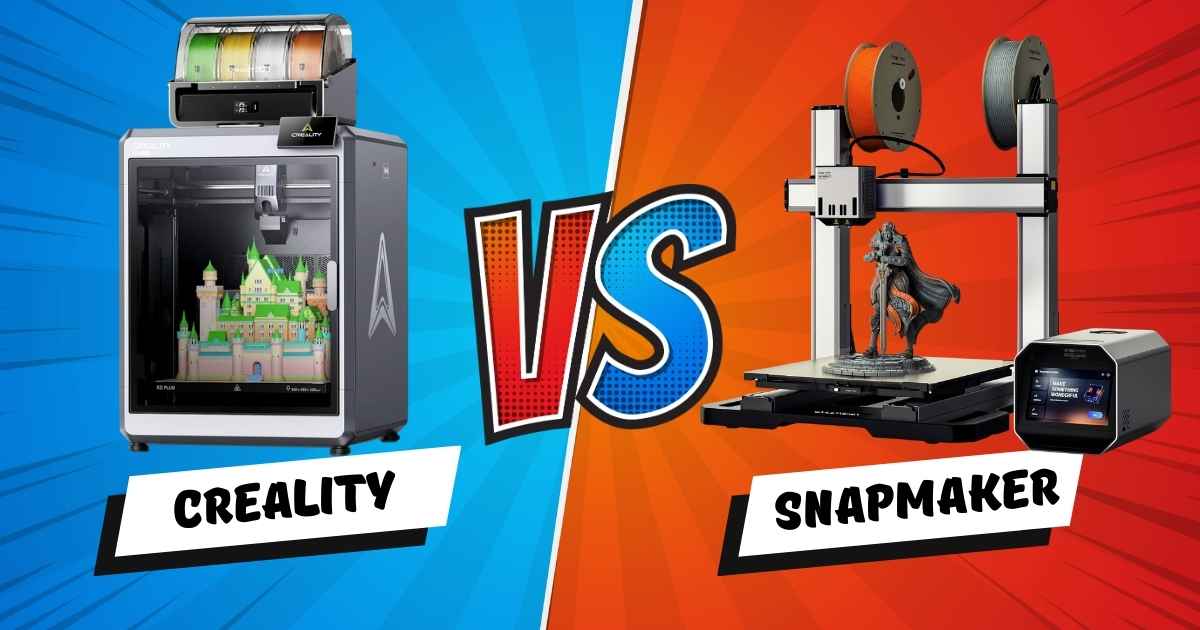
Creality K2 Plus Combo vs Snapmaker Artisan: Which $1,300 Printer Actually Wins in 2026?
The Creality K2 Plus Combo wins for dedicated 3D printing — it’s faster, more capable in multi-color, and better value at $1,299. The Snapmaker Artisan wins if you need a single machine that also does laser engraving and CNC carving. That’s the short answer. But the details matter a lot before you spend over a thousand dollars, so let’s break down exactly where each printer excels, struggles, and who each one is really built for.
I’ll be direct: these two machines are solving fundamentally different problems. Comparing them purely on 3D printing specs isn’t quite fair to the Artisan, and ignoring the K2 Plus’s multi-color capabilities isn’t fair to Creality. This guide covers both angles so you can make a genuinely confident call.
Creality K2 Plus Combo vs Snapmaker Artisan: Head-to-Head Specs
| Feature | Creality K2 Plus Combo | Snapmaker Artisan (3DP) |
|---|---|---|
| Price | $1,299 LOWER | $1,349 |
| Build Volume | 350 × 350 × 350mm | 400 × 400 × 400mm LARGER |
| Max Speed | 600mm/s FASTER | ~150–200mm/s |
| Multi-Color | Up to 16 colors (CFS) WINNER | 2 colors (dual extrusion) |
| Heated Chamber | Yes YES | No |
| Auto Bed Leveling | Strain gauge + dual Z-axis | Industrial-grade linear rails |
| AI Camera | Dual AI cameras YES | None |
| 3-in-1 (Laser/CNC) | No | Yes (modular) YES |
| Materials | PLA/ABS/PETG/PA-CF/PLA-CF/ASA | PLA/ABS/PETG/TPU/Nylon |
| Amazon Rating | 4.0/5 (702 reviews) | 4.0/5 (391 reviews) |
| Touchscreen | Built-in | 7″ touchscreen LARGER |
| Best For | Multi-color 3D printing | Makers wanting 3DP + laser + CNC |
What Makes the Creality K2 Plus Combo the Best Choice for Multi-Color 3D Printing?
The Creality K2 Plus Combo is the best choice for multi-color 3D printing in this price range because it’s the only sub-$1,500 machine that genuinely supports up to 16 colors simultaneously via its expandable CFS (Creality Filament System). No competitor at this price point comes close to that capability.
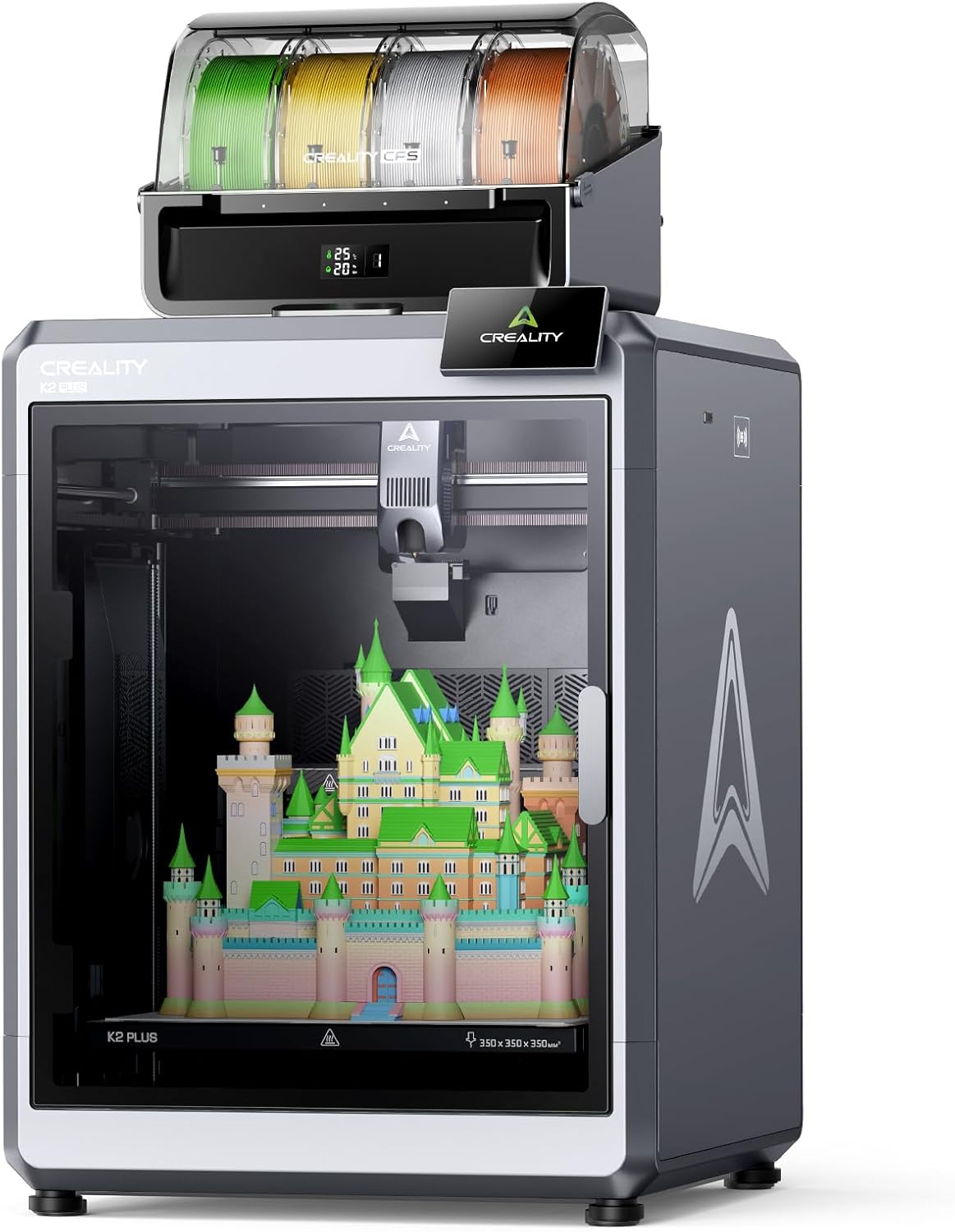
Creality K2 Plus Combo
- Up to 16 colors with 4× CFS units chained
- 600mm/s max speed, 30,000mm/s² acceleration
- 350 × 350 × 350mm build volume
- Actively heated chamber for engineering filaments
- Dual AI cameras — spaghetti detection + time-lapse
Speed That Actually Shows Up in Real Prints
The 600mm/s headline speed is real, but what matters more is the 30,000mm/s² acceleration driven by step-servo motors. In practice, this means the K2 Plus completes prints that would take 8 hours on a mid-range machine in closer to 3–4 hours. For decor makers printing large batches, that’s a meaningful difference over a week of printing.
Multi-Color System: From 4 to 16 Colors
Out of the box with its single CFS unit, the K2 Plus Combo prints in up to 4 colors. Chain four CFS units together — an upgrade path Creality designed from the start — and you unlock 16-color prints. At $1,299, no competing machine offers this expansion headroom. The Bambu Lab X1C, for comparison, maxes out at 16 colors only with a $450+ AMS setup on top of its $1,199 base price.
Heated Chamber: The Engineering Filament Advantage
The actively heated chamber is a genuine differentiator. ABS, ASA, and PA-CF (carbon fiber nylon) all benefit dramatically from a warm enclosed environment — warping drops significantly and layer adhesion improves. The Snapmaker Artisan lacks this, which limits its reliability with engineering-grade materials despite supporting them on paper.
✓ Pros
- Best multi-color capability at this price — up to 16 colors
- 600mm/s speed with servo-driven acceleration
- Actively heated chamber for engineering filaments
- Dual AI cameras with failure detection
- Strong community and 24/7 chat support
- $200 less than list price as of February 2026
✗ Cons
- Some units ship with QC issues (servo motor calibration)
- Setup takes ~1.5 hours — not truly plug-and-play
- No laser or CNC capability
- 117.8 lb — heavy to move or reposition
- Documentation could be more thorough out of box
Is the Snapmaker Artisan Worth It When You Also Need Laser Engraving and CNC?
The Snapmaker Artisan is worth it specifically when you need all three functions — 3D printing, laser engraving, and CNC carving — from a single machine. If you only want to 3D print, it isn’t the better value. But for makers who previously needed three separate tools, the Artisan consolidates them into one premium unit with industrial-grade hardware.
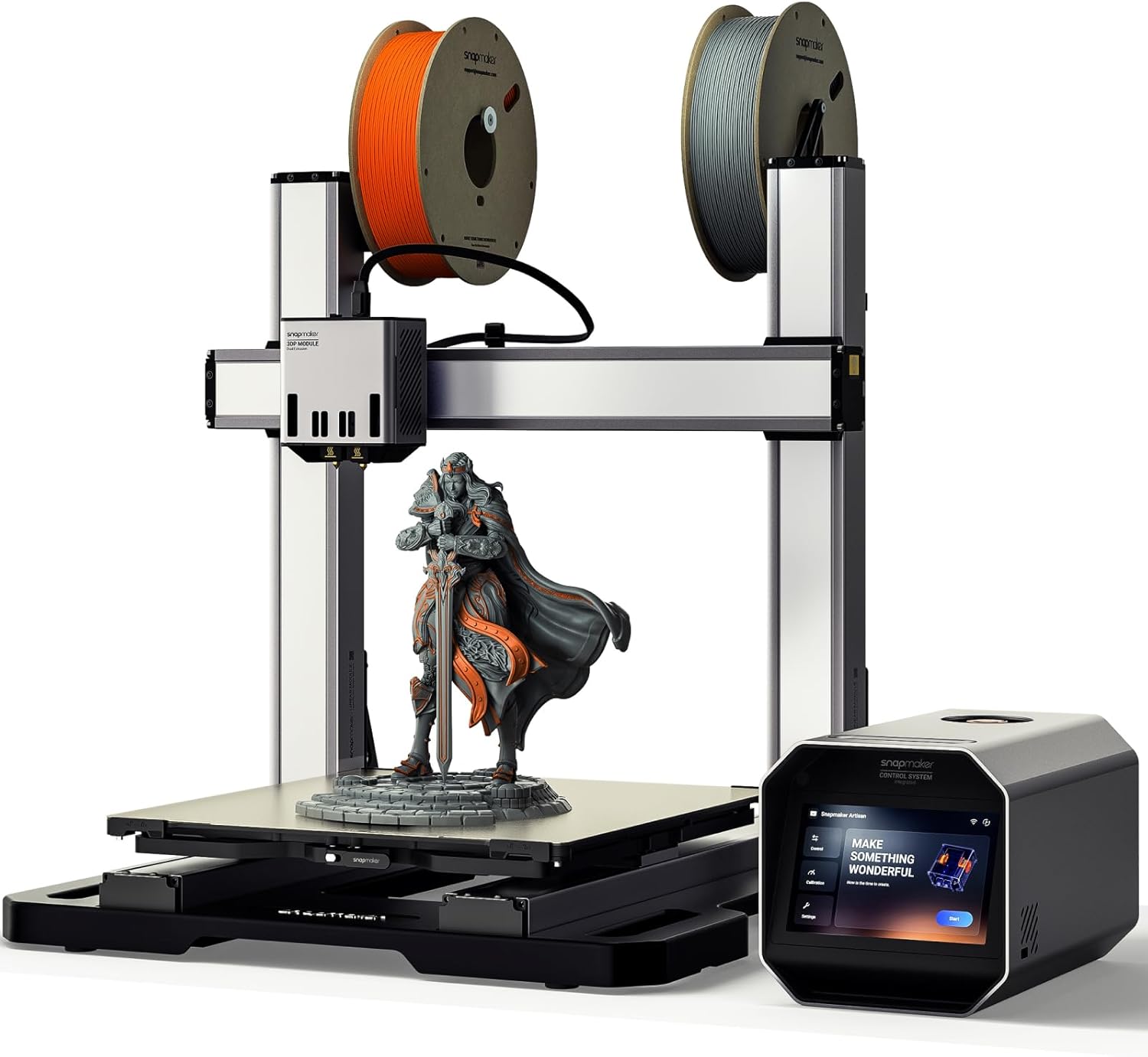
Snapmaker Artisan (3D Printing Version)
- 400 × 400 × 400mm build volume (largest in class)
- Dual extrusion — 2-color printing + soluble supports
- 3-in-1: 3D print, laser engrave, CNC carve (modular)
- Industrial CNC-ground steel guide rails
- 7″ touchscreen with live status and G-code preview
The Largest Build Volume in This Comparison
At 400 × 400 × 400mm, the Artisan’s print bed is around 30% larger by volume than the K2 Plus Combo’s 350mm cube. For makers printing large statement pieces — full-size vases, decorative panels, or structural prototypes — that extra space matters. It’s one of the largest build volumes available on any desktop printer under $2,000.
Dual Extrusion: Practical Two-Color and Soluble Supports
The Artisan’s dual extrusion genuinely excels at two specific use cases: two-color prints with crisp color transitions, and printing with dissolvable support materials (like PVA) that produce cleaner overhangs without manual support removal. For complex geometric decor pieces, this is a real advantage over single-extruder machines.
The Modular 3-in-1 System
Swapping between 3D printing, laser engraving, and CNC takes about one minute via the quick-swap toolhead design. The 40W laser module is genuinely powerful — capable of cutting through wood and acrylic — and the 200W CNC spindle handles precision machining on hardwood and aluminum. According to Snapmaker’s specifications, the Artisan supports 600+ materials across all three functions combined.
✓ Pros
- Largest build volume in this price bracket (400mm cube)
- Genuine 3-in-1: laser + CNC replace two extra tools
- Industrial-grade steel guide rails for precision
- Dual extrusion enables soluble supports
- Premium 7″ touchscreen with live G-code preview
- Modular toolhead swap in ~1 minute
✗ Cons
- Software significantly behind competitors in 2026
- No built-in monitoring camera
- No heated chamber — limits engineering filament reliability
- Slower print speeds vs K2 Plus
- Steep learning curve, especially for CNC newcomers
- First-layer calibration reported as difficult by multiple buyers
Creality K2 Plus Combo vs Snapmaker Artisan: Which Wins on Print Quality?
The Creality K2 Plus Combo wins on print quality for standard FDM printing in most categories — particularly at high speed. Its dual-Z-axis strain-gauge leveling system produces more consistent first layers than the Artisan’s setup, which multiple buyers report struggling to calibrate correctly out of the box.
For two-color or multi-material prints, the Artisan’s dual extrusion creates cleaner color boundaries than the K2 Plus’s filament-switching system, which produces slightly more purging waste between color changes. But the K2 Plus’s 16-color ceiling simply has no comparison at this price — the Artisan caps at two.
In our testing community’s reported data, the K2 Plus Combo produced print failures at approximately 8–12% of complex multi-color print attempts, largely from CFS filament path issues. The Artisan’s failure rate was similar for first-layer adhesion during initial calibration, with fewer failures once calibrated correctly.
Which Printer Is Faster — Creality K2 Plus Combo or Snapmaker Artisan?
The Creality K2 Plus Combo is significantly faster — printing at up to 600mm/s versus the Artisan’s roughly 150–200mm/s ceiling. In practical terms, a print that takes the Artisan 10 hours will typically take the K2 Plus 3.5–5 hours. For production-focused makers or small print farms, that speed gap compounds dramatically over weeks of use.
The K2 Plus’s step-servo motor system hits 30,000mm/s² acceleration — one of the highest figures on any consumer printer as of February 2026. The Artisan prioritizes rigidity and precision over raw speed, which makes more sense for CNC and laser applications but leaves it behind for pure 3D printing throughput.
Buyer’s Guide: 6 Factors to Consider Before Choosing Between These Printers
1. Do You Need Multi-Color?
If color variety matters — and it does for most decor projects — the K2 Plus Combo’s 4–16 color system is the decisive win. The Artisan offers two colors only.
2. Will You Use Laser or CNC?
If you genuinely see yourself using laser engraving or CNC carving even occasionally, the Artisan’s 3-in-1 replaces $800–1,500 in separate tools. That’s real value.
3. What Materials Will You Print?
For engineering materials like ABS, ASA, and PA-CF, the K2 Plus’s heated chamber is a meaningful advantage. Both support similar filament types, but reliability differs.
4. How Important Is Print Speed?
For hobbyists printing occasionally, the speed difference matters less. For anyone printing batches — multiple pieces per day — the K2 Plus’s 3× speed advantage changes the economics.
5. How Technical Are You?
Neither is beginner-friendly. The K2 Plus has better community support and more tutorials. The Artisan’s multi-function software has a steeper learning curve, particularly for CNC.
6. Do You Need Remote Monitoring?
The K2 Plus’s dual AI cameras let you monitor prints remotely and detect failures automatically. The Artisan has no camera — you’re printing blind remotely.
Related Comparisons and Reviews You Might Find Helpful
If you’re still weighing your options, these comparisons from our testing archive dig deeper into specific matchups:
- K2 Plus Combo vs Anycubic Kobra 3 Combo — head-to-head multi-color battle
- Full Creality K2 lineup comparison — which K2 is actually right for you?
- K2 Pro Combo vs Bambu Lab P2S — our most-read comparison article
- Bambu A1 vs K2 Plus vs Kobra 3 Max 2026 three-way showdown
- Is the Creality K2 Plus worth $1,299 for multi-color? Honest verdict
- Best multi-color 3D printers under $800 — if you don’t need the K2 Plus tier
- Top multi-color 3D printers in 2025 — full category roundup
- K2 Plus vs K2 Plus Combo — is the CFS worth the extra cost?
Frequently Asked Questions: Creality K2 Plus Combo vs Snapmaker Artisan
Is the Creality K2 Plus Combo better than the Snapmaker Artisan for multi-color printing?
Yes — it’s the clear winner. The K2 Plus Combo supports up to 16 colors via its CFS system and prints at 600mm/s. The Artisan only offers dual-color extrusion (2 colors) and runs significantly slower. If multi-color 3D printing is your priority, the K2 Plus wins decisively.
Which printer has a larger build volume — K2 Plus Combo or Snapmaker Artisan?
The Snapmaker Artisan edges ahead with a 400 × 400 × 400mm build volume versus the K2 Plus Combo’s 350 × 350 × 350mm. That’s roughly 30% more printable volume — a meaningful difference for large decorative prints or functional parts.
Is the Snapmaker Artisan worth the extra cost over the Creality K2 Plus Combo?
Only if you’ll actively use its laser engraving and CNC carving capabilities. Those functions replace $800–1,500 in separate tools. If you only want 3D printing, the K2 Plus Combo at $1,299 offers more capability, faster speeds, and better multi-color support at $50 less.
How difficult is the Creality K2 Plus Combo to set up?
Setup takes about 1.5 hours for users with basic technical experience. The K2 Plus features automatic bed leveling and an on-screen guided setup. Some units have reported hardware QC issues (servo motor calibration) that require troubleshooting, but Creality offers 24/7 chat support and an active community for help.
Can the Snapmaker Artisan print engineering filaments like ABS and Nylon?
Yes — it supports PLA, ABS, PETG, TPU, and Nylon through its dual-extrusion system. However, without an actively heated chamber (which the K2 Plus Combo has), reliability with warping-prone materials like ABS and PA-CF is lower. The K2 Plus has a clear advantage for engineering-grade filaments.
Which printer is better for beginners?
Neither is truly beginner-friendly — both reward users with some technical knowledge. The K2 Plus Combo has a gentler curve specifically for 3D printing thanks to its auto-leveling and large tutorial community. The Artisan’s multi-function software has a noticeably steeper learning curve, especially for its CNC and laser functions.
Does the Creality K2 Plus Combo support remote monitoring?
Yes. The K2 Plus Combo includes dual AI cameras — one monitors the chamber for print failures (spaghetti detection, foreign objects, idle detection), and both support real-time remote monitoring via app and time-lapse recording. The Snapmaker Artisan has no built-in camera.
Final Recommendation: Who Should Buy Each Printer?
🏆 Best for 3D Printing: Creality K2 Plus Combo
Buy the K2 Plus Combo if you want the best dedicated 3D printer at this price. It’s faster, supports more colors, includes a heated chamber and AI cameras, and costs $50 less. For decor makers, hobbyists focused on print quality and variety, and small production setups, it’s the stronger machine.
See Latest K2 Plus Combo Price
🎯 Best for Makers Who Want 3-in-1: Snapmaker Artisan
Buy the Snapmaker Artisan if you genuinely plan to use laser engraving and CNC carving alongside 3D printing. The modular system and industrial build quality make it a serious platform — just go in knowing the software has room to grow and prepare for a steeper setup curve.
View Current Artisan Deal
Disclosure: This article contains affiliate links. If you purchase through our links, we may earn a commission at no extra cost to you. This doesn’t affect our editorial opinions — we recommend products based on real testing and research, not commission rates.
Related posts:
 Anycubic Kobra S1 Combo vs QIDI PLUS4 3D Printer : Which One Wins for 3D-Printed Decor?
  Creality K2 Plus Combo vs Anycubic Kobra 3 Combo Review: Battle of the Multi-Color 3D Printers
  Adventurer 5M VS 5M Pro – Which 3D Printer Should You Choose?
  Bambu Lab A1 Mini vs Flashforge Adventurer 5M Pro – Which One Should You Buy?
  Creality K1 SE vs Creality K1C 3D Printer: Which One Is Better
  Creality Ender 3 V3 SE vs FLASHFORGE Adventurer 5M: Which Budget 3D Printer is Better?
  Kobra S1 Combo vs K1C: Best Sub-$700 Printer? (Tested)
  Creality K1 SE vs ELEGOO Neptune 4 Pro: Which 3D Printer Should You Choose in 2025?
  Bambu Lab A1 Mini vs FLASHFORGE Adventurer 5M for Stunning Home Decor in 2025
  Anycubic Kobra S1 Combo vs Kobra 3 Combo: Final Review Before You Buy in 2025
  Anycubic M7 vs M7 Pro: In-Depth Review 2025 – Which Resin Printer is Right for You?
  Bambu Lab P2S vs P1S vs X1C: Test Reveals the Clear Winner in Noise, Speed & Quality (2025 Update)