
So, you’ve mastered PLA and PETG. You’re printing beautiful custom home decor and functional kitchen organizers. But now you need more. You need parts that can handle a hot car dash, withstand impacts, or bear structural loads. You’re looking at filaments like ASA, Nylon, and Polycarbonate (PC).
Affiliate Disclosure
We participate in Amazon affiliate programs, earning fees from qualifying purchases via links at no extra cost to you. It’s how we keep this blog rolling and my 3D printers buzzing with fresh filament for reviews like this one!
This is where your 3D printing journey takes a serious turn. Printing these advanced materials isn’t just about hotter temperatures; it’s about control. Specifically, controlling the environment around your print to prevent warping, cracking, and layer separation. This is the absolute domain of a fully enclosed printer.
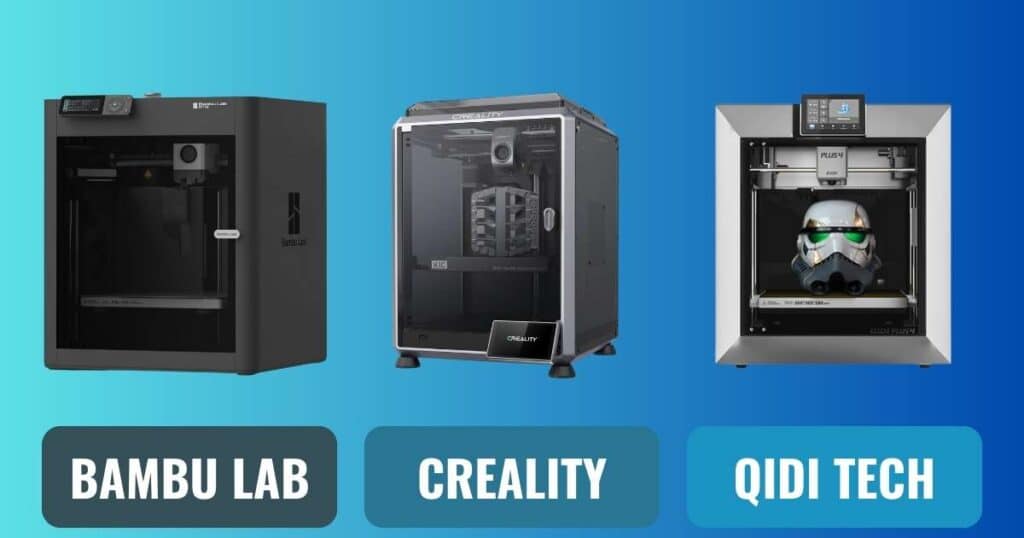
But which one? The market is dominated by three powerful contenders: the Bambu Lab P1S, the Creality K1C, and the Qidi Tech Plus 4. Each is a fully enclosed printer designed for high-temperature materials, but they approach the challenge in very different ways. If you’re still considering your options, our guide on how to choose a 3D printer is a great starting point.
This guide will cut through the specs and marketing to answer one crucial question: which enclosed printer is the right tool to unlock your engineering potential? For those interested in other comparisons, check out our Bambu Lab A1 Mini vs Elegoo Neptune 3 Pro article.
At a Glance: Which Enclosed Printer Matches Your Mission?
- For the Ecosystem & Multi-Color Mastery: Bambu Lab P1S. The best choice if you want a seamless, feature-rich experience and dream of multi-color prints with an AMS.
- For Raw Speed & Value: Creality K1C. The fastest option that brings carbon fiber printing capability to a surprisingly affordable price point.
- For the Serious Engineer: Qidi Tech Plus 4. The undisputed champion for printing the toughest materials like PPS-CF, thanks to its actively heated chamber.
Who This Guide Is For
🛠️ Not Sure If You Need an Enclosed Printer? Read This.
This comparison isn’t for everyone. It’s specifically for you if:
- You’ve outgrown PLA and PETG and need functional parts that can handle a hot car interior, outdoor weather, or mechanical stress.
- You’re a designer, engineer, or serious maker ready to work with engineering-grade materials like ASA, Nylon (PA), and Polycarbonate (PC).
- You’re tired of failed prints due to warping, cracking, and layer separation and need the controlled environment only an enclosure provides.
- You want to know where to best invest your money for serious, functional printing, not just decorative models.
Still printing mostly with PLA? You might be better served by our guide to the best entry-level printers under $500. But if you’re ready to step up, read on.
Why You Absolutely Need an Enclosed Printer for ASA, Nylon, and PC
Before we dive into the models, let’s be clear: an enclosed printer is not a luxury for these materials; it’s a requirement. Understanding the key features to look for in a 3D printer is crucial here.
- ASA/ABS: These materials shrink significantly as they cool. A draft or a temperature fluctuation can cause the layers to warp and pull away from the build plate, ruining the print. An enclosed printer maintains a consistently hot, draft-free environment to prevent this.
- Nylon (PA): Nylon is notoriously hygroscopic (it absorbs moisture from the air) and is prone to warping. A warm, controlled chamber helps manage moisture absorption during printing and prevents warping. You’ll also need a good filament dryer for storage.
- Polycarbonate (PC): PC requires very high temperatures and is extremely sensitive to drafts. Without a proper enclosed printer, achieving a successful PC print is nearly impossible.
An enclosed printer is your ticket to reliability with these advanced filaments. For a broader look at printer types, see our best 3D printers for every budget.
Head-to-Head: The Spec Showdown
| Feature | Bambu Lab P1S | Creality K1C | Qidi Tech Plus 4 |
|---|---|---|---|
| Price | ~$699 | ~$519 | ~$799 |
| Build Volume | 256 x 256 x 256 mm | 220 x 220 x 250 mm | 305 x 305 x 280 mm |
| Max Nozzle Temp | 300°C | 300°C | 370°C |
| Max Chamber Temp | Passive (~45-55°C) | Passive (~45-55°C) | Active 65°C |
| Key Strength | Multi-Color, Ecosystem | Speed, Carbon Fiber Support | High-Temp Engineering Materials |
| Best For | Hobbyists, Creators | Speed Demons, Budget Builders | Engineers, Professionals |
Bambu Lab P1S vs Creality K1C vs Qidi Tech Plus 4: Analyzing Each Enclosed Printer Contender
1. Bambu Lab P1S: The Ecosystem King
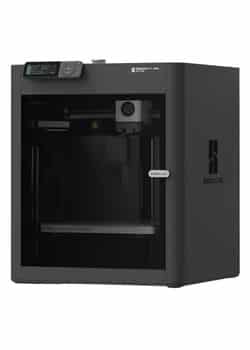
The Bambu Lab P1S isn’t just an enclosed printer; it’s the heart of a seamless printing ecosystem. It’s designed for users who want a “it just works” experience with unparalleled versatility. For a deeper look at multi-color printing, check out our best multicolor 3D printers of 2025 guide.
✅ Pros:
- Unbeatable Multi-Color: Its biggest win is seamless integration with the Bambu AMS (Automatic Material System), allowing for effortless 16-color printing.
- Polished Ecosystem: Bambu Studio software and the Handy app are incredibly user-friendly and powerful, offering cloud printing, flawless timelapses, and intuitive slicing.
- Excellent Reliability: Known for its out-of-the-box performance and consistent results with a wide range of materials.
- Strong Community: A massive user base means endless support, pre-tuned profiles, and troubleshooting help.
❌ Cons:
- Lower Max Temp: The 300°C hotend is capable but can’t handle the ultra-high-temp materials the Qidi can.
- Passive Chamber: The enclosure only heats from print bed radiation, limiting its ultimate potential for the most demanding materials.
- Proprietary Parts: While reliable, you’re largely locked into Bambu’s ecosystem for replacements and upgrades.
Verdict: The best all-around enclosed printer for most users who value ease-of-use, features, and multi-color potential above extreme material capabilities.
➡ Check the Latest Price on Amazon
2. Creality K1C: The Speed Demon
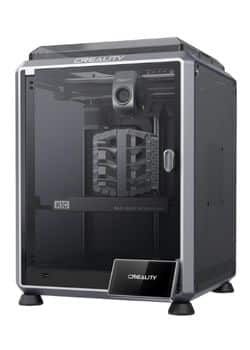
The Creality K1C is Creality’s answer to the modern coreXY enclosed printer. It packs staggering speed and carbon fiber capability into the most affordable package of the three. See how it compares to other Creality models in our Creality K1C review.
✅ Pros:
- Blistering Speed: Capable of up to 600mm/s, it’s the fastest printer in this showdown, dramatically cutting down print times.
- Carbon Fiber Ready: Comes out of the box with a hardened steel nozzle and geared extruder to handle abrasive filaments like PLA-CF and PA-CF.
- Incredible Value: Offers coreXY speed and an enclosure for a price that’s hard to beat.
- AI Camera: Includes useful print failure detection to save you from wasting time and filament.
❌ Cons:
- Creality QC History: While improved, Creality’s track record with quality control and customer support can be inconsistent. You might get a perfect unit or one that needs troubleshooting.
- Software is Good, Not Great: Creality Print software has improved but still lags behind Bambu Studio in polish and ease of use.
- Passive Chamber: Like the P1S, its chamber heating is passive, which can be a limiting factor.
Verdict: The best value enclosed printer for users who want extreme speed and abrasive filament capability on a budget and don’t mind a little potential tinkering.
➡ Check the Latest Price on Amazon
3. Qidi Tech Plus 4: The Engineering Powerhouse
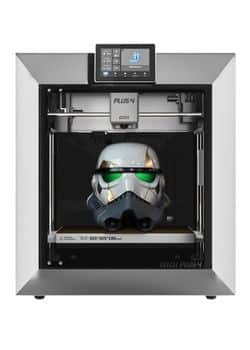
The Qidi Tech Plus 4 is not playing the same game as the others. It’s a purpose-built machine for professionals and serious enthusiasts who need to print with the most demanding engineering-grade thermoplastics. For those considering other Qidi models, see our Qidi Max 3 review.
✅ Pros:
- Actively Heated Chamber: This is its killer feature. The chamber can be heated to 65°C, providing unparalleled temperature stability to prevent warping on huge prints with ASA, PC, and especially Nylon.
- Ultra-High Temperature: A 370°C all-metal hotend is standard, allowing it to print exotic filaments like PPS-CF that are simply off-limits for the other two printers.
- Massive Build Volume: The largest build plate here, perfect for big functional prototypes and parts.
- Built for Industry: Designed from the ground up for reliability and performance with engineering materials, not just hobbyist filaments.
❌ Cons:
- High Price Point: The most expensive option by a significant margin.
- Overkill for Most: If you’re only printing PLA, PETG, and the occasional ABS, this machine’s potential is wasted.
- Slower Pace: Focused on precision and reliability over raw speed.
Verdict: The undisputed champion enclosed printer for engineers, machinists, and anyone who needs to reliably print the toughest, highest-temperature materials on the market.
➡ Check the Latest Price on Amazon
Beyond the Printer: Your Essential High-Temp Printing Toolkit
Buying the right enclosed printer is just the first step. To succeed with ASA, Nylon, and PC, you need the right accessories and knowledge:
- Filament Dryer (Non-Negotiable): Nylon and PC absorb moisture from the air like a sponge, ruining print quality. A high-quality filament dryer is essential, not optional. You must dry these filaments before and often during printing.
- Adhesion Solutions: A glue stick or dedicated bed adhesive is often needed for Nylon and PC to ensure parts stick to the build plate and don’t warp.
- Enclosure Upgrades: For the P1S and K1C, consider 3D printer enclosures or insulation kits to help stabilize chamber temperatures further.
- Ventilation & Safety: These materials can emit stronger fumes. Printing in a well-ventilated area or using an external ventilation kit is highly recommended. Don’t forget essential 3D printing safety gear.
- Slicing Software: Using the right best slicing software for 3D printing is crucial for dialing in the perfect settings for these advanced materials.
The Real Cost of Advanced Printing
💰 Before You Buy: What They Don’t Tell You About ASA, Nylon & PC
Your new enclosed printer is just the entry fee. To successfully print with these advanced materials, you must budget for these essentials:
- A High-Quality Filament Dryer (~$50-$100): This is non-negotiable. Nylon and PC act like sponges, absorbing moisture from the air which ruins print quality, causing bubbles, splattering, and weak layers. You need to dry filaments before and often during printing. We highly recommend the Sunlu S2 or Creality Space Pi Plus.
- Adhesion Solutions (~$10-$20): These materials love to warp and lift. A good glue stick or dedicated adhesives like Dimafix are essential for keeping your prints stuck to the build plate throughout the entire process.
- Ventilation & Safety: While an enclosure contains most fumes, printing with ASA/ABS in a living space isn’t ideal. Planning for a well-ventilated area or an external ventilation kit is a smart move for long-term comfort and safety.
Pro Tip: Factor in an extra $100-$150 for these essentials when budgeting for your new printer. It seems like a lot, but it’s the difference between frustration and flawless prints.
The Final Verdict: Which Enclosed Printer Should You Buy?
Your choice depends entirely on what you plan to print and your budget. For more context on making this decision, our ultimate 3D printer tier list can provide additional insights.
Choose the Bambu Lab P1S if: You are a hobbyist or creator who wants the most polished, feature-complete experience. You value multi-color printing, a flawless software ecosystem, and incredible reliability for materials like PLA, PETG, ABS, and ASA. It’s the best enclosed printer for most people.
Choose the Creality K1C if: Your top priorities are speed and value. You want to print fast with carbon fiber composites and don’t mind a slightly less refined experience. You’re willing to accept a small risk of quality control issues for a much lower price. It’s the best enclosed printer for budget-minded speed freaks.
Choose the Qidi Tech Plus 4 if: You are an engineer, professional, or serious enthusiast who needs to print polycarbonate (PC), Nylon (PA), or other high-temp engineering filaments reliably. The actively heated chamber is a non-negotiable feature for your work. It’s the best enclosed printer for professional-grade results.
The Bottom Line
For 90% of users looking to step up to ASA and more advanced materials, the Bambu Lab P1S offers the best overall combination of performance, features, and reliability. It makes the process of using an enclosed printer effortless and enjoyable. If your goals are more modest, our list of the best entry-level 3D printers under $500 might be a better fit.
Frequently Asked Questions (FAQ)
u003cstrongu003eI mostly print PLA and PETG. Do I really need an enclosed printer?u003c/strongu003e
For PLA and PETG, an enclosure is not strictly necessary and can sometimes be detrimental to PLA (causing heat creep). The value of an u003cstrongu003eenclosed printeru003c/strongu003e like these is u003cstrongu003efuture-proofingu003c/strongu003e. It unlocks the u003cemu003eabilityu003c/emu003e to print advanced materials when you’re ready, without needing a new machine. If you have any inkling you might try ABS, ASA, or Nylon down the line, starting with an enclosure is a smart move. For now, you can simply leave the door open when printing PLA. Learn more about material choices in our u003ca href=u0022https://3dprinteddecor.com/pla-vs-abs-vs-petg/u0022u003ePLA vs ABS vs PETGu003c/au003e guide.
u003cstrongu003eWhat’s the real-world difference between a passive and actively heated chamber?u003c/strongu003e
Think of it like an oven. A u003cstrongu003epassive chamberu003c/strongu003e (P1S, K1C) is like turning on the oven light—it gets warm from the heat of the bed and nozzle, usually stabilizing around 45-55°C. This is enough for ABS and ASA. An u003cstrongu003eactively heated chamberu003c/strongu003e (Qidi Plus 4) has a dedicated heater and fan, like turning on the bake element, allowing it to precisely maintain a set temperature up to 65°C. This is crucial for preventing warping in large Nylon and PC prints, where consistent, high ambient heat is non-negotiable.
u003cstrongu003eBesides the printer, what else do I need to print these advanced materials?u003c/strongu003e
Your u003cstrongu003eenclosed printeru003c/strongu003e is the core, but you must invest in:u003cbru003eu003cstrongu003eA Drybox:u003c/strongu003e Nylon and PC must be printed bone-dry. A u003ca href=u0022https://3dprinteddecor.com/the-best-filament-dryers-for-3d-printing-top-10-picks/u0022u003egood filament dryeru003c/au003e is essential, not optional. You can’t succeed without one.u003cbru003eu003cstrongu003eAdhesion Solutions:u003c/strongu003e A glue stick or dedicated bed adhesive is often needed for Nylon and PC to ensure parts stick.u003cbru003eu003cstrongu003eProper Ventilation:u003c/strongu003e These materials can emit stronger fumes. Printing in a well-ventilated area or using an u003ca href=u0022https://3dprinteddecor.com/3d-printer-enclosures-for-noise-and-temperature-control/u0022u003eexternal ventilation kitu003c/au003e is highly recommended.u003cbru003eu003cstrongu003eMaintenance Knowledge:u003c/strongu003e Regular u003ca href=u0022https://3dprinteddecor.com/3d-printer-maintenance/u0022u003e3D printer maintenanceu003c/au003e becomes more critical when working with abrasive and high-temperature materials.
Related posts:
 Bambu Lab P1S vs Creality K1C vs Anycubic Kobra S1: Which Enclosed Printer is Best for ABS, Nylon & PETG? (2025 Deep Dive)
  Flashforge Adventurer 5M PRO VS Creality K1C: Your Ultimate 3D Printing Showdown for 2025
  Kobra S1 Combo vs K1C: Best Sub-$700 Printer? (Tested)
  Anycubic Kobra S1 vs Creality K1C: I Tested Both for 6 Months – Here’s the Winner (Dec 2025)
  Creality K1 SE vs Creality K1C 3D Printer: Which One Is Better
  Bambu Lab P2S vs P1S vs X1C: Test Reveals the Clear Winner in Noise, Speed & Quality (2025 Update)
  Adventurer 5M VS 5M Pro – Which 3D Printer Should You Choose?
  Creality Ender 3 V3 SE vs FLASHFORGE Adventurer 5M: Which Budget 3D Printer is Better?
  Discover the Prusa CORE One: Your Next 3D Printing Adventure Awaits!
  Elegoo Centauri Carbon: The Best High-Speed CoreXY 3D Printer You Need Now!
  Creality K1 SE vs ELEGOO Neptune 4 Pro: Which 3D Printer Should You Choose in 2025?
  Creality K1 SE vs Anycubic Kobra 3 Max Combo: Which 3D Printer Reigns Supreme for Your Vision?