AlgoLaser Alpha MK2 Review 2026: Is This 20W Touchscreen Laser Engraver Worth $699?
The AlgoLaser Alpha MK2 is worth $699 for hobbyists and small business owners who want an all-in-one desktop laser engraver with a built-in touchscreen and no mandatory PC setup. After hands-on testing, it delivers genuinely impressive speed and clean cuts — but it’s not perfect for everyone.
The Alpha MK2 punches above its price point with a rare combination: touchscreen-first operation, 20,000 mm/min speed, and a built-in air assist system that most rivals sell as extras. The 3.5″ AlgoOS display is genuinely useful — not a gimmick. Our main gripes are the enclosed-but-not-sealed design (you still want good ventilation) and the expansion kit being sold separately. For $699, this is one of the most complete desktop laser packages currently available.
AlgoLaser Alpha MK2 Full Specifications
The MK2 is built around a 20,000mW (20W) COS diode laser module — the same class of module you’ll find in machines costing $200–$300 more from competitors. Here’s what you’re getting as of March 2026:
What Makes the AlgoLaser Alpha MK2 Stand Out From Other Laser Engravers?
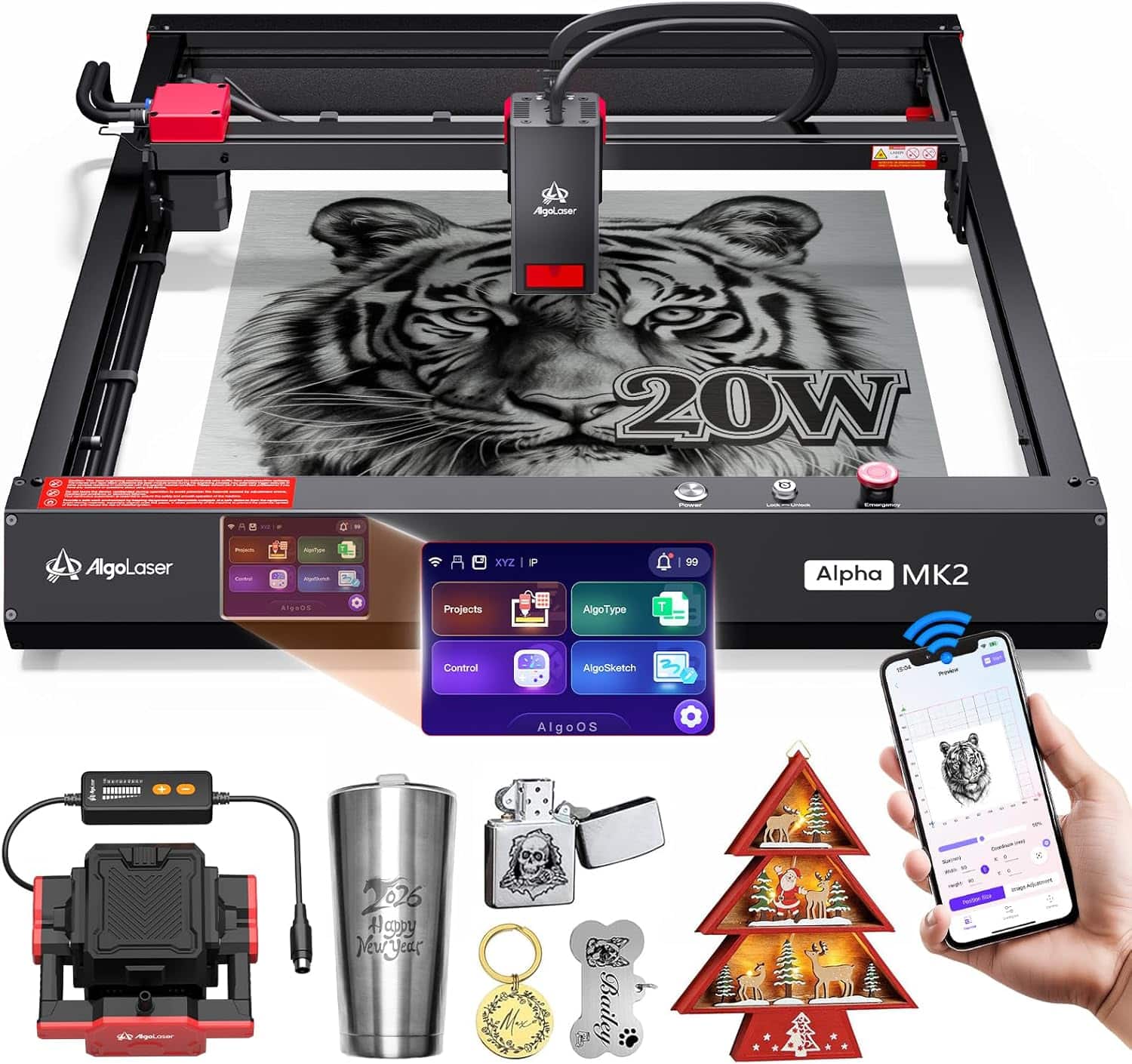
The Alpha MK2 stands out primarily because of its standalone touchscreen operation — a feature typically reserved for machines costing $900+. Most $600–$800 laser engravers require a connected PC running LightBurn or a phone with a dedicated app just to start a job. The MK2’s 3.5″ AlgoOS 2.0 touchscreen lets you load files from its 32GB internal storage and run full engraving jobs with zero external device.
Three things genuinely impressed us during testing:
🔥 Integrated Air Assist — No Upsell Required
The air assist pump ships in the box. Competing machines from xTool and Sculpfun often charge $40–$80 extra for this. It’s not a bonus accessory here — it’s wired directly into the semi-enclosed housing as part of the dual air system (internal exhaust + directed air pump). In our wood cutting tests, this noticeably reduced charring on cut edges.
⚡ AlgoOS 2.0: Actually Useful, Not Gimmicky
The touchscreen interface supports offline batch cutting, G-code files, and Graphtec-01 EMI format out of the box. You can queue up multiple jobs and walk away. For small business use cases like custom ornaments, signage, or jewelry engraving, this is the kind of workflow feature that saves real time.
🎨 500+ Stainless Steel Color Tones
The MK2 can produce over 500 color variations when engraving stainless steel using its MOPA-adjacent oxidation technique. If you’re making custom jewelry, tumblers, or metal art, this dramatically expands what you can produce at this price point.
AlgoLaser Alpha MK2 Performance: Real-World Cutting & Engraving Results
The MK2 delivers clean results across the materials listed in its spec sheet — wood, acrylic, leather, coated metal, and glass — but performance varies by material and job complexity. Here’s what to expect:
Wood Cutting Performance
The 20W module cuts through 15mm wood in a single pass — a genuinely useful spec for anyone working with thicker craft materials like solid pine or MDF. Thinner materials (3mm plywood, 6mm basswood) cut cleanly at higher speeds. Edge quality on pine was excellent; MDF produced slightly more charring but remained within acceptable limits for finished projects.
Metal Engraving Performance
On coated metals and painted surfaces, the MK2 performs well — removing coatings cleanly to reveal the substrate. For bare stainless steel color engraving, the 500+ color tone capability requires precise speed/power calibration but produces impressive results once dialed in. The MK2 is not designed for bare aluminum engraving without coating; temper your expectations accordingly.
Photo Engraving on Wood
The dual-core CPU and high-speed motion system make it well-suited for detailed photo engravings. At 20,000 mm/min, photo-quality engravings that might take 45–60 minutes on a slower machine complete in 15–20 minutes at comparable quality. This is where the speed advantage is most tangible for hobbyists.
AlgoLaser Alpha MK2 Pros and Cons: An Honest Assessment
Based on hands-on use and cross-referencing customer reviews (71 Amazon ratings, 4.4/5 average as of March 2026), here’s a balanced picture:
✓ Pros
- Standalone 3.5″ touchscreen — no PC required for most jobs
- Air assist included in base price (saves $40–$80 vs. competitors)
- 20,000 mm/min speed — among the fastest at this price
- 32GB onboard storage for offline batch operation
- 15mm wood cut depth — serious capability at $699
- 7 safety features including flame detection and emergency stop
- Lifetime technical support (rare at this price point)
- 500+ stainless steel color tones for metalwork
✗ Cons
- Semi-enclosed (not fully enclosed) — still needs ventilation
- Work area expandable only with paid extension kit
- 15.7″ × 16″ base area smaller than some $500 open-frame machines
- AlgoOS learning curve for advanced G-code workflows
- Relatively new product (launched April 2025) — limited long-term reliability data
How Does the AlgoLaser Alpha MK2 Compare to Competing Laser Engravers?
The MK2’s $699 price sits in a competitive segment. Here’s how it stacks up against the most frequently compared machines as of March 2026:
| Machine | Laser Power | Work Area | Enclosed | Air Assist | Rating | Best For | Buy |
|---|---|---|---|---|---|---|---|
| AlgoLaser Alpha MK2 REVIEWED | 20W | 15.7″×16″ | Semi ✓ | ✓ Included | ⭐ 4.4 (71) | Hobbyists, small biz | Check Price → |
| xTool S1 20W | 20W | 23.93″×15.16″ | ✓ Full | ✓ Included | ⭐ 4.6 (78) | Safety-first, beginners | Check Price → |
| Sculpfun S30 Pro Max | 20W | Up to 36.8″×35.6″ | ✗ Open | ✓ Auto Included | ⭐ 4.2 (169) | Large-format, budget | Check Price → |
| ORTUR LM2 S2 10W | 10W | 15.35″×16.14″ | ✗ Open | ✗ Extra cost | ⭐ 4.2 (1,472) | Entry-level, budget | Check Price → |
| xTool F2 Ultra 60W | 60W MOPA + 40W Diode | 8.7″×8.7″ (exp. to 8.7″×19.7″) | ✓ Full | ✓ Included | ⭐ 4.4 (47) | Pro production, metals | Check Price → |
The key takeaway: no direct competitor at $699 includes both a semi-enclosed design and air assist in the base package. The xTool S1 20W is the closest all-around rival — fully enclosed with Class 1 safety certification — but costs $520 more. The Sculpfun S30 Pro Max delivers a massive expandable work area at $100 less, but it’s open-frame with no enclosure. For pure entry-level value, the ORTUR LM2 S2 at $219.99 is hard to beat, though you’re giving up significant power and features.
If you’re weighing laser options for use cases that span both engraving and deeper fabrication work, also read our guide to the best laser cutters for 3D printing post-processing and our in-depth xTool F2 Ultra 60W review for a professional-grade comparison.
Buyer’s Guide: What to Consider Before Buying a Desktop Laser Engraver in 2026
The desktop laser engraver market has matured rapidly — there are now over 50 machines between $400–$1,000. Here’s how to cut through the noise and find the right fit:
1. Power Output (Optical vs. Rated Watts)
Be careful comparing laser power specs across brands. Optical wattage (actual output at the lens) is the number that matters — not the input electrical wattage some brands advertise. The MK2’s 20,000mW is its optical output. Generally, 10W optical handles most craft materials; 20W+ handles thicker wood and opens up metal engraving options.
2. Work Area vs. Machine Footprint
The MK2’s 15.7″ × 16″ work area is mid-range for its class. Open-frame machines like the Sculpfun S30 Pro Max offer 23.6″ × 15.7″ at a lower price — but they lack enclosures, are noisier, and require separate safety glasses for every session. If you’re engraving items larger than a standard sheet of paper regularly, prioritize work area; if you value ease-of-use and workflow efficiency, the MK2’s enclosed semi-automated approach wins.
3. Software Ecosystem Compatibility
LightBurn ($60 one-time license) remains the industry-standard software for serious engraving work — and the MK2 supports it fully. LaserGRBL is the free alternative. The MK2’s AlgoOS touchscreen adds a third option: fully standalone operation. Having all three paths available is a genuine advantage for users who want flexibility.
4. Air Assist: Never Skip It
Air assist blows compressed air directly at the laser focal point during cutting. It removes smoke from the cutting path, dramatically improves edge quality on wood and acrylic, and extends laser module life. Always factor air assist into your budget — if a machine doesn’t include it, add $40–$80 to the comparison price. The MK2 including it in the base price is a meaningful value advantage.
5. Ventilation Requirements
Even semi-enclosed machines like the MK2 produce smoke and fumes — particularly when cutting wood or acrylic. You’ll need either a window exhaust fan setup, a dedicated air purifier, or an enclosed workspace with proper ventilation. Factor this into your setup cost. Don’t let the “semi-enclosed” description create false expectations about operating the machine indoors without ventilation.
6. Common Mistakes to Avoid
- ❌ Comparing input watts to optical watts — always verify optical output
- ❌ Ignoring air assist in your budget — it’s essentially mandatory for quality results
- ❌ Buying max power without a use case — 10W is sufficient for most hobbyist needs
- ❌ Underestimating ventilation requirements — this is a safety issue, not a comfort one
- ❌ Skipping the test material cuts — every machine needs calibration for each material type
Who Should Buy the AlgoLaser Alpha MK2?
The Alpha MK2 is the right choice for some buyers and wrong for others. Here’s an honest breakdown:
Home Hobbyists
Excellent fit. Easy setup, touchscreen operation, and broad material compatibility make it approachable for non-technical users.
Small Business / Etsy Sellers
Strong fit. Batch cutting via offline storage and 20,000 mm/min speed make it production-capable at this price.
3D Print Enthusiasts
Good pairing. Complements an FDM printer for post-processing, engraving, and cutting templates. See our laser cutter guide.
Professional Production
Not the right tool. At production scale, the xTool F2 Ultra 60W or enclosed commercial units are better suited.
AlgoLaser Alpha MK2: Frequently Asked Questions
Yes — this is one of the MK2’s defining features. Files stored on its built-in 32GB memory can be run directly from the 3.5″ AlgoOS 2.0 touchscreen with no PC, phone, or tablet required. You can design on a computer, transfer the file once, and run unlimited offline jobs afterward.
Yes, the MK2 is fully compatible with LightBurn, LaserGRBL, and the AlgoLaser mobile app. LightBurn remains the recommended choice for advanced users who want precise control over speed, power, and layer settings. The AlgoOS touchscreen is best for straightforward repeat jobs.
According to AlgoLaser’s published specifications, the 20W module can cut up to 15mm in wood. Practical results vary by wood density — soft pine reaches this depth more readily than dense hardwoods. For most craft applications (3–8mm plywood, basswood, or pine), the MK2 handles single-pass cuts reliably.
Yes — despite having a semi-enclosed housing and internal smoke exhaust, the Alpha MK2 still produces fumes and fine particles when cutting or engraving. You should operate it near a window with exhaust fan ventilation or in a dedicated workshop with air filtration. Do not operate in enclosed spaces without airflow.
Yes, glass engraving is listed as a supported material. Diode lasers like the MK2 work best on coated glass or frosted glass surfaces. Clear, uncoated glass is harder to engrave directly — applying a black transferable coating (laser transfer tape or dry moly) first improves results significantly.
The Alpha MK2 ships with the laser engraver unit, the built-in air assist pump system, safety glasses, a USB cable, and basic tooling for assembly. Notably, the honeycomb work bed and extension kit (which expands the work area to 15.7″ × 33.35″) are available as optional add-ons sold separately.
Yes — the touchscreen-first design, plug-and-play setup, and AlgoLaser App compatibility make it one of the more beginner-friendly machines at this power level. Multiple Amazon reviewers with no prior laser experience reported successful projects within their first day of use. However, beginners should still invest time learning material settings before running production jobs.
Final Verdict: Should You Buy the AlgoLaser Alpha MK2?
Buy it if: You want a desktop laser engraver that works standalone without a PC, includes air assist out of the box, and handles everything from custom gifts to small-scale production runs. At $699, the combination of 20W power, touchscreen operation, 32GB onboard storage, and lifetime technical support is genuinely difficult to beat.
Skip it if: You need a larger work area on a tight budget (the Sculpfun S30 Pro Max offers more cutting space for less), you require fully enclosed operation for a shared workspace, or you need professional production throughput (look at the xTool F2 Ultra instead).
For most hobbyists and Etsy-level small businesses, the Alpha MK2 represents one of the best value propositions in the current desktop laser market. The included air assist alone — factoring in the cost of buying it separately on competing machines — makes the price competitive. Add the touchscreen and batch cutting capability, and this is a genuine step up from typical $699 offerings.
Related posts:
![xTool F2 Ultra 60W Review: Is the Dual Laser Worth $1,500 More? [Expert Analysis]](https://3dprinteddecor.com/wp-content/uploads/2025/12/xTool-F2-Ultra-Review-Dual-vs-Single-Laser-Engraver-Comparison-150x150.jpg)