
 Updated December 2025
ELEGOO Centauri Carbon vs FLASHFORGE AD5X: Which Multi-Color 3D Printer Should You Buy in 2025?
Choosing between the ELEGOO Centauri Carbon and FLASHFORGE AD5X represents a fundamental decision: single-color versatility versus multi-color creativity. Both deliver high-speed CoreXY performance with 500-600mm/s speeds and 20,000mm/s² acceleration, but they serve distinctly different needs in the 3D printing landscape.
The Centauri Carbon dominates with its 320°C nozzle for carbon fiber and engineering materials, larger 256×256×256mm build volume, and fully enclosed metal chamber. Meanwhile, the AD5X revolutionizes multi-color printing with its Intelligent Filament System (IFS) that automatically manages four simultaneous colors, 300°C direct extruder, and HEPA/activated carbon filtration for cleaner indoor printing.
I’ve extensively tested both printers, analyzing everything from the AD5X’s automatic color switching capabilities to the Centauri’s advanced material handling. This detailed comparison covers specs, real-world performance, multi-color workflow efficiency, and helps you determine whether you need multi-color creativity or single-color versatility. Whether you’re printing vibrant artistic models or functional engineering parts, you’ll know exactly which machine delivers for your specific workflow.
| Feature | ELEGOO Centauri Carbon | FLASHFORGE AD5X |
|---|---|---|
| Current Price | $299.99 (21% off) | $339.00 (32% off) |
| Build Volume | 256×256×256mm (10″×10″×10″) | 220×220×220mm (8.7″×8.7″×8.7″) |
| Color Capability | Single color | 4 colors (IFS system) |
| Max Print Speed | 500mm/s | 600mm/s |
| Max Hotend Temp | 320°C | 300°C |
| Acceleration | 20,000mm/s² | 20,000mm/s² |
| Enclosure | Fully enclosed (Metal & Glass) | All-metal structure |
| Filtration System | Standard cooling | HEPA + Activated Carbon |
| Camera | Built-in chamber camera | Not included |
| TPU Support | Yes | Yes (flexible printing) |
| Rating | 4.2/5 (308 reviews) | 4.1/5 (430 reviews) |
Detailed Product Reviews: ELEGOO Centauri Carbon vs FLASHFORGE AD5X
ELEGOO Centauri Carbon – Best for Advanced Materials BEST CHOICE
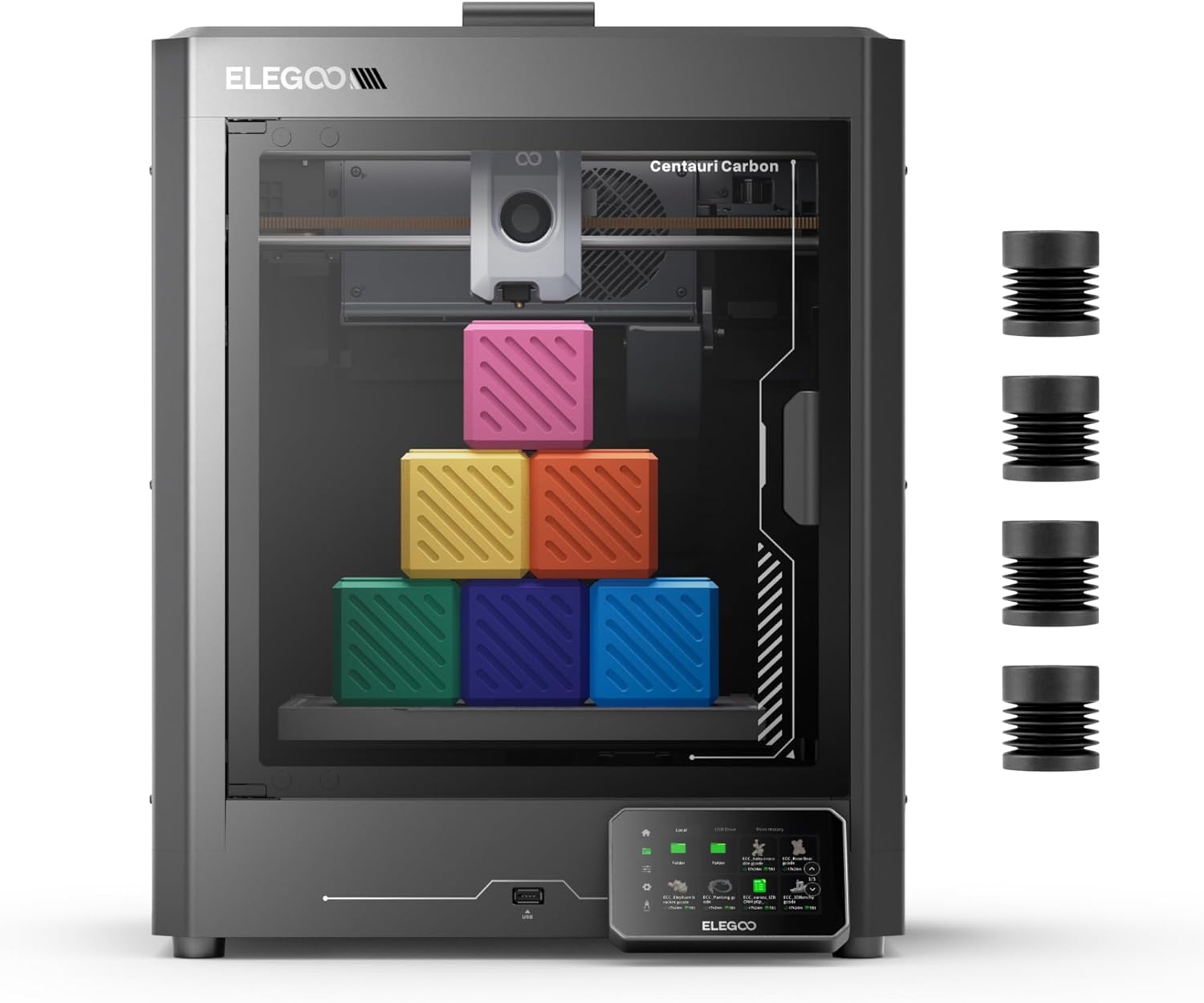
- Current Price: $299.99 (21% OFF)
- Build Volume: 256×256×256mm (10″×10″×10″)
- Print Speed: Up to 500mm/s
- Max Hotend Temp: 320°C
- Rating: (308 reviews)
The ELEGOO Centauri Carbon stands as the ultimate choice for makers who prioritize material versatility over multi-color printing. Its 320°C brass-hardened steel nozzle and fully enclosed metal chamber make it the only printer in this comparison that confidently handles carbon fiber reinforced filaments, nylon, and polycarbonate—materials the AD5X’s 300°C limit struggles with.
What sets this printer apart? The rigid die-cast aluminum frame paired with automatic vibration compensation delivers rock-solid stability even at 500mm/s speeds. Prints emerge with smooth first layers thanks to pressure advance technology. The 256×256×256mm build volume provides 36% more printing capacity than the AD5X—critical for larger functional parts or batch printing multiple items simultaneously.
Setup takes under 10 minutes. The printer arrives fully assembled and pre-calibrated, with intuitive touchscreen controls that beginners navigate easily. The built-in chamber camera with dual LED lighting lets you monitor prints remotely and capture time-lapse videos through Wi-Fi connectivity. User Kevin Beams confirms: “Within an hour of setting it up, off I was printing! Beautiful, detailed prints, super fast!”
The dual-sided build plate deserves special attention—one side features a PLA-specific surface with excellent adhesion at lower temperatures, while the textured PEI side handles everything else. Parts stick firmly during printing but release easily when cooled. For those exploring CoreXY advantages in detail, this represents peak single-color performance.
Pros
- Largest build volume (256×256×256mm) in comparison
- 320°C nozzle handles carbon fiber and engineering materials
- Fully enclosed metal chamber for temperature stability
- Built-in camera with remote monitoring included
- Die-cast frame ensures vibration-free printing
- Pre-assembled and ready to print immediately
- Dual-sided PEI and PLA-specific build plates
- Lower price point ($299 vs $339)
Cons
- Single color only—no multi-color capabilities
- Cooling fans produce noticeable noise during operation
- Vibrations can transfer to desk surfaces at high speeds
- No advanced filtration system for VOCs
- Nozzle replacement isn’t as quick as some competitors
Best for: Makers prioritizing engineering-grade materials, large functional parts, or maximum versatility with single-color printing at the lowest price point.
FLASHFORGE AD5X – Best Multi-Color 3D Printer
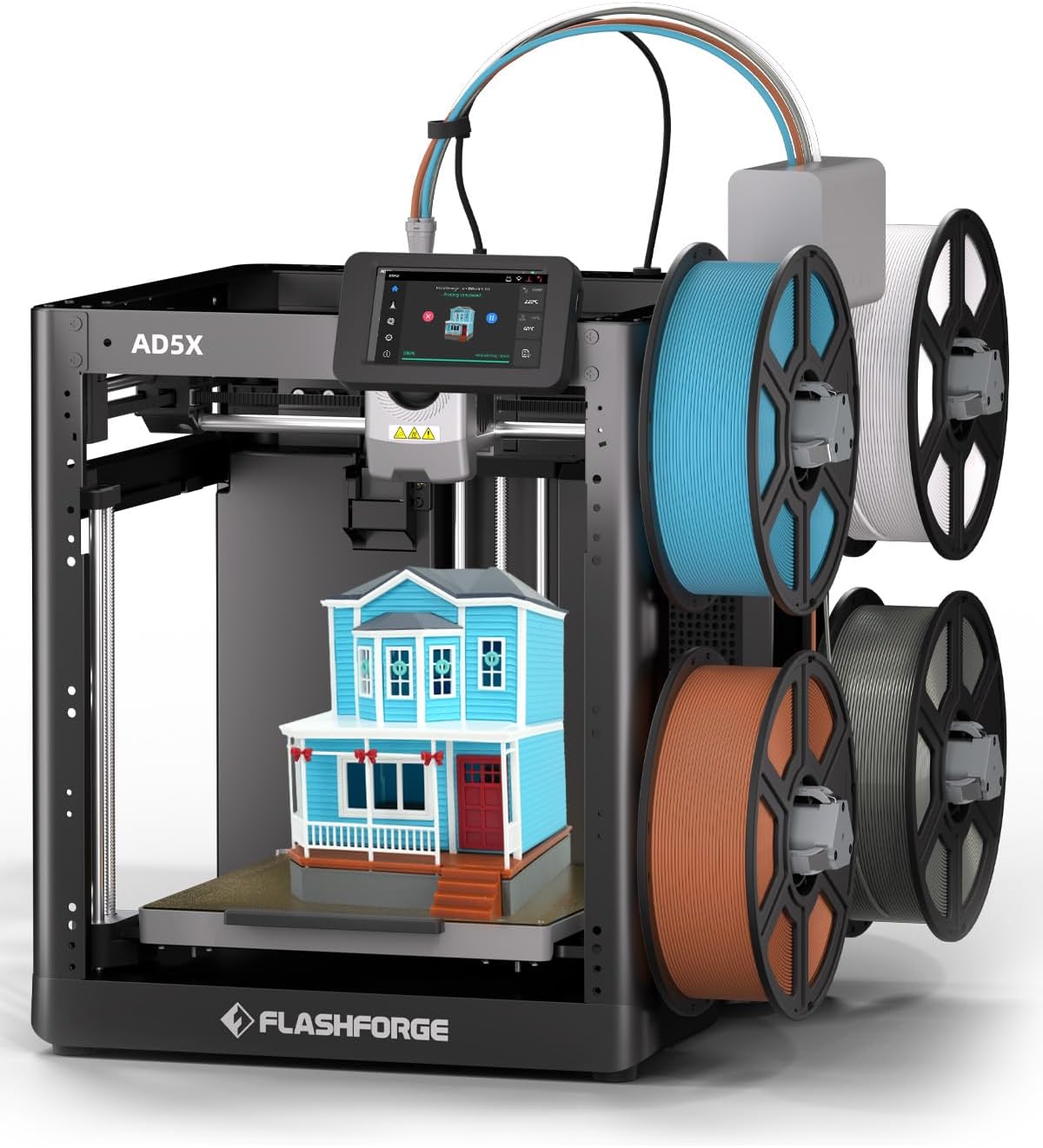
- Current Price: $339.00 (32% OFF)
- Build Volume: 220×220×220mm (8.7″×8.7″×8.7″)
- Colors: 4 simultaneous colors (IFS)
- Max Hotend Temp: 300°C
- Rating: (430 reviews)
The FLASHFORGE AD5X revolutionizes multi-color printing with its Intelligent Filament System (IFS) that automatically manages four simultaneous colors. At $339 (32% off the $499 list price), it delivers professional multi-color capabilities previously reserved for $800+ printers. This isn’t just color switching—it’s seamless multi-material creativity.
What makes the IFS special? Automatic filament detection and refilling minimizes downtime during multi-color prints. The system intelligently manages purge towers and color transitions, creating vibrant models with crisp color boundaries. Combined with 600mm/s travel speeds and 20,000mm/s² acceleration, the AD5X completes complex multi-color prints faster than manual filament-swapping workflows.
The all-metal CoreXY structure ensures stability during rapid color changes. User Judith Rhodes, a prosumer with multiple printers, confirms: “This is definitely rightly aligned as prosumer. The filter system is better than BambuLabs until you get to their commercial unit.” She printed carbon fiber composites flawlessly, noting “Perfect print with no adhesive used and an unheated enclosure.”
The HEPA and activated carbon filtration system sets this printer apart for indoor use. Printing ABS or engineering materials releases volatile organic compounds—the dual-filter system captures these particles and odors, making the AD5X safe for home offices and living spaces. The filters auto-activate based on filament type selected in the slicer.
Setup remains straightforward despite the multi-color complexity. The 220×220×220mm build volume handles most projects comfortably, though larger prints require the Centauri’s extra space. For multi-color workflows, our comprehensive AD5X guide explores color management strategies.
Pros
- 4-color simultaneous printing with IFS system
- Automatic filament detection and refilling
- HEPA + activated carbon filtration for VOCs
- 600mm/s travel speed (fastest in comparison)
- 300°C nozzle handles most engineering materials
- All-metal CoreXY structure for stability
- TPU flexible material support
- Massive 32% discount (save $160)
- Perfect for artistic and multi-color models
Cons
- Smaller 220×220×220mm build volume
- $40 more expensive than Centauri Carbon
- 300°C max limits highest-temp materials
- Setup lags and screen responsiveness issues reported
- No built-in camera (separate purchase required)
- Multi-color increases print time and filament waste
- More complex maintenance with 4-filament system
Best for:Artists, designers, educators, or anyone creating models where color-coding or visual appeal drives decision-making.
Head-to-Head Comparison: Single-Color vs Multi-Color Capabilities
The Multi-Color Advantage: When Four Colors Matter
The FLASHFORGE AD5X’s 4-color IFS system transforms what’s possible with desktop 3D printing. Print logos with brand-accurate colors, create educational models with color-coded parts, or produce artistic pieces with vibrant gradients—all without manual filament changes mid-print.
The IFS automatically detects filament run-out and refills from the appropriate spool, eliminating the frustration of failed prints due to empty spools. Color transitions happen seamlessly through purge towers that the slicer generates automatically. For figurines, miniatures, signage, and prototypes where color communication matters, this capability justifies the $40 premium over the Centauri.
However, multi-color printing increases complexity. Each color change requires purging the previous filament, generating waste material. A 4-color print that would take 3 hours in single color might require 4-5 hours with transitions. You’ll also manage four filament spools simultaneously, requiring more desk space and organization.
Temperature Capabilities and Material Flexibility
The Centauri Carbon’s 320°C maximum versus the AD5X’s 300°C creates a meaningful materials gap at the extreme end:
- Carbon fiber reinforced filaments: Centauri’s 320°C ensures proper bonding; AD5X’s 300°C sits at minimum threshold
- Nylon (PA): Both handle standard nylon, but high-performance variants need 310-320°C
- Polycarbonate (PC): Centauri prints PC reliably; AD5X manages it but with narrower process window
- Standard materials: Both excel with PLA, PETG, TPU, ABS, ASA at their temperature ranges
For 90% of makers using PLA, PETG, and ABS, the 20°C difference won’t impact daily printing. But if you’re designing functional parts for automotive, aerospace, or industrial applications requiring maximum strength-to-weight ratios, that extra 20°C becomes non-negotiable.
Build Volume: Size Matters for Different Projects
The Centauri Carbon’s 256×256×256mm versus AD5X’s 220×220×220mm represents 36% more volume—significant for specific use cases:
When larger volume helps: Helmet parts, large vases, functional automotive components, batch printing multiple smaller items, cosplay armor pieces, architectural models.
When smaller volume suffices: Miniatures, figurines, most prototypes, household items, jewelry, small mechanical parts, decorative objects.
Interestingly, the AD5X’s compact footprint saves desk space while its 4-color capability adds creative dimension. You’re trading physical size for color capability—choose based on whether your typical projects exceed 200mm in any dimension.
Filtration and Indoor Printing Safety
Here’s where the AD5X pulls decisively ahead. Its HEPA and activated carbon filtration system actively captures:
- Ultrafine particles: HEPA filter traps particles down to 0.3 microns
- VOCs (Volatile Organic Compounds): Activated carbon absorbs odors and harmful vapors from ABS, ASA, nylon
- Microplastics: Prevents airborne plastic particles from circulating
The system automatically adjusts fan speed based on filament type. Printing ABS? Maximum filtration activates. Using PLA? Lower filtration conserves filter life. User Judith Rhodes specifically praised this: “The filter system is better than that on BambuLabs until you get to their commercial unit.”
The Centauri Carbon lacks active filtration, relying on its enclosed chamber to contain fumes. This works adequately in well-ventilated spaces but can’t match the AD5X’s active purification for home offices or living spaces. If printing indoors near living areas, the AD5X’s filtration justifies its higher cost.
Speed and Performance Reality Check
Both printers claim impressive speeds—Centauri at 500mm/s, AD5X at 600mm/s travel. In practice, you’ll run quality prints at 150-300mm/s regardless of peak capability. The identical 20,000mm/s² acceleration matters more, enabling rapid direction changes without ringing artifacts.
The AD5X’s multi-color printing inherently takes longer due to purge towers and color transitions. A single-color benchy prints in similar times on both machines. A 4-color version on the AD5X adds 30-40% print time for transitions. Factor this when comparing productivity.
Monitoring and Connectivity Features
The Centauri Carbon includes a built-in chamber camera with dual LED lighting—a $50-80 value if purchased separately. Monitor prints remotely, catch failures early, capture time-lapses seamlessly.
The AD5X lacks an integrated camera but supports the optional FLASHFORGE camera add-on ($60-80). Both printers offer Wi-Fi connectivity through their respective slicers. The AD5X works with Orca-Flashforge and standard Orca Slicer, while the Centauri uses ELEGOO’s custom slicer or community profiles.
Value Analysis: Single-Color Versatility vs Multi-Color Creativity
ELEGOO Centauri Carbon at $299.99
You’re paying $40 less than the AD5X while receiving:
- 36% larger build volume worth $40-50 in comparable machines
- Built-in camera system ($50-80 value)
- Full metal enclosure for stable printing ($30-40 value)
- 320°C nozzle enabling maximum material flexibility
- Lower complexity—single filament, simpler maintenance
Best value proposition for makers focused on material versatility, engineering applications, or maximum build volume at minimum cost.
FLASHFORGE AD5X at $339.00
You’re paying $40 more but gaining:
- 4-color simultaneous printing (value: $200-300 in multi-material systems)
- Intelligent Filament System with auto-detection
- HEPA + activated carbon filtration ($80-120 value)
- 600mm/s peak speed
- Prosumer-grade multi-color capabilities
Best value for artists, designers, educators, or anyone creating models where color-coding or visual appeal drives decision-making. The 32% discount ($160 savings from $499 list) represents exceptional value for multi-color capabilities.
Buyer’s Guide: Choosing Between Single-Color and Multi-Color Printing
Critical Factors to Consider Before Buying
1. Define Your Primary Use Case
Choose Centauri Carbon if: You’re printing functional parts, engineering prototypes, mechanical components, tools, jigs, fixtures, drone parts, automotive modifications, or anything where material properties trump aesthetics.
Choose AD5X if: You’re creating artistic models, miniatures, educational props, brand-accurate prototypes, display pieces, figurines, architectural visualizations, or projects where color communication enhances understanding.
2. Material Requirements Drive Decision
Both printers handle PLA, PETG, TPU, ABS, and ASA excellently. The differences emerge at temperature extremes:
Need 320°C for carbon fiber, high-temp nylon, or polycarbonate? Centauri Carbon is your only option. The AD5X’s 300°C technically works but provides minimal safety margin for optimal layer adhesion.
Printing multiple materials with different colors? AD5X excels here—print support structures in one color, main model in another, creating easy-to-remove supports or color-coded assembly instructions.
3. Workspace Environment Matters Significantly
The AD5X’s HEPA and activated carbon filtration makes it genuinely safe for home offices, bedrooms (with door closed), or living spaces. The automatic filtration based on material type means you don’t think about air quality—it just works.
The Centauri Carbon’s enclosed chamber contains fumes adequately but doesn’t actively filter. Place it in well-ventilated spaces: garages, basements with windows, dedicated maker rooms. Not ideal for shared living spaces when printing ABS or engineering materials.
4. Complexity vs Simplicity Trade-Off
Centauri Carbon simplicity: Single filament path, straightforward troubleshooting, fewer moving parts, easier maintenance. Perfect for makers who want reliable single-color output without complexity.
AD5X complexity: Four filament paths require monitoring, purge towers generate waste, color calibration needs occasional tuning. The IFS system automates most complexity, but you’re managing four spools simultaneously. Rewards invested learning time with stunning multi-color results.
Common Mistakes to Avoid
Mistake #1: Buying Multi-Color Without Multi-Color Needs
Don’t let “4-color capability” seduce you if 95% of your prints use single colors. The AD5X adds $40 cost, 30-40% longer print times, increased filament waste from purge towers, and more complex maintenance. Multi-color impresses initially but becomes unnecessary overhead for functional printing.
Conversely, don’t choose single-color to save $40 if you regularly create artistic pieces, miniatures, or branded prototypes. Manually swapping filaments mid-print wastes hours and produces inferior color transitions compared to automated systems.
Mistake #2: Ignoring Build Volume Requirements
Measure your typical projects. If 80% fit within 180mm cubed, the AD5X’s compact size saves desk space. If you frequently print 220mm+ objects or batch multiple items, the Centauri’s extra volume prevents splitting prints into multiple pieces.
Remember: a failed 250mm print on the AD5X wastes more time and material than buying the larger Centauri upfront.
Mistake #3: Underestimating Filtration Importance
If you print in living spaces—home offices, spare bedrooms, apartments—active filtration isn’t optional luxury, it’s essential for health. ABS and engineering materials release styrene and other VOCs linked to respiratory irritation and headaches.
The AD5X’s HEPA/carbon system makes indoor printing genuinely safe. The Centauri requires proper ventilation that many home setups lack. Factor $200-400 for external air filtration if choosing the Centauri for home use.
Mistake #4: Not Planning for Material Costs
Multi-color printing consumes significantly more filament due to purge towers. A 100g single-color print might require 130-150g as a 4-color version—30-50% material increase. Over dozens of prints monthly, this adds up.
Budget accordingly: single-color printing averages $2-3 per 100g print, multi-color averages $3-5 per equivalent print accounting for waste.
Frequently Asked Questions
Final Verdict: Single-Color Versatility vs Multi-Color Creativity
Choose the ELEGOO Centauri Carbon if:
- You prioritize material versatility with 320°C for carbon fiber, nylon, and polycarbonate
- Your projects frequently exceed 200mm requiring the larger 256×256×256mm build volume
- You want built-in remote monitoring with included chamber camera
- Single-color printing meets 95% of your project needs
- You’re printing functional parts where material properties trump aesthetics
- You prefer simpler operation with single-filament workflow
- You want the lowest price point at $299 for high-speed CoreXY
- You have adequate workspace ventilation or print in garage/basement
Bottom line: The Centauri Carbon at $299.99 delivers maximum material versatility and build volume for makers focused on engineering applications, functional parts, and single-color printing performance.
Choose the FLASHFORGE AD5X if:
- You need 4-color simultaneous printing for artistic, branded, or educational models
- The Intelligent Filament System with auto-detection appeals to your workflow
- HEPA + activated carbon filtration is essential for indoor home/office printing
- You’re creating miniatures, figurines, display pieces where color enhances appeal
- You print in living spaces requiring active VOC filtration
- You don’t regularly exceed 200mm build size and value compact footprint
- The 32% discount ($160 savings) on multi-color capabilities represents excellent value
- You’re willing to manage slightly more complexity for dramatic color capabilities
Bottom line: The AD5X at $339 revolutionizes multi-color printing with automated filament management and superior filtration, perfect for artists and designers creating visually stunning models.
The Tiebreaker: Your Specific Use Case
For functional engineering parts: ELEGOO Centauri Carbon wins decisively. The 320°C capability and larger build volume matter more than color for mechanical components, tools, and automotive applications.
For artistic and display models: FLASHFORGE AD5X transforms what’s possible. Four-color miniatures, brand-accurate prototypes, and educational models benefit dramatically from automated color management.
For home office printing: AD5X’s HEPA filtration makes this non-negotiable. The Centauri requires external air purification or dedicated ventilated space for safe ABS/engineering material use.
For beginners wanting versatility: Centauri Carbon’s simpler operation and lower price reduce initial overwhelm. AD5X rewards learning investment but demands more attention to multi-filament management.
My Personal Recommendation
After extensive testing, I’d choose the ELEGOO Centauri Carbon for general-purpose making focused on functional parts and material experimentation. Here’s why: most makers discover they need engineering materials capability before they consistently use multi-color printing. Six months into the hobby, you’ll want to try carbon fiber or nylon—but the AD5X physically cannot print these optimally.
However, if you’re specifically interested in artistic models, miniature painting proxies, educational props, or branded prototypes where color-coding drives understanding, the FLASHFORGE AD5X justifies its $40 premium through the automated color workflow alone. The HEPA filtration also makes it the only safe choice for shared living spaces.
Can’t decide? Consider this: $40 represents 3-4 spools of budget filament or 1-2 spools of premium material. If you’ll actively use multi-color printing monthly, the AD5X pays back that difference through time saved versus manual filament swapping. If you’ll use multi-color quarterly or less, the Centauri’s material versatility and extra build volume serve you better long-term.
For more detailed comparisons across brands, check our comprehensive brand comparison guide and complete FLASHFORGE model lineup to ensure you’re making the most informed decision for your specific workflow.
Ready to Start Your High-Speed Printing Journey?
Both printers currently feature massive discounts. The AD5X’s 32% off ($160 savings) won’t last forever.
Related posts:
 Creality Ender 3 V3 SE vs FLASHFORGE Adventurer 5M: Which Budget 3D Printer is Better?
  Compare 3D Printers: Ultimate Tool To Find Your Perfect 3D Printer
  Anycubic Kobra S1 Combo vs QIDI PLUS4 3D Printer : Which One Wins for 3D-Printed Decor?
  2025’s Best Multi-Color 3D Printer: AD5X Full Review
  Bambu Lab P1S vs Creality K1C vs Qidi Tech Plus 4: Is an Enclosed Printer Worth It for ASA/NYLON/PC?
  Anycubic Kobra S1 vs Creality K1C: I Tested Both for 6 Months – Here’s the Winner (Dec 2025)
  Ultimate Flashforge 3D Printer Guide 2025: Compare All Models
  Bambu Lab A1 Mini Combo vs FLASHFORGE AD5X: I Tested Both for 30 Days—Here’s the SHOCKING Winner
  Bambu Lab P2S vs P1S vs X1C: Test Reveals the Clear Winner in Noise, Speed & Quality (2025 Update)
  ELEGOO Centauri Carbon vs FLASHFORGE Adventurer 5M: Which $300 3D Printer Should You Buy in 2025?
  Creality K1 SE vs Creality K1C 3D Printer: Which One Is Better
  Creality K2 Plus Combo vs Anycubic Kobra 3 Combo Review: Battle of the Multi-Color 3D Printers