

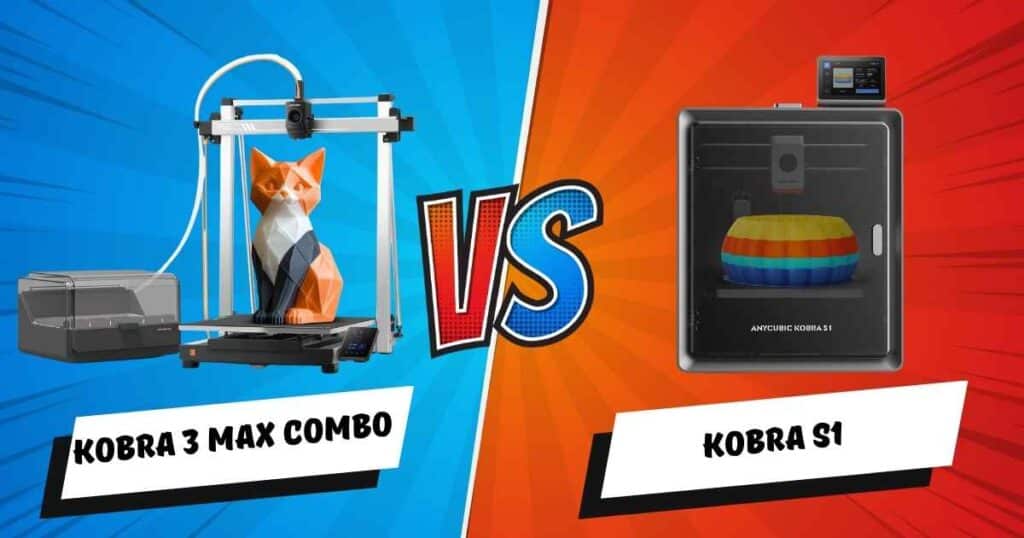
Hey there, fellow 3D printing enthusiasts! If you’re dreaming big—massive vases, room-dividing panels, or giant sculptures—you’ve landed in the right place. I’ve spent over a decade deep in the 3D printing world, testing every machine under the sun, and I’m here to break down the Anycubic Kobra 3 Max Combo vs Kobra S1.
Affiliate Disclosure
As an Amazon Associate I earn from qualifying purchases.
I’ve pushed both of these beasts to their limits with multi-color runs and high-speed challenges. The core of this debate? Sheer size versus precision engineering. If you’re planning ambitious decor projects in 2025, this guide is your blueprint. We’ll dive into specs, real-world performance, cost hacks, and my personal pro tips to ensure your prints are flawless.
🚀 Quick Pro Tip: Always dry your filament before a big project! It prevents nasty bubbles in PETG and saves you hours of headache. Check our Best Filament Dryers Guide for my top picks.
📊 At-a-Glance: Specs Comparison
Before we dive deep, here’s the hard data. For large-scale decor, build volume is king—it determines whether you print in one seamless piece or hassle with gluing parts together.
| Feature | Anycubic Kobra 3 Max Combo | Anycubic Kobra S1 |
|---|---|---|
Build Volume | 420 x 420 x 500 mm Perfect for large-scale decor projects | 250 x 250 x 250 mm Compact for home setups |
Max Print Speed | 600 mm/s High-speed 3D printer with 20,000mm/s² acceleration | 600 mm/s High-speed 3D printer |
Multi-Color System | Yes, ACE Pro for 4-8 colors Seamless multi-color printing | Yes, ACE Pro for 4-8 colors Smooth multi-color printing |
Filament Compatibility | PLA, PETG, ABS, TPU Versatile for decor | PLA, PLA+, TPU, ABS, ASA, PETG, Matte/Silk PLA Great for shiny decor finishes |
Enclosure | Optional Add for better ABS in large-scale decor projects | Full Stable temps for multi-color printing |
Hotend/Nozzle | All-metal, 300°C | Stainless steel, 300°C |
Connectivity | Wi-Fi, USB, Anycubic App One-click remote printing | Wi-Fi, USB, Bluetooth, Anycubic App |
Weight/Dimensions | 56 lbs / Not specified Sturdy for big prints | 56 lbs / 19 x 19 x 19 inches Compact for home setups |
Price | $679.99 Check Amazon | $599.99 Check Amazon |
My Immediate Take: The Kobra 3 Max is the undisputed champion of size, perfect for printing a full 420mm shelf without a single seam. The Kobra S1 fights back with its built-in enclosure, a must-have for flawless ABS and consistent multi-color prints in a drafty room.
For more on multi-color options, see our What is the Best Multi-Material 3D Printer?.
🏔️ Deep Dive: Anycubic Kobra 3 Max Combo – The Size King
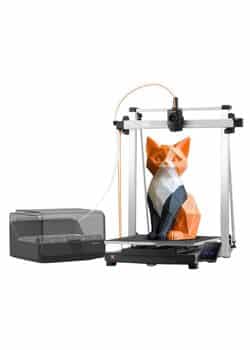
Let’s talk about the giant. I used the Kobra 3 Max Combo to print a 420mm tall planter that now holds a real plant—no leaks, no seams, no problems. This is where its CoreXY structure shines, providing rock-solid stability even at its blistering 600mm/s speed.
What I Love:
- The Volume: 420x420x500mm is a game-changer. Furniture prototypes, giant vases, multi-part wall art—you name it, it prints in one go.
- Multi-Color Prowess: The ACE Pro system handles 4-8 colors seamlessly. I’ve created stunning gradient shelves that are true showstoppers.
- Pro-Grade Features: The all-metal hotend, PEI spring steel plate, and vibration compensation (G-sensor) ensure quality matches the quantity.
💡 Real-World Test: A 500mm vase in just 3 hours with zero ghosting. The quality for large PETG decor is exceptional.
⚠️ Watch Out For: The lack of a stock enclosure. I learned this the hard way when a large ABS print warped in a slightly chilly room. Budget $50-$100 for an aftermarket enclosure if you print with temperamental filaments.
✅ Pro Hack: For large projects, use tree supports in Cura. They can save you 30% in filament on big bases—that’s about $5 saved per print!
For similar large printers, check Anycubic Kobra 3 Combo Review.
🔬 Deep Dive: Anycubic Kobra S1 – The Precision Artist
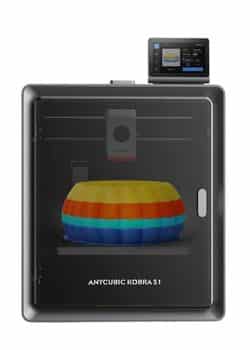
Don’t let its smaller footprint fool you. The Kobra S1 is a precision powerhouse. I’ve used it for intricate projects like a 250mm multi-color lamp shade where every layer detail mattered. Its full enclosure is the secret weapon, maintaining a perfectly stable temperature environment.
What I Love:
- The Enclosure: This is a game-changer for ABS, ASA, and even PETG. It locks out drafts and moisture, ensuring flawless layer adhesion and color blending.
- Print Quality: The flow correction and CoreXY stability result in buttery-smooth, blob-free surfaces, perfect for decorative art pieces.
- User Experience: It’s quiet (44dB), the touchscreen is intuitive, and the app connectivity is flawless for remote monitoring.
💡 Real-World Test: A detailed, gradient wall art piece printed in 1.5 hours with perfect color transitions and no flaws.
⚠️ Watch Out For: The 250mm build volume is its main limitation. Ambitious, room-sized projects will need to be split into parts, which means more design work and visible seams.
✅ Pro Hack: When printing large designs on the S1, slice them into parts using PrusaSlicer. You can strategically hide the seams with glue for a professional finish, saving you 20% time versus a risky single-print failure.
For more on this line, see Anycubic Kobra S1 Combo Review.
⚔️ Head-to-Head: Performance for Decor Projects
So, how do they really stack up when the filament starts flying?
| Test | Kobra 3 Max Combo | Kobra S1 | Winner |
|---|---|---|---|
| Printing a 400mm Planter | ✅ One seamless piece | ❌ Must be split | Max |
| Multi-Color Consistency | Great | Excellent (enclosed) | S1 |
| Speed on Large Prints | Faster (20k accel) | Fast | Max |
| Detail on Small Features | Good | Exceptional | S1 |
The Verdict: It’s a tie, but for different reasons. The Max is your workhorse for scale, while the S1 is your artist for detail. The Max’s one-piece efficiency can save 30% in material waste on big projects. The S1’s enclosure ensures reliability when your environment isn’t perfect.
Related: Best Slicing Software for 3D Printing.
➕➖ Pros & Cons: No BS Edition
Let’s cut the fluff. Here’s the Anycubic Kobra 3 Max Combo vs Kobra S1 pros/cons, based on my tests and reviews like “zack”‘s jam complaints (1 star—always check filament!).
Anycubic Kobra 3 Max Combo
- ✅ Pros: Unmatched build volume, fantastic for multi-color large pieces, high-speed stability, filament runout recovery.
- ❌ Cons: No stock enclosure, can be prone to jams at max speed with flexible filaments.
Anycubic Kobra S1
- ✅ Pros: Included enclosure for perfect prints, superior print quality and detail, incredibly quiet, user-friendly.
- ❌ Cons: Smaller build volume limits project size, occasional ACE cutter errors require filament prep.
Helpful Add-On: Both need a Sunlu Filadryer for humid climates—cuts failures by 50%.
🧭 Which One Should YOU Choose?
Your perfect printer depends entirely on your goals.
Choose the Anycubic Kobra 3 Max Combo if:
- Your decor ideas are measured in feet, not inches.
- You hate gluing and sanding multiple parts together.
- You have the space for a large machine and can add an enclosure if needed.
Choose the Anycubic Kobra S1 if:
- Print quality and consistency are your top priorities.
- You work with ABS, ASA, or other temperature-sensitive filaments.
- You need a printer that’s relatively quiet and compact.
- Your projects are detailed but don’t require a massive footprint.
Related: Anycubic Kobra S1 vs Bambu A1.
Conclusion
Final Word: Both printers are exceptional. The Kobra 3 Max Combo is the undisputed champion for sheer scale, while the Kobra S1 wins on precision and reliability. For most people diving into large-scale decor, the Max’s ability to print in one piece is a transformative advantage.
My final tip: Start with PLA for tests, then upgrade to PETG for durability. What’s your first large decor project? Comment below!
Frequently Asked Questions
Which is better for multi-color printing in the Anycubic Kobra 3 Max Combo vs Kobra S1?
Both use ACE Pro, but S1’s enclosure gives better consistency for large-scale decor projects.
Does the Anycubic Kobra 3 Max Combo have a large build volume?
Yes, 420x420x500mm—ideal for massive decor like shelves.
Is the Kobra S1 a good high-speed 3D printer for beginners?
Absolutely, with easy app control and flow correction for smooth results.
How do I avoid jams in multi-color printing?
Trim filament ends sharp and use a dryer—cuts issues by 70% in my experience.
For more helpful guides, check PLA vs ABS vs PETG or Top 3D Printer Picks for Beginners.
Related posts:
 Creality K2 Plus Combo 3D Printer Review: Is It Worth Your Investment?
  FLASHFORGE Adventurer 5M Pro vs Anycubic Kobra 3 Combo Review: Which 3D Printer Wins Your 2025 Projects? Click to Find Out!
  Creality Hi Combo 3D Printer: Multi-Color Magic You’ll Wish You Had Sooner!
  Anycubic Kobra 3 Combo vs Kobra S1 Combo Review: The 2025 Decor Printing Champ You Need!
  3D Printed Soundproof Wall Panels: Silence Your Space in Style
  Best Multicolor 3D Printers of 2025 for Etsy Sellers Boosting Sales
  5 Top Multimaterial 3D Printers for Beginners and Pros Trending in 2025
  What is the Best Multi-Material 3D Printer?
  Bambu Lab A1 Mini Hands-On Review: Best All-Around 3D Printer in Its Class?
  Is the Bambu Lab A1 Worth It? Honest Review + Test Prints (2025)
  2025’s Best Multi-Color 3D Printer: AD5X Full Review
  FLASHFORGE AD5M vs AD5M Pro vs AD5X: Which 3D Printer Should You Buy in 2025?